<?xml version="1.0" encoding="utf-8"?>
<feed xmlns="http://www.w3.org/2005/Atom">

  <title><![CDATA[Scott W. Bradley]]></title>
  <link href="http://scottwb.com/atom.xml" rel="self"/>
  <link href="http://scottwb.com/"/>
  <updated>2014-12-31T15:03:39-08:00</updated>
  <id>http://scottwb.com/</id>
  <author>
    <name><![CDATA[Scott W. Bradley]]></name>
    
  </author>
  <generator uri="http://octopress.org/">Octopress</generator>

  
  <entry>
    <title type="html"><![CDATA[On Retirement]]></title>
    <link href="http://scottwb.com/blog/2014/12/31/on-retirement/"/>
    <updated>2014-12-31T01:03:00-08:00</updated>
    <id>http://scottwb.com/blog/2014/12/31/on-retirement</id>
    <content type="html"><![CDATA[<p><img src="http://scottwb.com/images/posts/2014-12-31-on-retirement/coins.jpg"></p>

<p>Over the holidays, I had a conversation with my extended family about planning for retirement. We looked at standard retirement savings formulas and some aggressive monthly savings numbers. We computed what starting an aggressive savings plan at age 40, and retiring at age 65 would look like, when you hope to live to 85 years old. That&#8217;s 25 years of working and saving enough to live off of for another 20 years. It turns out that, even assuming good investment rates of return, it&#8217;s pretty hard to do much better than living for 20 years on a fixed income of half your age-40 salary. That&#8217;s pretty scary&#8230;</p>

<!-- MORE -->


<p>My fear is that planning for a fixed retirement income of half what I earn now seems really low <em>today</em> not to mention 25, 35, and 45 years from now..and I don’t want to live with <em>half</em> the means in 25 years. I want to live at <em>double</em>. I want to enjoy a big house where my kids and grandkids can visit, take family vacations, send my kids to college without them having to go $300K into debt, and be able to take care of my aging parents if necessary.</p>

<p>I see people from my parents&#8217; generation who retired on fixed income. While it&#8217;s great that they came up in a time where you had pensions and guarantees of a certain amount of fixed income and social security, it still seems really stressful. They have the same income for the rest of their lives, it&#8217;s a tight budget from day one, and their spending power decreases dramatically every year under inflation. They can&#8217;t afford to fly to a family wedding, go out to eat with friends, etc. It&#8217;s a weird thing to look forward to. You have this picture of retirement being a relaxation period where you can do all the things you always wanted to but couldn&#8217;t because you were working&#8230;and now you have the time but you can&#8217;t afford those things. Bleak picture of the twilight years, if you ask me.</p>

<p>The conclusion that I&#8217;ve come to accept is that <strong><em>retiring at age 65 is ridiculous</em></strong>. Not only because of what our quick-and-dirty retirement spreadsheet shows, but because of the increases in life expectancy over the last few decades and how the mind and body thrive on having a sense of purpose. I remember when my dad&#8217;s dad retired (I was younger than 10, so my memory may be inaccurate) and I heard the adults saying that statistically, men who retire before age 62 die within 5 years. He didn&#8217;t, but we saw how he decayed shortly after retirement. Maybe the memories of WWII had something to do with it. Maybe that’s just how everyone is at age 80. I don’t know. But I see a history of US presidents starting a presidency beyond our &#8220;normal&#8221; retirement age (Reagan was 69) and doing one of the highest-stress, most-demanding jobs on Earth for 8 more years. If the leader of the free world can work until 77 years old&#8230;</p>

<p>I think a retirement age of 65 was designed for when we had a life expectancy of roughly 65, and was meant for when you were no longer able to be a productive member of society, to give you a year or two of rest before you die. But that time span has grown from 2 years to 20 years with increased life expectancy, and our financial planning hasn&#8217;t. Trying to save enough money to live comfortably for 20 years with no income seems unachievable without a windfall.</p>

<p>Scary indeed. Most industries don&#8217;t hire 70-year-olds who expect higher paychecks, better health care benefits, and more vacation than kids just out of college do, especially when those twenty-somethings are seen as better investments for companies in the long run. Our employment rate doesn&#8217;t seem like it could keep up with extending everyone&#8217;s working years by 20 years. That leaves me with the only conclusion being that I have to <strong>OWN</strong> something — a business, investments, real-estate, something — that makes money.</p>

<p>Over my Christmas break I read Peter Thiel&#8217;s new book <em><a href="http://www.amazon.com/gp/product/B00J6YBOFQ/ref=as_li_tl?ie=UTF8&amp;camp=1789&amp;creative=390957&amp;creativeASIN=B00J6YBOFQ&amp;linkCode=as2&amp;tag=sleepcodin-20&amp;linkId=FHA5UOASSDX75WZS">Zero to One: Notes on Startups, or How to Build the Future</a></em>. There&#8217;s a chapter about the difference between <em>Definite Optimism</em> and <em>Indefinite Optimism</em>. Indefinite optimism assumes that things will generally always get better, but that we just don&#8217;t know how or when, so let’s just invest in things across the board and wander into the future. Definite optimism picks a goal and figures out how to make it happen, assuming we will always find a way. One example of indefinite optimism is the US economy since the 1980s, where all our growth comes from the financial sector, speculation, Wall Street, etc. As opposed to the 1940’s - 1960’s where our definite optimism saw problems and came up with answers — invent a nuke, put a man on the moon, etc. It’s amazing to think how small the budget and timeline was for putting a man on the moon compared to the indefinite expenditures and loose goals of today — decade-long oil wars for some nebulous positive outcome that may eventually happen, $19B acquisitions of messaging apps for sending each other cat pictures with no real value.</p>

<p>This all makes me think that the new way to think about retirement is to just find a problem and fix it. Make it your life&#8217;s goal. It’s the only thing I can actually grasp at. I just don’t know yet what that problem is, and it still seems like a gamble&#8230;</p>
]]></content>
  </entry>
  
  <entry>
    <title type="html"><![CDATA[If I Were 22]]></title>
    <link href="http://scottwb.com/blog/2014/05/28/if-i-were-22/"/>
    <updated>2014-05-28T11:07:00-07:00</updated>
    <id>http://scottwb.com/blog/2014/05/28/if-i-were-22</id>
    <content type="html"><![CDATA[<p><em>This is a re-post of an <a href="https://www.linkedin.com/today/post/article/20140528162048-161484886-if-i-were-22-11-lessons-for-younger-me">article I published on LinkedIn</a> today.</em></p>

<p><img src="http://scottwb.com/images/posts/2014-05-28-if-i-were-22/college.jpg"></p>

<p>There&#8217;s a trending topic going around on LinkedIn, where people talk about what lessons they would impart to their 22-year-old selves. &#8220;10 things I wish I had known,&#8221; &#8220;10 lessons I&#8217;ve learned,&#8221; &#8220;10 pieces of wisdom,&#8221; etc. Well, mine goes to 11&#8230;</p>

<h3>1. Don&#8217;t dream someone else&#8217;s dream.</h3>

<p>It&#8217;s very easy to get sucked into pursuing somebody else&#8217;s dream. They have passion and vision and can be very convincing. Silicon Valley is built on 22-year-olds breaking their backs and pulling all-nighters to make someone else&#8217;s dream a reality. At 22, I used to think, &#8220;I have plenty of time to sacrifice everything at startups and start over from scratch when I&#8217;m 30.&#8221; It doesn&#8217;t work that way. When the founder&#8217;s dream turns into a nightmare, you&#8217;re now living their nightmare with them. Statistically speaking, this is most likely how it will turn out. Pursue your <em>own</em> dreams.</p>

<!-- MORE -->


<h3>2. You&#8217;re not to young to go out on your own.</h3>

<p>I wrote a letter to my grandfather when I was 16. In it, I described how I wanted to write my own story, make an impact, do something daring, and not just be a 9-5 employee the rest of my life. It seems by 22, I had forgotten that&#8230;or at least tricked myself into thinking that working for a nice salary at a startup somehow fulfilled that ambition. If it&#8217;s comfortable and the only risk is your company going out of business, you&#8217;re not really daring to do anything extraordinary with your career. Having started my own company now, I can tell you with certainty that I had all the tools I needed to do it when I was 22&#8230;and no wife and kids to make me think twice about the risks.</p>

<h3>3. Put it out on the line. Take risks.</h3>

<p>If you have nothing to risk, you probably have nothing to gain. Wake up young 22-year-old Scott! Just because you are working at a startup that may make it big, or may crash and burn, does not mean you are risking anything as long as you&#8217;re getting a comfy salary and good benefits. Sure, you&#8217;ll learn a lot and gain great experiences, but you will do that wherever you go. The only real way to elevate to the next level is because you <em>have to</em>. Stay hungry. And more importantly, realize that failure is not the end of the story.</p>

<h3>4. Don&#8217;t try to be an airbrushed supermodel.</h3>

<p>Young women often grow up with body image and self-esteem issues because they compare themselves to the models on the cover of Cosmopolitan magazine. As we all know, those models are all airbrushed and photoshopped. In real life even those models cannot compare to those pictures, <em>because those pictures are not real</em>. The same thing applies to entrepreneurs trying to build the next big product or business. When I was 22, everyone was talking about being &#8220;the next Microsoft&#8221;. Today it&#8217;s Facebook, Instagram, and WhatsApp. These are outliers, and their successes are touted in the media until we come to believe they were overnight successes. Their stories suffer from survivor bias, and they are all &#8220;airbrushed&#8221; for public consumption. Don&#8217;t get star-struck by Gates, Jobs, and Zuckerberg. Don&#8217;t longingly dream of working at the perfect workplace with awesome cultures like GitHub, 37signals, Heroku, and Dropbox. Everyone&#8217;s public persona is airbrushed. Blindly comparing your behind-the-scenes to their highlight reels is a surefire way to cast self-doubt and anxiety.</p>

<h3>5. You&#8217;re not your job.</h3>

<p>At 22, I hadn&#8217;t seen Fight Club yet. And when I did, I missed much of the point. Watch it again 20 years later and you&#8217;ll see what I mean. One of the many great quotes from this movie goes like this:</p>

<blockquote><p><em>&#8220;You&#8217;re not your job. You&#8217;re not how much money you have in the bank. You&#8217;re not the car you drive. You&#8217;re not the contents of your wallet.&#8221;</em> &#8211;Tyler Durden</p></blockquote>

<p>Is Charles Barkley measured by how many championships he won? No. He&#8217;s measured by his <em>performance</em>, not by his teams&#8217; <em>outcomes</em>. If he was measured by his championships, he&#8217;d be a big fat zero. Instead, he&#8217;s a hall-of-fame legend who&#8217;s considered to be one of the best to ever play the game. And he was able to parlay that into a many other successes in life.</p>

<p>You&#8217;re not your job. You&#8217;re not your startup acquisition. You&#8217;re not your IPO, your products, or your company. You&#8217;re the sum of your experiences, the connections you make, the ethos you uphold, and the way you treat other people.</p>

<h3>6. It&#8217;s all about relationships.</h3>

<p>It&#8217;s been said time and time again, &#8220;It&#8217;s all about who you know.&#8221; There&#8217;s some truth to that. The saying carries a negative stigma. Perhaps instead it should be, &#8220;It&#8217;s all about who knows <em>you</em>.&#8221; Make your boss look good, network with your peers, mentor your subordinates. Don&#8217;t be the superhero, making sure you&#8217;re always the one who comes to save the day. Let other people be heroes sometimes. <em>Help</em> them be the hero. Get out there and network, see how everyone else does it &#8211; and respect and learn from it. Don&#8217;t stay in <a href="http://en.wikipedia.org/wiki/Allegory_of_the_Cave">Plato&#8217;s Cave</a> thinking that you&#8217;re so smart you can figure out everything for yourself. There are smart people out there that you can learn from. This will pay off tenfold down the road.</p>

<h3>7. Don&#8217;t associate with people that brag about their failed relationships.</h3>

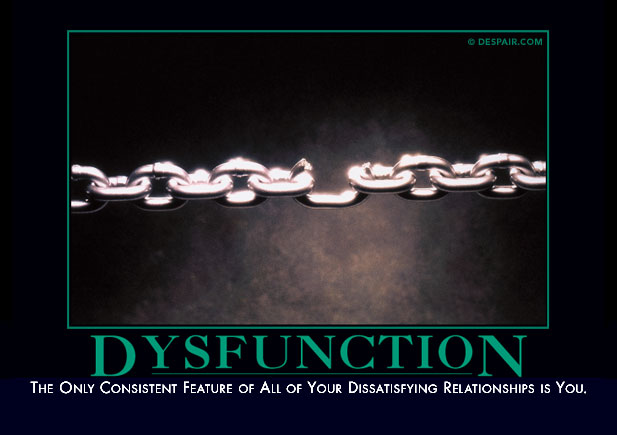
<p>If the first conversation with a prospective boss involves bragging about how much of a hard-ass he was when he fired the last wave of employees because they were idiots, that&#8217;s a big red flag. He&#8217;s either constantly hiring idiots, or <em>he&#8217;s</em> the idiot. I&#8217;ve known people who have never held a job for more than 6 months, and their reason for leaving is always something about how the company was mismanaged, the boss was a jerk, the team wasn&#8217;t smart enough, etc.</p>

<p><img class="center" src="http://scottwb.com/images/posts/2014-05-28-if-i-were-22/dysfunction.jpg"></p>

<p>Likewise, don&#8217;t be that guy. It turns out Mom was right when she said, &#8220;If you don&#8217;t have anything nice to say, don&#8217;t say anything at all.&#8221; Ignore this advice at your own peril.</p>

<h3>8. Lifestyle is more important than money.</h3>

<p>When buying a home, they tell you the three most important factors are location, location, and location. For building your career, think &#8220;lifestyle, lifestyle, lifestyle.&#8221; It&#8217;s not to say that mastery, autonomy, purpose, money, titles, upside, coworkers, etc. aren&#8217;t important&#8230;in fact, those are all factors in your lifestyle. But consider things like commuting and vacation time. How much better is your life when you can have flex time to eat breakfast with your kids, vacation whenever you want, work from anywhere in the world, and not have to waste an average of 33 hours per month sitting in traffic? Studies show that people give up 20-30% in salary for these kinds of benefits. I&#8217;ve made those kinds of decisions, and I believe those studies are bang on.</p>

<h3>9. Build habits intentionally.</h3>

<p>The older you get, the harder habits are to build, and the harder they are to break. Decide, while you&#8217;re young, what habits you want to develop (and which you don&#8217;t!) and deliberately design your <em>trigger-routine-reward</em> <a href="http://www.amazon.com/Power-Habit-What-Life-Business-ebook/dp/B0055PGUYU/ref=tmm_kin_swatch_0?_encoding=UTF8&amp;sr=&amp;qid=">habit loops</a> to set yourself up for success. In my youth habits formed unintentionally. Then, they were much harder to break when I got older. It seems the negative side-effects of bad habits are masked by youth&#8230;but they will catch up with you. Address them while it&#8217;s easy.</p>

<h3>10. Choose to be healthy over being macho.</h3>

<p>My generation of software developers pioneered an odd <a href="http://en.wikipedia.org/wiki/Brogrammer">machismo culture</a> of pulling all-nighters, drinking energy drinks, and coding 18-hours-a-day while cranking tunes and shooting each other with nerf guns. We sat in cushy high-back chairs with our feet up, and ate potato chips and fast food all day long from our limitless supplies of free sodas and snacks. The generation before me went to work at Initech 9-to-5, and lived normal work-lives like everyone else. The generation after me has their stand-up treadmill desks and exercise ball chairs. Their ergonomic keyboards, and company-sponsored gym memberships. Be more like the next generation. Bring a healthy lunch. Drink your coffee black. Drink more water. Sit up with better posture. Skip the sugary drinks and snacks. Get at least 8-hours of sleep.</p>

<p>Embrace <a href="http://chadfowler.com/passionate-programmer/burn.html">The Eight-Hour Burn</a> philosophy from the Extreme Programming movement. Work so hard and focused in 8 hours, that you could not possible output any more. Then enjoy the other two thirds of your day. You&#8217;ll be WAY more productive than the 18-hour-a-day folks, who&#8217;s big unspoken secret is that they still only get about 4 hours of real work done in a day. And if you work for a boss who&#8217;s offended by you only working 40-hours a week, no matter how productive you are, then quit. He doesn&#8217;t get it. Follow this advice and you&#8217;ll be more productive, more creative, and have a longer career.</p>

<h3>11. Start saving now.</h3>

<p>When you have your first kid and start thinking about how all those get-rich-quick schemes never panned out, and those one-in-a-million startup dreams never hit it big, it&#8217;ll largely be too late to start saving money for college and retirement. The beauty of compound interest is that the variable with the biggest impact is time &#8211; and you can control it. Start early. This is one of those habits you want to form early.</p>

<blockquote><p><em>&#8220;Compound interest is the eighth wonder of the world. He who understands it, earns it &#8230; he who doesn&#8217;t &#8230; pays it.&#8221;</em> &#8211;Albert Einstein</p></blockquote>

<p>The odds of retiring off of your startup win are like the odds of winning the lottery. You need a better game plan. My dad&#8217;s generation retired with millions of dollars in retirement funds because they saved from day one with pension plans. They played it safe, worked hard, earned money, saved regularly, and lived within their means. Emulating that doesn&#8217;t mean not playing for the big win. It just means not being ignorant about it. Having a plan to build wealth will free your mind in ways that just might enable you to go get those big wins without worrying about having no Plan B.</p>

<p><em>(Photo credits: <a href="http://www.morguefile.com/">morgueFile</a>, <a href="http://www.despair.com/">Despair, Inc.</a>)</em></p>
]]></content>
  </entry>
  
  <entry>
    <title type="html"><![CDATA[8 Startup Lessons in 6 Months]]></title>
    <link href="http://scottwb.com/blog/2014/05/27/8-startup-lessons-in-6-months/"/>
    <updated>2014-05-27T11:49:00-07:00</updated>
    <id>http://scottwb.com/blog/2014/05/27/8-startup-lessons-in-6-months</id>
    <content type="html"><![CDATA[<p><em>The following is an excerpt from a <a href="http://facetdigital.com/facet-digital-first-six-months/">blog post</a> I wrote for my company, <a href="http://facetdigital.com/">Facet Digital</a>, that was published today. We&#8217;ve been in business for six months, and we wanted to share what we have learned so far.</em></p>

<h2>So what have we learned?</h2>

<p>Stay committed. The first six months are about grit and hustle. Keep your eye on the ball, and know when to walk away from a bad deal. Remember how valuable you really are.</p>

<p>Doing this has taught us a few key lessons that we&#8217;d like to share with our 6-month-younger selves&#8230;</p>

<!-- MORE -->


<ol>
<li><p><strong>Know what your customer needs.</strong> At first we struggled to succinctly describe what we do as a technology consulting firm. We build apps. We write code. We design things. We know how to manage projects. We handcraft delightful user experiences that&#8230;blah blah blah. Those things are not what are customers need. <em>Our customers need their problems solved.</em> You have technology problems. We solve them for you so that you can focus on your business.</p></li>
<li><p><strong>Don&#8217;t sacrifice quality.</strong> One of my favorite quotes as a consultant:</p>

<blockquote><p> &#8220;If you think it&#8217;s expensive to hire a professional to do the job, wait until you hire an amateur.&#8221; &#8211;Red Adair</p></blockquote>

<p>We&#8217;ve seen the reality in this time and time again. In fact, we&#8217;ve made a good living cleaning up after amateurs. The cost of hiring an amateur is not immediately realized. It comes back to haunt you again and again over the lifetime of your project. We don&#8217;t want our names on that. When potential customers ask us to drop our rates to match some half-priced bargain firm, we politely decline. We know they&#8217;ll be back when the excrement hits the proverbial whirling blades.</p></li>
<li><p><strong>Never lock in a client.</strong> I never sign up for an online service that won&#8217;t let me quit on a moment&#8217;s notice and export all my data. Why shouldn&#8217;t we give <em>our</em> customers the same benefit? In software consulting this means providing full transparency into everything we do. Written records of deliverables, wireframes, ERDs, blueprints, API docs, wiki instructions, etc. We strive to make it 100% easy to replace us, and we let our customers know this. You&#8217;re never locked into us. Our clients stick with us because of the value we provide, not because we enact dubious practices to try to force them to be dependent upon us.</p></li>
<li><p><strong>Work for payers. Be a payer.</strong> &#8221;<a href="http://smashingreader.com/How_do_you_persuade_someone_to_pay_for_%E2%80%9Cfree%E2%80%9D_information_i23805563">Payers value their time more than their money.</a>&#8221; Amy Hoy nails it with this simple piece. A client that will pay you for your expertise, to get the job done, while they are off solving their own bigger and better problems, is like GOLD. They value their time and will pay you to solve problems and save them time. A client that doesn&#8217;t value their time will spend six hours researching the solutions to a problem <em>you&#8217;re</em> hired to be the expert in. They&#8217;ll impede your ability to provide them value, and they&#8217;ll nickel-and-dime you to death. Run away.</p>

<p>By the same token, when running a small business, you should <em>be a payer</em>. We&#8217;re way more productive and profitable when we focus on what we do best, and pay someone else to save us time and money on the rest. That&#8217;s why after learning the ropes of business accounting, we hired an awesome accountant.</p></li>
<li><p><strong>Invest in tools, platforms, and processes.</strong> I always take notice of a professional carpenter&#8217;s tools and processes, and how those serve as multipliers for their skill. A pro has the right tools and he knows which tools to apply to which problems. Building software is no different. Small teams often try to get by only using free tools, cobbling together pieces of custom code, and trying to build everything in-house to save cash, when buying a solution would move them so much farther ahead. At Facet, we&#8217;re not afraid to pay for platforms like AWS and Heroku, buy tools like Adobe Creative Cloud, and outsource commodity technology to SaaS platforms like SendGrid. Likewise, we&#8217;re in a great position to identify common problems across multiple clients, and solve them with one solution that we can sell over and over again.</p></li>
<li><p><strong>Give back.</strong> So much of what our industry builds today is based on the free and open-source software world. When we started Facet Digital, we gave ourselves a goal of contributing back an average of <a href="https://github.com/facetdigital">one open-source project per month</a>, no matter how big or small, and we&#8217;re right on track. Not only is it rewarding to be a part of that community, it generates real leads and sparks valuable networking.</p></li>
<li><p><strong>Trust your co-founders.</strong> We&#8217;ve all seen the stereotypical co-founder feuds. One founder manipulating the other. Bad-mouthing behind each others&#8217; backs. Countering each others&#8217; every move. Why even go into business together if that&#8217;s how you&#8217;re going to act? One of Facet Digital&#8217;s core principles is to let each other fail and learn. We try things outside of our comfort zones. We make the bold moves, and we trust each other&#8217;s motivation and intellect. If we&#8217;re always worrying about each other, we&#8217;re not putting our energy in the right place.</p></li>
<li><p><strong><em>Audentes fortuna iuvat.</em></strong> Fortune favors the bold. Starting a company is great exposure therapy for fear of failure. The easy, comfortable path is not fulfilling. The quickest way to stunt the growth of a fledgling company is to play it safe. Babies learn to walk by trying to stand up and falling over thousands of times. Their egos don&#8217;t get hurt by failure. They just get up and keep trying. At Facet, we have a ton of bold moves on deck. Baby steps&#8230;</p></li>
</ol>


<p><strong><em><a href="http://facetdigital.com/facet-digital-first-six-months/">Read the full article at facetdigital.com</a></em></strong></p>
]]></content>
  </entry>
  
  <entry>
    <title type="html"><![CDATA[Wake Surfing With RubyMotion]]></title>
    <link href="http://scottwb.com/blog/2014/02/09/wake-surfing-with-rubymotion/"/>
    <updated>2014-02-09T13:53:00-08:00</updated>
    <id>http://scottwb.com/blog/2014/02/09/wake-surfing-with-rubymotion</id>
    <content type="html"><![CDATA[<p><a href="https://itunes.apple.com/us/app/supra-boats-swell-surf-system/id804765775?mt=8"><img class="left" src="http://scottwb.com/images/posts/2014-02-09-wake-surfing-with-rubymotion/swell.jpg" width="350" title="Supra Boats Swell System" alt="Supra Boats Swell System"></a></p>

<p>A couple weeks ago, our first <a href="http://facetdigital.com/">Facet Digital</a> client project to go public in 2014 was launched in the Apple App Store: <a href="https://itunes.apple.com/us/app/supra-boats-swell-surf-system/id804765775?mt=8">Supra Boats Swell Surf System</a>.</p>

<p>This is a multimedia catalog app designed for reps and resellers on the boat show floor, allowing them to show off their <a href="http://supraboats.com/swell/">Swell System</a> for wake surfing. It features an interactive look at some of the unqiue features of this system, such as the ability to change the shape of the wave and even which side of the boat the wave is on! I&#8217;m no professional wake surfer, but just watching some of the videos embedded in this app make me anxious for summer to arrive&#8230;and to participate in some of these fun photo shoots with the great folks at Supra Boats for next year&#8217;s app.</p>

<p><a href="http://ramsmusings.com/">Jeremy</a>, <a href="http://koolmanchu.com/">Leif</a>, and I had a blast building this app. Part of that was because the content was so cool. A bigger part was because because we decided, for the first time, to build an iOS app using 100% RubyMotion, instead of going the traditional XCode and Objective-C route.</p>

<p>So, I thought I&#8217;d share a litte bit about why we enjoyed using RubyMotion&#8230;</p>

<!-- MORE -->


<h2>7 Reasons We Liked RubyMotion</h2>

<p>Most of the code we&#8217;ve written in the last 5 - 10 years has been in higher-level, programmer-pleasing, dynamic languages like Ruby, Python, and JavaScript. While I do have an extensive background in C and C++, sometimes I cringe at the thought of going back there. That&#8217;s what Objective-C represents to me. Sure, it has message passing like Smalltalk, and the last few years of improvements like ARC and some of the excellent static analysis tools are great, but for my programmer productivity buck, Objective-C in all its verbosity doesn&#8217;t even compare to the expressiveness of Ruby.</p>

<p>Plus, I hate XCode. I&#8217;m an Emacs, Vim, and zsh guy. Keep my hands on the keyboard.</p>

<p>Here are a few of the highlights we experienced:</p>

<h3>1. The Language</h3>

<p>If you ask me, the Objective-C syntax is ugly and cumbersome. Maybe that&#8217;s just the view through my Ruby-colored glasses, but just compare this simple Objective-C code:</p>

<figure class='code'><figcaption><span></span></figcaption><div class="highlight"><table><tr><td class="gutter"><pre class="line-numbers"><span class='line-number'>1</span>
<span class='line-number'>2</span>
<span class='line-number'>3</span>
</pre></td><td class='code'><pre><code class='objc'><span class='line'><span class="c1">// Objective-C</span>
</span><span class='line'><span class="n">UIView</span> <span class="o">*</span><span class="n">view</span><span class="o">=</span><span class="p">[[</span><span class="n">UIView</span> <span class="n">alloc</span><span class="p">]</span> <span class="nl">initWithFrame:</span><span class="n">CGRectMake</span><span class="p">(</span><span class="n">x</span><span class="p">,</span> <span class="n">y</span><span class="p">,</span> <span class="n">width</span><span class="p">,</span> <span class="n">height</span><span class="p">)];</span>
</span><span class='line'><span class="p">[</span><span class="n">view</span> <span class="nl">setBackgroundColor:</span><span class="p">[</span><span class="n">UIColor</span> <span class="nl">colorWithPatternImage:</span><span class="p">[</span><span class="n">UIImage</span> <span class="nl">imageNamed:</span><span class="s">@&quot;a.png&quot;</span><span class="p">]]];</span>
</span></code></pre></td></tr></table></div></figure>


<p>to the equivalent RubyMotion code:</p>

<figure class='code'><figcaption><span></span></figcaption><div class="highlight"><table><tr><td class="gutter"><pre class="line-numbers"><span class='line-number'>1</span>
<span class='line-number'>2</span>
<span class='line-number'>3</span>
</pre></td><td class='code'><pre><code class='ruby'><span class='line'><span class="c1"># ruby</span>
</span><span class='line'><span class="n">view</span> <span class="o">=</span> <span class="no">UIView</span><span class="o">.</span><span class="n">alloc</span><span class="o">.</span><span class="n">initWithFrame</span><span class="p">(</span><span class="o">[[</span><span class="n">x</span><span class="p">,</span> <span class="n">y</span><span class="o">]</span><span class="p">,</span> <span class="o">[</span><span class="n">width</span><span class="p">,</span> <span class="n">height</span><span class="o">]]</span><span class="p">)</span>
</span><span class='line'><span class="n">view</span><span class="o">.</span><span class="n">backgroundColor</span> <span class="o">=</span> <span class="no">UIColor</span><span class="o">.</span><span class="n">colorWithPatternImage</span><span class="p">(</span><span class="no">UIImage</span><span class="o">.</span><span class="n">imageNamed</span><span class="p">(</span><span class="s1">&#39;a.png&#39;</span><span class="p">))</span>
</span></code></pre></td></tr></table></div></figure>


<p>Or how about native types, list comprehension, and block syntax?</p>

<figure class='code'><figcaption><span></span></figcaption><div class="highlight"><table><tr><td class="gutter"><pre class="line-numbers"><span class='line-number'>1</span>
<span class='line-number'>2</span>
<span class='line-number'>3</span>
<span class='line-number'>4</span>
<span class='line-number'>5</span>
<span class='line-number'>6</span>
<span class='line-number'>7</span>
<span class='line-number'>8</span>
<span class='line-number'>9</span>
<span class='line-number'>10</span>
<span class='line-number'>11</span>
</pre></td><td class='code'><pre><code class='objc'><span class='line'><span class="c1">// Objective-C</span>
</span><span class='line'><span class="n">NSMutableDictionary</span><span class="o">*</span> <span class="n">d</span> <span class="o">=</span> <span class="p">[</span><span class="n">NSMutableDictionary</span> <span class="n">dictionary</span><span class="p">];</span>
</span><span class='line'><span class="k">for</span> <span class="p">(</span><span class="kt">int</span> <span class="n">i</span> <span class="o">=</span> <span class="mi">0</span><span class="p">;</span> <span class="n">i</span> <span class="o">&lt;</span> <span class="mi">100</span><span class="p">;</span> <span class="o">++</span><span class="n">i</span><span class="p">)</span> <span class="p">{</span>
</span><span class='line'>  <span class="n">NSNumber</span> <span class="o">*</span><span class="n">v</span> <span class="o">=</span> <span class="err">@</span><span class="p">(</span><span class="n">i</span><span class="p">);</span>
</span><span class='line'>  <span class="n">d</span><span class="p">[[</span><span class="n">v</span> <span class="n">stringValue</span><span class="p">]]</span> <span class="o">=</span> <span class="n">v</span><span class="p">;</span>
</span><span class='line'><span class="p">}</span>
</span><span class='line'>
</span><span class='line'><span class="n">__block</span> <span class="kt">int</span> <span class="n">sum</span> <span class="o">=</span> <span class="mi">0</span><span class="p">;</span>
</span><span class='line'><span class="p">[</span><span class="n">d</span> <span class="nl">enumerateKeysAndObjectsUserBlock:</span><span class="o">^</span><span class="p">(</span><span class="kt">id</span> <span class="n">key</span><span class="p">,</span> <span class="kt">id</span> <span class="n">onj</span><span class="p">,</span> <span class="kt">BOOL</span> <span class="o">*</span><span class="n">stop</span><span class="p">)</span> <span class="p">{</span>
</span><span class='line'>  <span class="n">sum</span> <span class="o">+=</span> <span class="p">[</span><span class="n">obj</span> <span class="n">intValue</span><span class="p">];</span>
</span><span class='line'><span class="p">}];</span>
</span></code></pre></td></tr></table></div></figure>


<figure class='code'><figcaption><span></span></figcaption><div class="highlight"><table><tr><td class="gutter"><pre class="line-numbers"><span class='line-number'>1</span>
<span class='line-number'>2</span>
<span class='line-number'>3</span>
<span class='line-number'>4</span>
<span class='line-number'>5</span>
</pre></td><td class='code'><pre><code class='ruby'><span class='line'><span class="c1"># ruby</span>
</span><span class='line'><span class="n">d</span> <span class="o">=</span> <span class="p">{}</span>
</span><span class='line'><span class="p">(</span><span class="mi">0</span><span class="o">.</span><span class="n">.</span><span class="mi">100</span><span class="p">)</span><span class="o">.</span><span class="n">each</span> <span class="p">{</span> <span class="o">|</span><span class="n">i</span><span class="o">|</span> <span class="n">d</span><span class="o">[</span><span class="n">i</span><span class="o">.</span><span class="n">to_s</span><span class="o">]</span> <span class="o">=</span> <span class="n">i</span> <span class="p">}</span>
</span><span class='line'>
</span><span class='line'><span class="n">sum</span> <span class="o">=</span> <span class="n">d</span><span class="o">.</span><span class="n">values</span><span class="o">.</span><span class="n">inject</span><span class="p">(</span><span class="mi">0</span><span class="p">)</span> <span class="p">{</span> <span class="o">|</span><span class="n">memo</span><span class="p">,</span> <span class="n">value</span><span class="o">|</span> <span class="n">memo</span> <span class="o">+</span> <span class="n">value</span> <span class="p">}</span>
</span></code></pre></td></tr></table></div></figure>


<p>Even though RubyMotion is compiled to LLVM just like the Objective-C code is, I am sure one could make a performance argument in favor of Objective-C in examples like this. However, I prefer to optimize for developer productivity, time to market, and ease of correctness. The beauty of RubyMotion is that you can call anything natively written in Objective-C or C anyway, so you always have the option to factor out performance sensitive pieces if you feel it is necessary.</p>

<h3>2. The Test Infrastructure</h3>

<p>If you&#8217;re used to TDD in a language like Ruby, using tools like RSpec, you&#8217;ll find the iOS/Objective-C ecosystem lacking in this department. RubyMotion integrates Bacon, a mini RSpec of sorts, that provides a great DSL for unit and integration testing. For example:</p>

<figure class='code'><figcaption><span></span></figcaption><div class="highlight"><table><tr><td class="gutter"><pre class="line-numbers"><span class='line-number'>1</span>
<span class='line-number'>2</span>
<span class='line-number'>3</span>
<span class='line-number'>4</span>
<span class='line-number'>5</span>
<span class='line-number'>6</span>
<span class='line-number'>7</span>
<span class='line-number'>8</span>
<span class='line-number'>9</span>
<span class='line-number'>10</span>
<span class='line-number'>11</span>
<span class='line-number'>12</span>
<span class='line-number'>13</span>
<span class='line-number'>14</span>
<span class='line-number'>15</span>
<span class='line-number'>16</span>
</pre></td><td class='code'><pre><code class='ruby'><span class='line'><span class="n">describe</span> <span class="s2">&quot;Dealer&quot;</span> <span class="k">do</span>
</span><span class='line'>  <span class="n">before</span> <span class="k">do</span>
</span><span class='line'>    <span class="vi">@dealer</span> <span class="o">=</span> <span class="no">Dealer</span><span class="o">.</span><span class="n">new</span><span class="p">(</span><span class="mi">40</span><span class="p">,</span> <span class="o">-</span><span class="mi">100</span><span class="p">,</span> <span class="s2">&quot;Cool Dealer&quot;</span><span class="p">,</span> <span class="s2">&quot;http://dealer.com/&quot;</span><span class="p">)</span>
</span><span class='line'>  <span class="k">end</span>
</span><span class='line'>
</span><span class='line'>  <span class="n">it</span> <span class="s2">&quot;.closest_dealer_to finds the closest dealer to a given location&quot;</span> <span class="k">do</span>
</span><span class='line'>    <span class="n">closest_dealer</span> <span class="o">=</span> <span class="no">Dealer</span><span class="o">.</span><span class="n">closest_dealer_to</span><span class="p">(</span>
</span><span class='line'>      <span class="no">CLLocation</span><span class="o">.</span><span class="n">alloc</span><span class="o">.</span><span class="n">initWithLatitude</span><span class="p">(</span>
</span><span class='line'>        <span class="mi">47</span><span class="o">.</span><span class="mi">7</span><span class="p">,</span>
</span><span class='line'>        <span class="n">longitude</span><span class="p">:</span> <span class="o">-</span><span class="mi">122</span><span class="o">.</span><span class="mi">2</span>
</span><span class='line'>      <span class="p">)</span>
</span><span class='line'>    <span class="p">)</span>
</span><span class='line'>    <span class="n">closest_dealer</span><span class="o">.</span><span class="n">is_a?</span><span class="p">(</span><span class="no">Dealer</span><span class="p">)</span><span class="o">.</span><span class="n">should</span> <span class="o">==</span> <span class="kp">true</span>
</span><span class='line'>    <span class="n">closest_dealer</span><span class="o">.</span><span class="n">title</span><span class="o">.</span><span class="n">should</span> <span class="o">==</span> <span class="s2">&quot;Active Watersports&quot;</span>
</span><span class='line'>  <span class="k">end</span>
</span><span class='line'><span class="k">end</span>
</span></code></pre></td></tr></table></div></figure>


<p>Running these tests is as easy as running the <code>rake spec</code> command. This builds all your app and library code, yoru test code, downloads a test executable to the simulator, runs it, and prints typical RSpec-style output right to the terminal. The build/test cycle is almost identical to what you&#8217;d do for a Ruby on Rails app. You can even run the test suite on the device with <code>rake spec:device</code> and can filter to specific test cases when you want to focus on one part of the app.</p>

<h3>3. The Workflow</h3>

<p>The workflow is all based around <code>rake</code>. Everything is done via the command line. No XCode required. For an old-school guy like me, this is way it should be. My workflow goes like this:</p>

<ul>
<li>Write code in Emacs</li>
<li>Run <code>rake spec</code> to build the test suite, download it to the simulator, and and run it, seeing the output in my terminal.</li>
<li>Run <code>rake</code> to build the app, downloaded it to the simulator, and run it.</li>
<li>Play with the app on simulator.</li>
<li>Use the REPL to tinker with layout, variables, etc. live on the simulator!</li>
<li>Repeat as necessary.</li>
<li>Run <code>rake device</code> to build the app for my target device, download it there, and run it, so I can play with it on a real iPhone or iPad.</li>
<li>Run <code>rake testflight notes="Added new features!"</code> to build an AdHoc distribution, upload it to TestFlight, and push it out to all of my beta-testers.</li>
<li>Run <code>rake archive</code> to build the whole submission to the app store.</li>
<li>Drag the <code>.ipa</code> that outputs into the Application Loader, and I&#8217;m off to the App Store!</li>
</ul>


<p>Note the part about the REPL! This is one of my favorite parts. I can&#8217;t stand working in a langauge without a good REPL. It&#8217;s one of the reasons I love working in Ruby and Python. Not only does RubyMotion provide a nice REPL, it is run in the context of the running app. That means you can call methods on live objects, print out their values, etc. This can come in super handy when you just want to tweak the positioning of something until you like it, and then read out its final values.</p>

<p>You can also use <code>puts</code> to print to <code>stdout</code> right there in the REPL in your terminal, like you&#8217;re used to with your usual Ruby apps.</p>

<h3>4. The Integration</h3>

<p>It&#8217;s very cool that out of the box, RubyMotion comes with <a href="http://testflightapp.com/">TestFlight</a> integration. That&#8217;s hands-down the best way to get your pre-release app builds in the hands of beta-testers and stakeholders.</p>

<p>If you&#8217;re not into Emacs (why wouldn&#8217;t you be?), <a href="http://www.jetbrains.com/ruby/">RubyMine</a> by JetBrains is a great IDE for RubyMotion (as well as Ruby on Rails). It integrates with auto-completion of the iOS SDK API, and the rake-based test runner too. And it has support for Emacs key-bindings. ;)</p>

<h3>5. Great Libraries</h3>

<p>You can&#8217;t talk about RubyMotion without mentioning <a href="https://github.com/rubymotion/BubbleWrap">BubbleWrap</a> and <a href="https://github.com/rubymotion/sugarcube">SugarCube</a>. Both of these libraries add tremendous value and easy-of-use to RubyMotion. They provide two different perspectives on wrapping CocoaTouch/iOS APIs with more idiomatic Ruby interfaces &#8211; with some amount of overlap. These go a long way to making your code even less verbose &#8211; particularly when dealing with the direction one-to-one nature of calling Objective-C APIs from RubyMotion.</p>

<p>Consider SugarCube, for example:</p>

<figure class='code'><figcaption><span></span></figcaption><div class="highlight"><table><tr><td class="gutter"><pre class="line-numbers"><span class='line-number'>1</span>
<span class='line-number'>2</span>
<span class='line-number'>3</span>
</pre></td><td class='code'><pre><code class='ruby'><span class='line'><span class="n">view</span><span class="o">.</span><span class="n">on_swipe</span><span class="p">(</span><span class="n">direction</span><span class="p">:</span> <span class="ss">:left</span><span class="p">,</span> <span class="n">fingers</span><span class="p">:</span> <span class="mi">2</span><span class="p">)</span> <span class="k">do</span> <span class="o">|</span><span class="n">gesture</span><span class="o">|</span>
</span><span class='line'>  <span class="c1"># handle two-finger left swipe</span>
</span><span class='line'><span class="k">end</span>
</span></code></pre></td></tr></table></div></figure>


<p>You don&#8217;t even want to know what that code looks like in raw RubyMotion, let alone Objective-C. SugarCubes adds some useful tools to the REPL as well, like the <code>tree</code> command that outputs information about your view hierarchy, and lets you gain access to these easily:</p>

<figure class='code'><figcaption><span></span></figcaption><div class="highlight"><table><tr><td class="gutter"><pre class="line-numbers"><span class='line-number'>1</span>
<span class='line-number'>2</span>
<span class='line-number'>3</span>
<span class='line-number'>4</span>
</pre></td><td class='code'><pre><code class='ruby'><span class='line'><span class="p">(</span><span class="n">main</span><span class="p">)</span><span class="o">&gt;</span> <span class="n">tree</span>
</span><span class='line'>  <span class="mi">0</span><span class="p">:</span> <span class="o">.</span> <span class="no">UIWindow</span><span class="p">(</span><span class="c1">#6e1f950: [[0.0, 0.0], [320.0, 480.0]])</span>
</span><span class='line'>  <span class="mi">1</span><span class="p">:</span> <span class="sb">`-- UIView(#8b203b0: [[0.0, 20.0], [320.0, 460.0]])</span>
</span><span class='line'><span class="sb">  2:     +-- UIButton(#d028de0: [[10.0, 10.0], [320.0, 463.400512695312]])</span>
</span></code></pre></td></tr></table></div></figure>


<p>BubbleWrap provides a JSON interface that is identical to the native Ruby JSON API, making your web service consumers from your Rails apps easy to port over. It also gives us some great one-line high-level wrappers for common operations like playing a movie or taking a picture with the camera, for example:</p>

<figure class='code'><figcaption><span></span></figcaption><div class="highlight"><table><tr><td class="gutter"><pre class="line-numbers"><span class='line-number'>1</span>
<span class='line-number'>2</span>
<span class='line-number'>3</span>
<span class='line-number'>4</span>
</pre></td><td class='code'><pre><code class='ruby'><span class='line'><span class="c1"># Uses the rear camera</span>
</span><span class='line'><span class="no">BW</span><span class="o">::</span><span class="no">Device</span><span class="o">.</span><span class="n">camera</span><span class="o">.</span><span class="n">rear</span><span class="o">.</span><span class="n">picture</span><span class="p">(</span><span class="n">media_types</span><span class="p">:</span> <span class="o">[</span><span class="ss">:movie</span><span class="p">,</span> <span class="ss">:image</span><span class="o">]</span><span class="p">)</span> <span class="k">do</span> <span class="o">|</span><span class="n">result</span><span class="o">|</span>
</span><span class='line'>  <span class="n">image_view</span> <span class="o">=</span> <span class="no">UIImageView</span><span class="o">.</span><span class="n">alloc</span><span class="o">.</span><span class="n">initWithImage</span><span class="p">(</span><span class="n">result</span><span class="o">[</span><span class="ss">:original_image</span><span class="o">]</span><span class="p">)</span>
</span><span class='line'><span class="k">end</span>
</span></code></pre></td></tr></table></div></figure>


<p>Before you re-invent anything in RubyMotion&#8230;look in BubbleWrap and SugarCube first. They&#8217;re open source, of course, so even if you need to customize their behavior, you can learn a lot by looking at their source code.</p>

<h3>6. Compiled Performance</h3>

<p>Unlike other non-Objective-C iOS app frameworks like Sencha Touch or PhoneGap, RubyMotion compiles to the same LLVM code that Objective-C does. It uses the same compilers. The secret is that RubyMotion is not Ruby. It is a subset of Ruby, based on MacRuby. There are a few features of Ruby that do not exist, but most of them do. This is because Objective-C and Ruby are very similar, and both attribute their message-passing and object-oriented nature to a Smalltalk heritage.</p>

<p>You can program slick animations with RubyMotion that perform as well as those made in Objective-C, without dealing with the sub-par performance of the JavaScript engine running a bloated jQuery library inside a <code>UIWebView</code>, like you would with PhoneGap.</p>

<h3>7. Memory Management</h3>

<p>Memory Management - you don&#8217;t have to. The RubyMotion team has basically built their own ARC-style memory management baked into the language constructs. You use Ruby like you always do, the RubyMotion framework takes care of auto-releasing unreferenced objects, similar to Apple&#8217;s ARC. You rarely need to worry about references, but in the rare case that you do (e.g., for cyclical references), the <a href="http://www.rubymotion.com/developer-center/guides/runtime/#_weak_references">WeakRef</a> class gives you what you need. The RubyMotion docs are pretty good too, and they generally point out very explicitly when you are in danger of needing to use a <code>WeakRef</code>.</p>

<h2>Conclusion</h2>

<p>Developing an iOS app with RubyMotion was fast and fun. I believe programming should be fun as much as possible. Anything tedious should be automated or abstracted &#8211; and that&#8217;s exactly what RubyMotion has done for iOS programming. We&#8217;ll definitely be using RubyMotion at <a href="http://facetdigital.com/">Facet Digital</a> for a few more iOS apps coming out in the next few months&#8230;</p>
]]></content>
  </entry>
  
  <entry>
    <title type="html"><![CDATA[Defeating The Infamous CHEF-3694 Warning]]></title>
    <link href="http://scottwb.com/blog/2014/01/24/defeating-the-infamous-chef-3694-warning/"/>
    <updated>2014-01-24T19:47:00-08:00</updated>
    <id>http://scottwb.com/blog/2014/01/24/defeating-the-infamous-chef-3694-warning</id>
    <content type="html"><![CDATA[<p><em><strong>TL;DR:</strong> I hate the CHEF-3694 warning, so I made a <a href="https://github.com/facetdigital/chef_resource_merging">cookbook</a> to get rid of it. YMMV.</em></p>

<p>Resource cloning in Chef is a bit of a minefield. They have a ticket known as <a href="https://tickets.opscode.com/browse/CHEF-3694">CHEF-3694</a> saying that the feature should be removed, and indicating that it will be by the time Chef 12.0.0 comes out. However, a lot of their Opscode-developed community cookbooks use (abuse?) resource cloning. The result is that you get tons of warnings about resource cloning that look like this:</p>

<figure class='code'><div class="highlight"><table><tr><td class="gutter"><pre class="line-numbers"><span class='line-number'>1</span>
<span class='line-number'>2</span>
<span class='line-number'>3</span>
</pre></td><td class='code'><pre><code class=''><span class='line'>[2014-01-24T16:15:55+00:00] WARN: Cloning resource attributes for package[perl] from prior resource (CHEF-3694)
</span><span class='line'>[2014-01-24T16:15:55+00:00] WARN: Previous package[perl]: /tmp/vagrant-chef-1/chef-solo-1/cookbooks/perl/recipes/default.rb:26:in `block in from_file'
</span><span class='line'>[2014-01-24T16:15:55+00:00] WARN: Current  package[perl]: /tmp/vagrant-chef-1/chef-solo-1/cookbooks/iptables/recipes/default.rb:21:in `from_file'</span></code></pre></td></tr></table></div></figure>


<p>Where I come from, it&#8217;s considered an error to have a warning in your output. Ignorable warnings bury important ones. So&#8230;for better or worse, I embarked upon a journey to see what I could do to use resources correctly and avoid these warnings&#8230;</p>

<!-- MORE -->


<h2>What is resource cloning and why are you warning me about it?</h2>

<p>The <a href="https://tickets.opscode.com/browse/CHEF-3694">discussion</a> about this this issue is an interesting read. You should be able to, for example, declare a service resource in one spot of your recipe, and later start it. You should also be able to have multiple recipes be able to install the same package resource and have it be idempotent, without having to worry about coordinating between cookbooks. That&#8217;s Chef&#8217;s job. To support this, Chef uses a technique they call <em>resource cloning</em>, which spews out warning messages because they plan to get rid of it. Proponents of the warning messages argue that if your cookbook relies on resource cloning, then you are doing something incorrectly and you have bigger problems. However, there are popular community cookbooks that won&#8217;t work without it.</p>

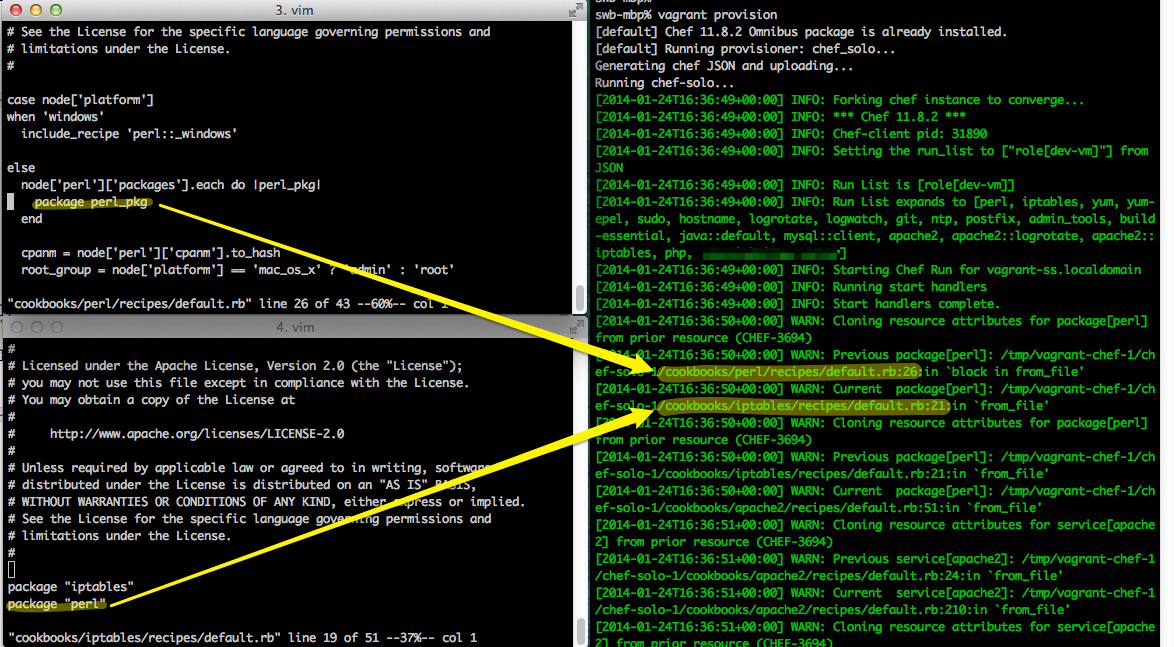
<p>Here&#8217;s an example of stock <code>perl</code> and <code>iptables</code> cookbooks causing this problem:</p>

<p><a href="http://scottwb.com/images/posts/2014-01-24-defeating-the-infamous-chef-3694-warning/CHEF-3694-perl.png"><img class="center" src="http://scottwb.com/images/posts/2014-01-24-defeating-the-infamous-chef-3694-warning/CHEF-3694-perl.png"></a></p>

<p>I really wouldn&#8217;t want <code>perl</code> and <code>iptables</code> to have to coordinate between each other in order to avoid this warning. Perhaps there is a way to re-order them? Not that I could figure out&#8230;at least not without either making dangerous assumptions or editing stock community cookbook code.</p>

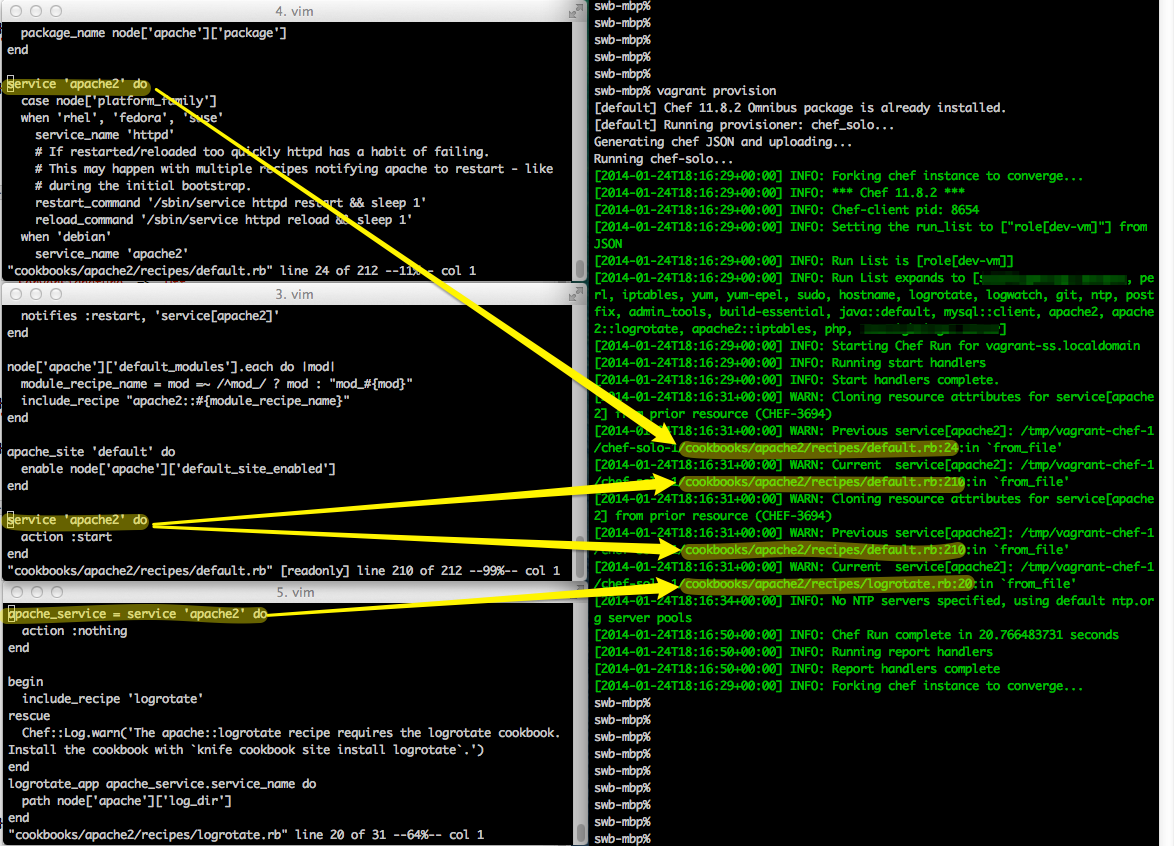
<p>Even so&#8230;there are cookbooks that have this problem by themselves without the help of other cookbooks. For example, one of the most popular cookbooks, <code>apache2</code>:</p>

<p><a href="http://scottwb.com/images/posts/2014-01-24-defeating-the-infamous-chef-3694-warning/CHEF-3694-apache.png"><img class="center" src="http://scottwb.com/images/posts/2014-01-24-defeating-the-infamous-chef-3694-warning/CHEF-3694-apache.png"></a></p>

<h2>Can we just remove resource cloning?</h2>

<p>Since it was well-argued that cookbooks shouldn&#8217;t rely on resource cloning, and that it would be removed in a future version of Chef, I decided to replace it myself with resource <em>duplication</em>. Resource cloning and its associated warning messages are handled in a method called <code>Chef::Resource::load_prior_resources</code>, so I just monkey-patched out that method to allow the duplicate resource without copying over any of the existing resources&#8217;s attributes, using a bit of code like this:</p>

<figure class='code'><figcaption><span></span></figcaption><div class="highlight"><table><tr><td class="gutter"><pre class="line-numbers"><span class='line-number'>1</span>
<span class='line-number'>2</span>
<span class='line-number'>3</span>
<span class='line-number'>4</span>
<span class='line-number'>5</span>
<span class='line-number'>6</span>
<span class='line-number'>7</span>
<span class='line-number'>8</span>
</pre></td><td class='code'><pre><code class='ruby'><span class='line'><span class="k">class</span> <span class="nc">Chef</span>
</span><span class='line'>  <span class="k">class</span> <span class="nc">Resource</span>
</span><span class='line'>    <span class="k">def</span> <span class="nf">load_prior_resource</span>
</span><span class='line'>      <span class="no">Chef</span><span class="o">::</span><span class="no">Log</span><span class="o">.</span><span class="n">warn</span><span class="p">(</span><span class="s2">&quot;I AIN&#39;T CLONING </span><span class="si">#{</span><span class="nb">self</span><span class="o">.</span><span class="n">to_s</span><span class="si">}</span><span class="s2">!!!&quot;</span><span class="p">)</span>
</span><span class='line'>      <span class="kp">true</span>
</span><span class='line'>    <span class="k">end</span>
</span><span class='line'>  <span class="k">end</span>
</span><span class='line'><span class="k">end</span>
</span></code></pre></td></tr></table></div></figure>


<p>NOPE! That doesn&#8217;t work. While this works for some of my cookbooks and certain resources, the community <code>apache2</code> recipes clearly rely on the soon-to-be-deprecated resource cloning behavior. These recipes define the <code>service[apache2]</code> resource a number of times to do things like enable/start/restart after config changes. Without resource cloning, the <code>apache2::logrotate</code> recipe, for example, fails to process a restart of the apache2 service because it <em>didn&#8217;t</em> inherit the necessary attributes that needed to be cloned from the original service definition, giving errors like this:</p>

<figure class='code'><figcaption><span></span></figcaption><div class="highlight"><table><tr><td class="gutter"><pre class="line-numbers"><span class='line-number'>1</span>
<span class='line-number'>2</span>
<span class='line-number'>3</span>
<span class='line-number'>4</span>
<span class='line-number'>5</span>
<span class='line-number'>6</span>
<span class='line-number'>7</span>
<span class='line-number'>8</span>
<span class='line-number'>9</span>
<span class='line-number'>10</span>
<span class='line-number'>11</span>
<span class='line-number'>12</span>
<span class='line-number'>13</span>
<span class='line-number'>14</span>
<span class='line-number'>15</span>
<span class='line-number'>16</span>
<span class='line-number'>17</span>
<span class='line-number'>18</span>
<span class='line-number'>19</span>
<span class='line-number'>20</span>
<span class='line-number'>21</span>
<span class='line-number'>22</span>
<span class='line-number'>23</span>
<span class='line-number'>24</span>
<span class='line-number'>25</span>
<span class='line-number'>26</span>
<span class='line-number'>27</span>
<span class='line-number'>28</span>
<span class='line-number'>29</span>
<span class='line-number'>30</span>
<span class='line-number'>31</span>
<span class='line-number'>32</span>
<span class='line-number'>33</span>
<span class='line-number'>34</span>
<span class='line-number'>35</span>
<span class='line-number'>36</span>
</pre></td><td class='code'><pre><code class='ruby'><span class='line'><span class="o">================================================================================</span>
</span><span class='line'><span class="no">Error</span> <span class="n">executing</span> <span class="n">action</span> <span class="sb">`restart`</span> <span class="n">on</span> <span class="n">resource</span> <span class="s1">&#39;service[apache2]&#39;</span>
</span><span class='line'><span class="o">================================================================================</span>
</span><span class='line'>
</span><span class='line'><span class="no">Chef</span><span class="o">::</span><span class="no">Exceptions</span><span class="o">::</span><span class="no">Service</span>
</span><span class='line'><span class="o">-------------------------</span>
</span><span class='line'><span class="n">service</span><span class="o">[</span><span class="n">apache2</span><span class="o">]</span><span class="p">:</span> <span class="n">unable</span> <span class="n">to</span> <span class="n">locate</span> <span class="n">the</span> <span class="n">init</span><span class="o">.</span><span class="n">d</span> <span class="n">script!</span>
</span><span class='line'>
</span><span class='line'><span class="no">Resource</span> <span class="no">Declaration</span><span class="p">:</span>
</span><span class='line'><span class="o">---------------------</span>
</span><span class='line'><span class="c1"># In /tmp/vagrant-chef-1/chef-solo-1/cookbooks/apache2/recipes/logrotate.rb</span>
</span><span class='line'>
</span><span class='line'> <span class="mi">20</span><span class="p">:</span> <span class="n">apache_service</span> <span class="o">=</span> <span class="n">service</span> <span class="s1">&#39;apache2&#39;</span> <span class="k">do</span>
</span><span class='line'> <span class="mi">21</span><span class="p">:</span>   <span class="n">action</span> <span class="ss">:nothing</span>
</span><span class='line'> <span class="mi">22</span><span class="p">:</span> <span class="k">end</span>
</span><span class='line'> <span class="mi">23</span><span class="p">:</span>
</span><span class='line'>
</span><span class='line'><span class="no">Compiled</span> <span class="no">Resource</span><span class="p">:</span>
</span><span class='line'><span class="o">------------------</span>
</span><span class='line'><span class="c1"># Declared in /tmp/vagrant-chef-1/chef-solo-1/cookbooks/apache2/recipes/logrotate.rb:20:in `from_file&#39;</span>
</span><span class='line'>
</span><span class='line'><span class="n">service</span><span class="p">(</span><span class="s2">&quot;apache2&quot;</span><span class="p">)</span> <span class="k">do</span>
</span><span class='line'>  <span class="n">action</span> <span class="o">[</span><span class="ss">:nothing</span><span class="o">]</span>
</span><span class='line'>  <span class="n">supports</span> <span class="p">{</span><span class="ss">:restart</span><span class="o">=&gt;</span><span class="kp">false</span><span class="p">,</span> <span class="ss">:reload</span><span class="o">=&gt;</span><span class="kp">false</span><span class="p">,</span> <span class="ss">:status</span><span class="o">=&gt;</span><span class="kp">true</span><span class="p">}</span>
</span><span class='line'>  <span class="n">retries</span> <span class="mi">0</span>
</span><span class='line'>  <span class="n">retry_delay</span> <span class="mi">2</span>
</span><span class='line'>  <span class="n">service_name</span> <span class="s2">&quot;apache2&quot;</span>
</span><span class='line'>  <span class="n">pattern</span> <span class="s2">&quot;apache2&quot;</span>
</span><span class='line'>  <span class="n">startup_type</span> <span class="ss">:automatic</span>
</span><span class='line'>  <span class="n">cookbook_name</span> <span class="ss">:apache2</span>
</span><span class='line'>  <span class="n">recipe_name</span> <span class="s2">&quot;logrotate&quot;</span>
</span><span class='line'><span class="k">end</span>
</span></code></pre></td></tr></table></div></figure>


<h2>Then how about reusing the existing resource?</h2>

<p>I think resource reuse is probably the intention in 99% of the use cases. Some commenters on this discussion have suggested making all their recipes look up the resource in the <em>resources collection</em> first, and using the existing one if possible, otherwise handling the not-found exception and creating the new resource. Not a bad suggestion&#8230;but there&#8217;s no way I&#8217;m going to modify every community cookbook to do that.</p>

<p>As an experiment, I tried simply overriding the <code>service</code> DSL method (which is actually implemented in <code>method_missing</code>) to test this theory, with some monkey-patching like this:</p>

<figure class='code'><figcaption><span></span></figcaption><div class="highlight"><table><tr><td class="gutter"><pre class="line-numbers"><span class='line-number'>1</span>
<span class='line-number'>2</span>
<span class='line-number'>3</span>
<span class='line-number'>4</span>
<span class='line-number'>5</span>
<span class='line-number'>6</span>
<span class='line-number'>7</span>
<span class='line-number'>8</span>
<span class='line-number'>9</span>
<span class='line-number'>10</span>
<span class='line-number'>11</span>
<span class='line-number'>12</span>
<span class='line-number'>13</span>
</pre></td><td class='code'><pre><code class='ruby'><span class='line'><span class="k">class</span> <span class="nc">Chef</span>
</span><span class='line'>  <span class="k">module</span> <span class="nn">DSL</span>
</span><span class='line'>    <span class="k">module</span> <span class="nn">Recipe</span>
</span><span class='line'>      <span class="k">def</span> <span class="nf">service</span><span class="p">(</span><span class="n">svc</span><span class="p">,</span> <span class="o">&amp;</span><span class="n">block</span><span class="p">)</span>
</span><span class='line'>        <span class="n">s</span> <span class="o">=</span> <span class="n">run_context</span><span class="o">.</span><span class="n">resource_collection</span><span class="o">.</span><span class="n">find</span><span class="p">(</span><span class="s2">&quot;service[</span><span class="si">#{</span><span class="n">svc</span><span class="si">}</span><span class="s2">]&quot;</span><span class="p">)</span>
</span><span class='line'>        <span class="n">s</span><span class="o">.</span><span class="n">instance_eval</span><span class="p">(</span><span class="o">&amp;</span><span class="n">block</span><span class="p">)</span> <span class="k">if</span> <span class="n">block</span>
</span><span class='line'>        <span class="n">s</span>
</span><span class='line'>      <span class="k">rescue</span> <span class="no">Chef</span><span class="o">::</span><span class="no">Exceptions</span><span class="o">::</span><span class="no">ResourceNotFound</span> <span class="o">=&gt;</span> <span class="n">e</span>
</span><span class='line'>        <span class="nb">method_missing</span><span class="p">(</span><span class="s2">&quot;service&quot;</span><span class="p">,</span> <span class="n">svc</span><span class="p">,</span> <span class="o">&amp;</span><span class="n">block</span><span class="p">)</span>
</span><span class='line'>      <span class="k">end</span>
</span><span class='line'>    <span class="k">end</span>
</span><span class='line'>  <span class="k">end</span>
</span><span class='line'><span class="k">end</span>
</span></code></pre></td></tr></table></div></figure>


<p>That&#8217;s close, but it doesn&#8217;t quite work. The most noticeable failure with this is that only the last <code>action</code> will be run. So for example, say you have something like this:</p>

<figure class='code'><figcaption><span></span></figcaption><div class="highlight"><table><tr><td class="gutter"><pre class="line-numbers"><span class='line-number'>1</span>
<span class='line-number'>2</span>
<span class='line-number'>3</span>
<span class='line-number'>4</span>
<span class='line-number'>5</span>
<span class='line-number'>6</span>
<span class='line-number'>7</span>
<span class='line-number'>8</span>
<span class='line-number'>9</span>
</pre></td><td class='code'><pre><code class='ruby'><span class='line'><span class="n">service</span> <span class="s2">&quot;apache2&quot;</span> <span class="k">do</span>
</span><span class='line'>  <span class="n">action</span> <span class="ss">:enable</span>
</span><span class='line'><span class="k">end</span>
</span><span class='line'>
</span><span class='line'><span class="c1"># ...some other stuff...</span>
</span><span class='line'>
</span><span class='line'><span class="n">service</span> <span class="s2">&quot;apache2&quot;</span> <span class="k">do</span>
</span><span class='line'>  <span class="n">action</span> <span class="ss">:start</span>
</span><span class='line'><span class="k">end</span>
</span></code></pre></td></tr></table></div></figure>


<p>Normally, this creates two <code>service[apache2]</code> resources, each copying its configuration from the previous definition, and <em>overriding</em> the action(s). When executed, you&#8217;d end up with both actions being executed (but with a bunch of warnings that you&#8217;re using the dreaded resource cloning).</p>

<p>With the reuse technique above, the problem is that, in this simple example, the <code>action: start</code> <em>overwrites</em> the <code>action: enable</code>. In the end, you have your service started&#8230;but <code>chkconfig</code> shows that it was never enabled. This can obviously be much worse in more complex scenarios.</p>

<h2>The Workaround: resource merging</h2>

<p>My workaround for this takes advantage of internal knowledge of how the <code>action</code> DSL method works&#8230;and it only applies to that one method. We&#8217;re in dark magic territory, so I am sure this could potentially break somebody&#8217;s cookbooks.</p>

<p>Building on the resource reuse attempt above, I made it so that instead of letting the <code>action</code> of a resource stomp over the pre-existing resource&#8217;s action, it would <em>merge</em> the actions together. In the over-simplified version, this looks like replacing the single <code>instance_eval</code> line from above with code like this:</p>

<figure class='code'><figcaption><span></span></figcaption><div class="highlight"><table><tr><td class="gutter"><pre class="line-numbers"><span class='line-number'>1</span>
<span class='line-number'>2</span>
<span class='line-number'>3</span>
<span class='line-number'>4</span>
<span class='line-number'>5</span>
<span class='line-number'>6</span>
</pre></td><td class='code'><pre><code class='ruby'><span class='line'><span class="n">combined_actions</span> <span class="o">=</span> <span class="n">s</span><span class="o">.</span><span class="n">action</span>
</span><span class='line'><span class="k">if</span> <span class="n">block</span>
</span><span class='line'>  <span class="n">s</span><span class="o">.</span><span class="n">instance_eval</span><span class="p">(</span><span class="o">&amp;</span><span class="n">block</span><span class="p">)</span>
</span><span class='line'>  <span class="n">combined_actions</span> <span class="o">+=</span> <span class="n">s</span><span class="o">.</span><span class="n">action</span>
</span><span class='line'><span class="k">end</span>
</span><span class='line'><span class="n">s</span><span class="o">.</span><span class="n">action</span> <span class="n">combined_actions</span>
</span></code></pre></td></tr></table></div></figure>


<h2>Putting it together</h2>

<p>There are a few details I glossed over, such as managing the <code>:nothing</code> action, different default actions for different types of resources, actions that are Arrays vs Symbols, etc. My final solution was to extend <code>Chef::DSL::Recipe</code> with a <code>reusable_resource</code> method that could be used by specific resource DSL overrides as much or as little as you want. Here&#8217;s what that looks like:</p>

<figure class='code'><figcaption><span></span></figcaption><div class="highlight"><table><tr><td class="gutter"><pre class="line-numbers"><span class='line-number'>1</span>
<span class='line-number'>2</span>
<span class='line-number'>3</span>
<span class='line-number'>4</span>
<span class='line-number'>5</span>
<span class='line-number'>6</span>
<span class='line-number'>7</span>
<span class='line-number'>8</span>
<span class='line-number'>9</span>
<span class='line-number'>10</span>
<span class='line-number'>11</span>
<span class='line-number'>12</span>
<span class='line-number'>13</span>
<span class='line-number'>14</span>
<span class='line-number'>15</span>
<span class='line-number'>16</span>
<span class='line-number'>17</span>
<span class='line-number'>18</span>
<span class='line-number'>19</span>
<span class='line-number'>20</span>
<span class='line-number'>21</span>
<span class='line-number'>22</span>
<span class='line-number'>23</span>
<span class='line-number'>24</span>
<span class='line-number'>25</span>
<span class='line-number'>26</span>
<span class='line-number'>27</span>
<span class='line-number'>28</span>
<span class='line-number'>29</span>
<span class='line-number'>30</span>
<span class='line-number'>31</span>
<span class='line-number'>32</span>
</pre></td><td class='code'><pre><code class='ruby'><span class='line'><span class="k">class</span> <span class="nc">Chef</span>
</span><span class='line'>  <span class="k">module</span> <span class="nn">DSL</span>
</span><span class='line'>    <span class="k">module</span> <span class="nn">Recipe</span>
</span><span class='line'>      <span class="k">def</span> <span class="nf">reusable_resource</span><span class="p">(</span>
</span><span class='line'>        <span class="n">resource_type</span><span class="p">,</span>
</span><span class='line'>        <span class="n">resource_name</span><span class="p">,</span>
</span><span class='line'>        <span class="n">default_action</span><span class="p">,</span>
</span><span class='line'>        <span class="o">&amp;</span><span class="n">block</span>
</span><span class='line'>      <span class="p">)</span>
</span><span class='line'>        <span class="n">resource_str</span> <span class="o">=</span> <span class="s2">&quot;</span><span class="si">#{</span><span class="n">resource_type</span><span class="si">}</span><span class="s2">[</span><span class="si">#{</span><span class="n">resource_name</span><span class="si">}</span><span class="s2">]&quot;</span>
</span><span class='line'>        <span class="n">existing_resource</span> <span class="o">=</span> <span class="n">run_context</span><span class="o">.</span><span class="n">resource_collection</span><span class="o">.</span><span class="n">find</span><span class="p">(</span><span class="n">resource_str</span><span class="p">)</span>
</span><span class='line'>        <span class="n">actions_before</span> <span class="o">=</span> <span class="n">existing_resource</span><span class="o">.</span><span class="n">action</span>
</span><span class='line'>        <span class="n">actions_before</span> <span class="o">=</span> <span class="o">[</span><span class="n">actions_before</span><span class="o">]</span> <span class="k">unless</span> <span class="n">actions_before</span><span class="o">.</span><span class="n">is_a?</span> <span class="nb">Array</span>
</span><span class='line'>        <span class="k">if</span> <span class="n">block</span>
</span><span class='line'>          <span class="n">existing_resource</span><span class="o">.</span><span class="n">instance_eval</span><span class="p">(</span><span class="o">&amp;</span><span class="n">block</span><span class="p">)</span>
</span><span class='line'>          <span class="n">actions_after</span> <span class="o">=</span> <span class="n">existing_resource</span><span class="o">.</span><span class="n">action</span>
</span><span class='line'>        <span class="k">else</span>
</span><span class='line'>          <span class="n">actions_after</span> <span class="o">=</span> <span class="o">[]</span>
</span><span class='line'>        <span class="k">end</span>
</span><span class='line'>        <span class="k">if</span> <span class="n">actions_after</span><span class="o">.</span><span class="n">nil?</span> <span class="o">||</span> <span class="n">actions_after</span><span class="o">.</span><span class="n">empty?</span>
</span><span class='line'>          <span class="n">actions_after</span> <span class="o">=</span> <span class="o">[</span><span class="n">default_action</span><span class="o">]</span>
</span><span class='line'>        <span class="k">end</span>
</span><span class='line'>        <span class="n">combined_actions</span> <span class="o">=</span> <span class="n">actions_before</span> <span class="o">+</span> <span class="n">actions_after</span>
</span><span class='line'>        <span class="n">combined_actions</span><span class="o">.</span><span class="n">delete</span><span class="p">(</span><span class="ss">:nothing</span><span class="p">)</span> <span class="k">if</span> <span class="n">combined_actions</span><span class="o">.</span><span class="n">count</span> <span class="o">&gt;</span> <span class="mi">1</span>
</span><span class='line'>        <span class="n">existing_resource</span><span class="o">.</span><span class="n">action</span> <span class="n">combined_actions</span>
</span><span class='line'>        <span class="n">existing_resource</span>
</span><span class='line'>      <span class="k">rescue</span> <span class="no">Chef</span><span class="o">::</span><span class="no">Exceptions</span><span class="o">::</span><span class="no">ResourceNotFound</span> <span class="o">=&gt;</span> <span class="n">e</span>
</span><span class='line'>        <span class="nb">method_missing</span><span class="p">(</span><span class="n">resource_type</span><span class="p">,</span> <span class="n">resource_name</span><span class="p">,</span> <span class="o">&amp;</span><span class="n">block</span><span class="p">)</span>
</span><span class='line'>      <span class="k">end</span>
</span><span class='line'>    <span class="k">end</span>
</span><span class='line'>  <span class="k">end</span>
</span><span class='line'><span class="k">end</span>
</span></code></pre></td></tr></table></div></figure>


<p>With that, if you only wanted to override the default behavior for <code>package</code> and <code>service</code> resources, you could monkey-patch those in like this:</p>

<figure class='code'><figcaption><span></span></figcaption><div class="highlight"><table><tr><td class="gutter"><pre class="line-numbers"><span class='line-number'>1</span>
<span class='line-number'>2</span>
<span class='line-number'>3</span>
<span class='line-number'>4</span>
<span class='line-number'>5</span>
<span class='line-number'>6</span>
<span class='line-number'>7</span>
<span class='line-number'>8</span>
<span class='line-number'>9</span>
<span class='line-number'>10</span>
<span class='line-number'>11</span>
<span class='line-number'>12</span>
<span class='line-number'>13</span>
<span class='line-number'>14</span>
<span class='line-number'>15</span>
<span class='line-number'>16</span>
<span class='line-number'>17</span>
<span class='line-number'>18</span>
</pre></td><td class='code'><pre><code class='ruby'><span class='line'><span class="k">class</span> <span class="nc">Chef</span>
</span><span class='line'>  <span class="k">module</span> <span class="nn">DSL</span>
</span><span class='line'>    <span class="k">module</span> <span class="nn">Recipe</span>
</span><span class='line'>      <span class="k">def</span> <span class="nf">reusable_resource</span>
</span><span class='line'>        <span class="c1"># Omitted for brevity</span>
</span><span class='line'>      <span class="k">end</span>
</span><span class='line'>
</span><span class='line'>      <span class="k">def</span> <span class="nf">package</span><span class="p">(</span><span class="n">pkg</span><span class="p">,</span> <span class="o">&amp;</span><span class="n">block</span><span class="p">)</span>
</span><span class='line'>        <span class="n">reusable_resource</span><span class="p">(</span><span class="s2">&quot;package&quot;</span><span class="p">,</span> <span class="n">pkg</span><span class="p">,</span> <span class="ss">:install</span><span class="p">,</span> <span class="o">&amp;</span><span class="n">block</span><span class="p">)</span>
</span><span class='line'>      <span class="k">end</span>
</span><span class='line'>
</span><span class='line'>      <span class="k">def</span> <span class="nf">service</span><span class="p">(</span><span class="n">svc</span><span class="p">,</span> <span class="o">&amp;</span><span class="n">block</span><span class="p">)</span>
</span><span class='line'>        <span class="n">reusable_resource</span><span class="p">(</span><span class="s2">&quot;service&quot;</span><span class="p">,</span> <span class="n">svc</span><span class="p">,</span> <span class="ss">:nothing</span><span class="p">,</span> <span class="o">&amp;</span><span class="n">block</span><span class="p">)</span>
</span><span class='line'>      <span class="k">end</span>
</span><span class='line'>
</span><span class='line'>    <span class="k">end</span>
</span><span class='line'>  <span class="k">end</span>
</span><span class='line'><span class="k">end</span>
</span></code></pre></td></tr></table></div></figure>


<p>Now all those warnings are gone. My complete initial install works great without complaint. So do my subsequent re-runs.</p>

<p>I&#8217;ve packaged this all up as a cookbook that has nothing but a library applying these monkey-patches. You can <a href="https://github.com/facetdigital/chef_resource_merging">grab it from GitHub</a> and put it at the front of your run_list with <code>recipe[chef_resource_merging]</code>.</p>

<h2>Limitations</h2>

<p>This technique will probably fail in scenarios where you want to have multiple resources with the same name that have differing attributes other than <code>action</code>. For example, two different <code>bash</code> resources in two different places, with two different <code>command</code> scripts, with the same name. Either resource cloning or resource duplication would work&#8230;but resource merging the way I&#8217;ve implemented it is going to crash and burn. Of course you can simply name these resources differently, but given that resources share a global namespace, there&#8217;s always a risk unless you make sure to prefix your resource names with something uniquely yours.</p>

<p>This is why I factored this technique into a <code>reusable_resource</code> DSL method. You can use it directly in custom cookbooks if you want. You can override specific types of resources as I have shown in the example, only touching <code>package</code> and <code>service</code>. Or, you can override those with additional logic to only do in in narrower cases (e.g., only if there is no block given). That&#8217;s up to you. Your Mileage May Vary.</p>

<h2>Discussion</h2>

<p>I welcome any and all discussion on this. Especially from someone who knows the internals of Chef much more deeply than I do, who can tell me if I&#8217;m getting myself into too much trouble here.</p>

<p>I&#8217;m hoping that some day there is a proper mechanism for resource reuse, when that is what is intended, or perhaps some way to detect if two resources internals are the same and make a smart decision about whether to reuse or duplicate. Maybe a real resource merging solution could happen, where the entire blocks are chained and executed? Or perhaps we&#8217;ll see some resource namespace solution (though that would not have solved any of the issues I&#8217;ve had).</p>
]]></content>
  </entry>
  
  <entry>
    <title type="html"><![CDATA[Optimistic Locking With Couchbase and Ruby]]></title>
    <link href="http://scottwb.com/blog/2013/11/11/optimistic-locking-with-couchbase-and-ruby/"/>
    <updated>2013-11-11T10:35:00-08:00</updated>
    <id>http://scottwb.com/blog/2013/11/11/optimistic-locking-with-couchbase-and-ruby</id>
    <content type="html"><![CDATA[<p>Concurrent modification of shared data can be a problem in any distributed system regardless of what data store you are using. With ACID-compliant relational databases, a common tactic is to use pessimistic locking at the table or row level. Most NoSQL data stores do not have a pessimistic lock operation, and even when they do, it is often considered a performance hazard. So, most applications do not lock objects before writing them to a NoSQL datastore (or they use an external lock of some sort). This can quickly become a problem when you have a distributed system with write contention, as shown in the figure below:</p>

<p><img class="center" src="http://scottwb.com/images/posts/2013-11-11-optimistic-locking-with-couchbase-and-ruby/wrong.png"></p>

<p>One of the nice features of Couchbase is its &#8220;CAS&#8221; operation. This provides the ability to do an atomic check-and-set operation. You can set the value of a key, providing the last known version identifier (called a &#8220;CAS value&#8221;). The write will succeed if the document has not been modified since you read it, or it will fail if it has been modified and now has a different CAS value.</p>

<p>Using this operation, we can easily build a higher-level operation to provide <a href="http://en.wikipedia.org/wiki/Optimistic_concurrency_control">optimistic locking</a> on our documents, using a CAS retry loop. The idea is simple: get the latest version of the document, apply your update(s), and write it back to Couchbase. If there are no conflicts, then all is well, and you can move on. If there is a conflict, you <em>re-get</em> the latest version of the document, <em>fully reapply</em> your modifications, and try again to write the document back to Couchbase. Repeat until the write succeeds.</p>

<!-- MORE -->


<p>With this, the figure above would look like this:</p>

<p><img class="center" src="http://scottwb.com/images/posts/2013-11-11-optimistic-locking-with-couchbase-and-ruby/right.png"></p>

<p>There are a few things that are important to note about this technique.</p>

<ol>
<li>You should have no unsaved modifications to the document before doing this. They will be lost.</li>
<li>Your modification code <em>must</em> be re-runnable and not have undesired side-effects, because it may be run an unpredictable number of times.</li>
<li>Your modification code <em>should</em> be <a href="http://en.wikipedia.org/wiki/Commutative_property">commutative</a>, since multiple clients may be operating at the same time, and we cannot guarantee order.</li>
<li>If your modification is not commutative, you should be comfortable that this roughly amounts to a Last Writer Wins (LWW) strategy (although that is not strictly guaranteed without a real vector clock).</li>
</ol>


<h2>Example Code</h2>

<p>I have created a <a href="https://github.com/scottwb/couchbase-optimistic-locking">GitHub repository</a> that implements this technique by extending the Couchbase Ruby client&#8217;s <code>Couchbase::Bucket</code> class on which you normally call <code>get</code> and <code>set</code> methods. You can, of course, put this elsewhere so that you don&#8217;t need to monkey-patch someone else&#8217;s library. Here is a look at the code:</p>

<figure class='code'><figcaption><span></span></figcaption><div class="highlight"><table><tr><td class="gutter"><pre class="line-numbers"><span class='line-number'>1</span>
<span class='line-number'>2</span>
<span class='line-number'>3</span>
<span class='line-number'>4</span>
<span class='line-number'>5</span>
<span class='line-number'>6</span>
<span class='line-number'>7</span>
<span class='line-number'>8</span>
<span class='line-number'>9</span>
<span class='line-number'>10</span>
<span class='line-number'>11</span>
<span class='line-number'>12</span>
<span class='line-number'>13</span>
<span class='line-number'>14</span>
<span class='line-number'>15</span>
<span class='line-number'>16</span>
<span class='line-number'>17</span>
<span class='line-number'>18</span>
<span class='line-number'>19</span>
<span class='line-number'>20</span>
<span class='line-number'>21</span>
<span class='line-number'>22</span>
<span class='line-number'>23</span>
<span class='line-number'>24</span>
<span class='line-number'>25</span>
<span class='line-number'>26</span>
<span class='line-number'>27</span>
<span class='line-number'>28</span>
</pre></td><td class='code'><pre><code class='ruby'><span class='line'><span class="nb">require</span> <span class="s1">&#39;couchbase&#39;</span>
</span><span class='line'>
</span><span class='line'><span class="k">module</span> <span class="nn">Couchbase</span>
</span><span class='line'>  <span class="k">class</span> <span class="nc">Bucket</span>
</span><span class='line'>    <span class="c1"># IMPORTANT:</span>
</span><span class='line'>    <span class="c1">#   This method assumes that the doc you pass in is unmodified.</span>
</span><span class='line'>    <span class="c1">#   Any unsaved changes to it will be discarded.</span>
</span><span class='line'>    <span class="c1">#</span>
</span><span class='line'>    <span class="c1">#   It loads a clean copy of the doc and passes it to the given</span>
</span><span class='line'>    <span class="c1">#   block, which should apply changes to that document that can</span>
</span><span class='line'>    <span class="c1">#   be retried from scratch multiple times until they are successful.</span>
</span><span class='line'>    <span class="c1">#</span>
</span><span class='line'>    <span class="c1">#   This method will return the final state of the saved doc.</span>
</span><span class='line'>    <span class="c1">#   The caller should use this afterward, instead of the object it has</span>
</span><span class='line'>    <span class="c1">#   passed in to the method call.</span>
</span><span class='line'>    <span class="c1">#</span>
</span><span class='line'>    <span class="k">def</span> <span class="nf">update_with_retry</span><span class="p">(</span><span class="n">key</span><span class="p">,</span> <span class="n">doc</span><span class="p">,</span> <span class="o">&amp;</span><span class="n">block</span><span class="p">)</span>
</span><span class='line'>      <span class="k">begin</span>
</span><span class='line'>        <span class="n">doc</span><span class="p">,</span> <span class="n">flags</span><span class="p">,</span> <span class="n">cas</span> <span class="o">=</span> <span class="n">get</span><span class="p">(</span><span class="n">key</span><span class="p">,</span> <span class="ss">:extended</span> <span class="o">=&gt;</span> <span class="kp">true</span><span class="p">)</span>
</span><span class='line'>        <span class="k">yield</span> <span class="n">doc</span>
</span><span class='line'>        <span class="n">set</span><span class="p">(</span><span class="n">key</span><span class="p">,</span> <span class="n">doc</span><span class="p">,</span> <span class="ss">:flags</span> <span class="o">=&gt;</span> <span class="n">flags</span><span class="p">,</span> <span class="ss">:cas</span> <span class="o">=&gt;</span> <span class="n">cas</span><span class="p">)</span>
</span><span class='line'>      <span class="k">rescue</span> <span class="no">Couchbase</span><span class="o">::</span><span class="no">Error</span><span class="o">::</span><span class="no">KeyExists</span>
</span><span class='line'>        <span class="k">retry</span>
</span><span class='line'>      <span class="k">end</span>
</span><span class='line'>      <span class="n">doc</span>
</span><span class='line'>    <span class="k">end</span>
</span><span class='line'>  <span class="k">end</span>
</span><span class='line'><span class="k">end</span>
</span></code></pre></td></tr></table></div></figure>


<p>With this monkey-patch loaded, you can now do the following:</p>

<figure class='code'><figcaption><span></span></figcaption><div class="highlight"><table><tr><td class="gutter"><pre class="line-numbers"><span class='line-number'>1</span>
<span class='line-number'>2</span>
<span class='line-number'>3</span>
<span class='line-number'>4</span>
<span class='line-number'>5</span>
<span class='line-number'>6</span>
<span class='line-number'>7</span>
<span class='line-number'>8</span>
</pre></td><td class='code'><pre><code class='ruby'><span class='line'><span class="n">cb</span> <span class="o">=</span> <span class="no">Couchbase</span><span class="o">.</span><span class="n">connect</span><span class="p">(</span><span class="ss">:bucket</span> <span class="o">=&gt;</span> <span class="s1">&#39;my_bucket&#39;</span><span class="p">,</span> <span class="ss">:hostname</span> <span class="o">=&gt;</span> <span class="s1">&#39;localhost&#39;</span><span class="p">)</span>
</span><span class='line'><span class="n">doc</span> <span class="o">=</span> <span class="n">cb</span><span class="o">.</span><span class="n">get</span><span class="p">(</span><span class="s1">&#39;some-key&#39;</span><span class="p">)</span>
</span><span class='line'>
</span><span class='line'><span class="n">doc</span> <span class="o">=</span> <span class="n">cb</span><span class="o">.</span><span class="n">update_with_retry</span><span class="p">(</span><span class="s1">&#39;some-key&#39;</span><span class="p">,</span> <span class="n">doc</span><span class="p">)</span> <span class="k">do</span> <span class="o">|</span><span class="n">d</span><span class="o">|</span>
</span><span class='line'>  <span class="c1"># Modify `d` to your heart&#39;s content</span>
</span><span class='line'><span class="k">end</span>
</span><span class='line'>
</span><span class='line'><span class="c1"># Now doc has safely been updated by the block and saved without collision.</span>
</span></code></pre></td></tr></table></div></figure>


<p>It is important to note that, if your changes are not commutative, like our simple increment example, the code in your modification block will probably want to be smart enough to do some kind of merge logic for conflict resolution. It must recognize that the state of the document before calling <code>update_with_retry</code> may not actually be the same state that the successful block operates on.</p>

<p><a href="https://github.com/scottwb/couchbase-optimistic-locking/blob/master/spec/lib/couchbase_bucket_spec.rb">Test code for this method</a> can be seen in the GitHub repository.</p>

<p><strong>Also note:</strong> My colleague <a href="http://www.linkedin.com/in/jgroh9/">Jeremy Groh</a> has a similar post with sample code for doing <a href="http://www.ramsmusings.com/2013/06/11/optimistic-locking-with-couchbase/">optimistic locking on Couchbase using C#</a>.</p>

<p><em><strong>UPDATED Nov. 15, 2013:</strong> As <a href="https://twitter.com/avsej">Sergey Avseyev</a> pointed out, there is a very similar method <code>Couchbase::Bucket#cas</code> that already exists in the couchbase-ruby-client. The only thing it doesn&#8217;t do that I described above, is the retry upon collision. At his suggestion, I&#8217;ve <a href="https://github.com/couchbase/couchbase-ruby-client/commit/4c9b6761d6afb1320a852a58104678335dcb7909">extended that method</a> to take a <code>retry</code> option. This is probably a better solution anyway, since it handles both synchronous and asynchronous modes. Look for it in an upcoming release of the couchbase-ruby-client gem.</em></p>
]]></content>
  </entry>
  
  <entry>
    <title type="html"><![CDATA[5 Things Your Code Must Be]]></title>
    <link href="http://scottwb.com/blog/2013/11/10/5-things-your-code-must-be/"/>
    <updated>2013-11-10T06:47:00-08:00</updated>
    <id>http://scottwb.com/blog/2013/11/10/5-things-your-code-must-be</id>
    <content type="html"><![CDATA[<p>If you work for me, with me, or near me, there are certain qualities of your code that must be met before I will let you get away with calling it &#8220;done&#8221;. Developers love to brag about a piece of code being done the second it sort of works for the main &#8220;happy path&#8221; use case it was intended for&#8230;on their development system. Developers are also optimists when it comes to estimation. Some of that has to do with their enthusiasm for achieving the &#8220;done&#8221; state based on their own notion of just having solved the base problem they set out to solve.</p>

<p>This creates all kinds of schedule problems, expectation/reality mismatch problems with management, marketing, sales, etc.</p>

<p>There are tons of details that go into the definition of &#8220;done&#8221;, and they vary depending on the project and the organization&#8217;s software development lifecycle. Rather than try to rigorously enumerate these &#8211; which would be the topic of an entire book &#8211; I tend to lean on 5 keystone requirements that we can assess about the code before we can call it &#8220;done&#8221;. There are many tactical rules for developing good software, but at a strategic level, following these keystone requirements generally leads us to cover most of those details.</p>

<p>So&#8230;before you can call it &#8220;done&#8221;, your code module must be:</p>

<!-- MORE -->


<h3>#1 - Testable</h3>

<p>This is fairly obvious if you follow TDD/BDD methodologies. But this is also important when it comes to things like daemon services that produce/consume messages via queues. We need to keep an eye on making those services fully self-contained such that we can mock the queue system, as well as the collaborator queue producers/consumers, and still fully integration test the service under test. Enforcing this often eliminates other classes of problems such as code coupling. <em>If your code is not testable (and covered with tests!), it is not done.</em></p>

<h3>#2 - Configurable</h3>

<p>Maybe small features don&#8217;t need this day one, but we often find ourselves with things like constants defined very early on. If the overall system has a configuration framework of some sort, we should be using that from day one, and we should be especially aware of config params that vary between test/dev/stag/prod environments, and have these extracted to a config file. This makes it so that your automated deployment tools can manage environment configuration as well. <em>If your code module cannot be externally configured for different environments as necessary, it is not done.</em></p>

<h3>#3 - Deployable</h3>

<p>Deployability often piggybacks on existing deployment mechanisms for small features, but in a larger sense, I mean &#8220;your new image upload processing service isn&#8217;t done until it has the worker process wrapper, config file, rake/capistrano tasks as necessary, chef cookbook/recipe/role as necessary, etc. that are necessary to deploy and run it in development, staging, and production&#8221;. You don&#8217;t get away with throwing code over the fence to the operations team these days. One of the core tenets of the &#8220;DevOps&#8221; culture is that developers are responsible for the operations aspects of their code. <em>If you code module cannot be deployed by the automated continuous deployment system, it is not done.</em></p>

<h3>#4 - Measurable</h3>

<p>For some features this just may be logging. Even just at that, it&#8217;s important this integrates day one with your centralized logging infrastructure (rsyslog, <a href="http://papertrailapp.com/">Papertrail</a>, <a href="http://www.loggly.com/">Loggly</a>, etc). I believe that every unit should emit timing and workload information to a stats collector like <code>statsd</code> or <a href="http://square.github.io/cube/">Cube</a>. In a service-oriented architecture, for example, at the very least, each queue and service should be recording message queue wait times, throughput, busy/idle percentage, processing times, etc. Throw that over to something like <a href="http://www.nagios.org/">nagios</a>, <a href="http://www.zabbix.com/">zabbix</a>, <a href="https://www.scoutapp.com/">Scout</a>, or the new custom monitoring charts at <a href="http://newrelic.com/">NewRelic</a>, and you should be able to answer those hard ops questions about where something went wrong in your distributed system much more quickly. <em>If we cannot measure the operating parameters of your code, it is not done.</em></p>

<h3>#5 - Monitorable</h3>

<p>Maybe this isn&#8217;t that much different than #4, or maybe this should really be called &#8220;alertable&#8221;. For the most part, when we release a piece of code, we want to know if it is working, and when it stops working. At the simplest level, this is aimed at letting us sleep at night - ideally this includes &#8220;restartable&#8221;. We don&#8217;t need to manually check if the async mailer workers are down if something like <a href="http://godrb.com/">god</a> or <a href="http://mmonit.com/monit/">monit</a> is watching our processes, and when they die, alerting us and restarting them. (This applies at the cloud instance level too.) Being monitorable doesn&#8217;t just have to apply at the process level though. Going hand-in-hand with measurability, this comes down to defining early the operating bands for our measurements from #4, and when to alert that we&#8217;ve gone outside of them. For example, your &#8220;sign up form&#8221; feature could be measured and monitored for signups-per-hour. If you have a steady enough visitor rate, there is some low (perhaps zero) that you don&#8217;t think you should ever reach if your sign up form is functioning properly. Alerting on this proxy variable can serve as a canary in the coal mine, letting you know that an underlying problem is developing. <em>If we cannot tell when your code is in trouble, and ideally be able to kill and restart it, then it is not done.</em></p>
]]></content>
  </entry>
  
  <entry>
    <title type="html"><![CDATA[Defeating The Infamous Mechanize "Too Many Connection Resets" Bug]]></title>
    <link href="http://scottwb.com/blog/2013/11/09/defeating-the-infamous-mechanize-too-many-connection-resets-bug/"/>
    <updated>2013-11-09T07:56:00-08:00</updated>
    <id>http://scottwb.com/blog/2013/11/09/defeating-the-infamous-mechanize-too-many-connection-resets-bug</id>
    <content type="html"><![CDATA[<p>Have you ever seen this nasty, obnoxious error when using the Mechanize gem to write a screen scraper in Ruby?</p>

<figure class='code'><div class="highlight"><table><tr><td class="gutter"><pre class="line-numbers"><span class='line-number'>1</span>
</pre></td><td class='code'><pre><code class=''><span class='line'>Net::HTTP::Persistent::Error: too many connection resets (due to Connection reset by peer - Errno::ECONNRESET) after 2 requests on 14759220</span></code></pre></td></tr></table></div></figure>


<p>This has plagued Mechanize users for years, and it&#8217;s never been properly fixed. There are a lot of voodoo suggestions and incantations rumored to address this, but none of them seem to really work. You can read all about it on <a href="https://github.com/sparklemotion/mechanize/issues/123">Mechanize Issue #123</a>.</p>

<p>I believe the root cause is how the underlying Net::HTTP handles reusing persistent connections after a POST &#8211; and there is some evidence on the aforementioned github issue that supports this theory. Based on that assumption, I crafted a solution that has been working 100% of the time for me in production for a few months now.</p>

<!-- MORE -->


<h2>The Workaround</h2>

<p>This is not really a fix for Mechanize or Net::HTTP::Persistent, and there are sure to be some corner cases where you legitimately want this error to be bubbled up, but in practice, I have found that simply handling a persistent connection being reset with the &#8220;too many connection resets&#8221; error, <em>forcing the connection to be shutdown and recreated</em>, and simply trying again has worked 100% of the time in high-volume production for scrapers that suffered this problem intermittently.</p>

<p>This is done by creating a wrapper for <code>Mechanize::HTTP::Agent#fetch</code>, the low level HTTP request method that is used to do GETs, PUTs, POSTs, HEADs, etc. This wrapper catches this annoying little exception, and uses the <code>shutdown</code> method to effectively create a new HTTP connection, and then tries the <code>fetch</code> again.</p>

<p>Loading the following monkey-patch somewhere in your application ought to shutup this annoying error for you for most use cases:</p>

<figure class='code'><figcaption><span></span></figcaption><div class="highlight"><table><tr><td class="gutter"><pre class="line-numbers"><span class='line-number'>1</span>
<span class='line-number'>2</span>
<span class='line-number'>3</span>
<span class='line-number'>4</span>
<span class='line-number'>5</span>
<span class='line-number'>6</span>
<span class='line-number'>7</span>
<span class='line-number'>8</span>
<span class='line-number'>9</span>
<span class='line-number'>10</span>
<span class='line-number'>11</span>
<span class='line-number'>12</span>
<span class='line-number'>13</span>
<span class='line-number'>14</span>
<span class='line-number'>15</span>
<span class='line-number'>16</span>
<span class='line-number'>17</span>
<span class='line-number'>18</span>
<span class='line-number'>19</span>
<span class='line-number'>20</span>
<span class='line-number'>21</span>
<span class='line-number'>22</span>
<span class='line-number'>23</span>
<span class='line-number'>24</span>
<span class='line-number'>25</span>
<span class='line-number'>26</span>
<span class='line-number'>27</span>
<span class='line-number'>28</span>
<span class='line-number'>29</span>
<span class='line-number'>30</span>
<span class='line-number'>31</span>
<span class='line-number'>32</span>
<span class='line-number'>33</span>
<span class='line-number'>34</span>
<span class='line-number'>35</span>
<span class='line-number'>36</span>
<span class='line-number'>37</span>
<span class='line-number'>38</span>
<span class='line-number'>39</span>
<span class='line-number'>40</span>
<span class='line-number'>41</span>
<span class='line-number'>42</span>
<span class='line-number'>43</span>
<span class='line-number'>44</span>
<span class='line-number'>45</span>
<span class='line-number'>46</span>
<span class='line-number'>47</span>
<span class='line-number'>48</span>
<span class='line-number'>49</span>
<span class='line-number'>50</span>
<span class='line-number'>51</span>
<span class='line-number'>52</span>
<span class='line-number'>53</span>
</pre></td><td class='code'><pre><code class='ruby'><span class='line'><span class="k">class</span> <span class="nc">Mechanize</span><span class="o">::</span><span class="no">HTTP</span><span class="o">::</span><span class="no">Agent</span>
</span><span class='line'>  <span class="no">MAX_RESET_RETRIES</span> <span class="o">=</span> <span class="mi">10</span>
</span><span class='line'>
</span><span class='line'>  <span class="c1"># We need to replace the core Mechanize HTTP method:</span>
</span><span class='line'>  <span class="c1">#</span>
</span><span class='line'>  <span class="c1">#   Mechanize::HTTP::Agent#fetch</span>
</span><span class='line'>  <span class="c1">#</span>
</span><span class='line'>  <span class="c1"># with a wrapper that handles the infamous &quot;too many connection resets&quot;</span>
</span><span class='line'>  <span class="c1"># Mechanize bug that is described here:</span>
</span><span class='line'>  <span class="c1">#</span>
</span><span class='line'>  <span class="c1">#   https://github.com/sparklemotion/mechanize/issues/123</span>
</span><span class='line'>  <span class="c1">#</span>
</span><span class='line'>  <span class="c1"># The wrapper shuts down the persistent HTTP connection when it fails with</span>
</span><span class='line'>  <span class="c1"># this error, and simply tries again. In practice, this only ever needs to</span>
</span><span class='line'>  <span class="c1"># be retried once, but I am going to let it retry a few times</span>
</span><span class='line'>  <span class="c1"># (MAX_RESET_RETRIES), just in case.</span>
</span><span class='line'>  <span class="c1">#</span>
</span><span class='line'>  <span class="k">def</span> <span class="nf">fetch_with_retry</span><span class="p">(</span>
</span><span class='line'>    <span class="n">uri</span><span class="p">,</span>
</span><span class='line'>    <span class="nb">method</span>    <span class="o">=</span> <span class="ss">:get</span><span class="p">,</span>
</span><span class='line'>    <span class="n">headers</span>   <span class="o">=</span> <span class="p">{},</span>
</span><span class='line'>    <span class="n">params</span>    <span class="o">=</span> <span class="o">[]</span><span class="p">,</span>
</span><span class='line'>    <span class="n">referer</span>   <span class="o">=</span> <span class="n">current_page</span><span class="p">,</span>
</span><span class='line'>    <span class="n">redirects</span> <span class="o">=</span> <span class="mi">0</span>
</span><span class='line'>  <span class="p">)</span>
</span><span class='line'>    <span class="n">action</span>      <span class="o">=</span> <span class="s2">&quot;</span><span class="si">#{</span><span class="nb">method</span><span class="o">.</span><span class="n">to_s</span><span class="o">.</span><span class="n">upcase</span><span class="si">}</span><span class="s2"> </span><span class="si">#{</span><span class="n">uri</span><span class="o">.</span><span class="n">to_s</span><span class="si">}</span><span class="s2">&quot;</span>
</span><span class='line'>    <span class="n">retry_count</span> <span class="o">=</span> <span class="mi">0</span>
</span><span class='line'>
</span><span class='line'>    <span class="k">begin</span>
</span><span class='line'>      <span class="n">fetch_without_retry</span><span class="p">(</span><span class="n">uri</span><span class="p">,</span> <span class="nb">method</span><span class="p">,</span> <span class="n">headers</span><span class="p">,</span> <span class="n">params</span><span class="p">,</span> <span class="n">referer</span><span class="p">,</span> <span class="n">redirects</span><span class="p">)</span>
</span><span class='line'>    <span class="k">rescue</span> <span class="no">Net</span><span class="o">::</span><span class="no">HTTP</span><span class="o">::</span><span class="no">Persistent</span><span class="o">::</span><span class="no">Error</span> <span class="o">=&gt;</span> <span class="n">e</span>
</span><span class='line'>      <span class="c1"># Pass on any other type of error.</span>
</span><span class='line'>      <span class="k">raise</span> <span class="k">unless</span> <span class="n">e</span><span class="o">.</span><span class="n">message</span> <span class="o">=~</span> <span class="sr">/too many connection resets/</span>
</span><span class='line'>
</span><span class='line'>      <span class="c1"># Pass on the error if we&#39;ve tried too many times.</span>
</span><span class='line'>      <span class="k">if</span> <span class="n">retry_count</span> <span class="o">&gt;=</span> <span class="no">MAX_RESET_RETRIES</span>
</span><span class='line'>        <span class="nb">puts</span> <span class="s2">&quot;**** WARN: Mechanize retried connection reset </span><span class="si">#{</span><span class="no">MAX_RESET_RETRIES</span><span class="si">}</span><span class="s2"> times and never succeeded: </span><span class="si">#{</span><span class="n">action</span><span class="si">}</span><span class="s2">&quot;</span>
</span><span class='line'>        <span class="k">raise</span>
</span><span class='line'>      <span class="k">end</span>
</span><span class='line'>
</span><span class='line'>      <span class="c1"># Otherwise, shutdown the persistent HTTP connection and try again.</span>
</span><span class='line'>      <span class="nb">puts</span> <span class="s2">&quot;**** WARN: Mechanize retrying connection reset error: </span><span class="si">#{</span><span class="n">action</span><span class="si">}</span><span class="s2">&quot;</span>
</span><span class='line'>      <span class="n">retry_count</span> <span class="o">+=</span> <span class="mi">1</span>
</span><span class='line'>      <span class="nb">self</span><span class="o">.</span><span class="n">http</span><span class="o">.</span><span class="n">shutdown</span>
</span><span class='line'>      <span class="k">retry</span>
</span><span class='line'>    <span class="k">end</span>
</span><span class='line'>  <span class="k">end</span>
</span><span class='line'>
</span><span class='line'>  <span class="c1"># Alias so #fetch actually uses our new #fetch_with_retry to wrap the</span>
</span><span class='line'>  <span class="c1"># old one aliased as #fetch_without_retry.</span>
</span><span class='line'>  <span class="n">alias_method</span> <span class="ss">:fetch_without_retry</span><span class="p">,</span> <span class="ss">:fetch</span>
</span><span class='line'>  <span class="n">alias_method</span> <span class="ss">:fetch</span><span class="p">,</span> <span class="ss">:fetch_with_retry</span>
</span><span class='line'><span class="k">end</span>
</span></code></pre></td></tr></table></div></figure>

]]></content>
  </entry>
  
  <entry>
    <title type="html"><![CDATA[Easy Papertrail Deployment Using Rake]]></title>
    <link href="http://scottwb.com/blog/2013/11/08/easy-papertrail-deployment-using-rake/"/>
    <updated>2013-11-08T06:37:00-08:00</updated>
    <id>http://scottwb.com/blog/2013/11/08/easy-papertrail-deployment-using-rake</id>
    <content type="html"><![CDATA[<p><a href="http://papertrailapp.com/">Papertrail</a> is a great centralized logging service you can use for distributed systems that have numerous processes creating numerous log files, across numerous hosts. Having all your logs in one place, live tail-able, searchable, and archived is key to debugging such systems in production.</p>

<p>There are a few ways to set it up, as documented on their quick start page, such as a system-wide installation via <a href="http://community.opscode.com/cookbooks/papertrail-rsyslog">Chef</a>, or configuring your app to use the syslog protocol. They also provide a convenient Ruby gem called <a href="http://help.papertrailapp.com/kb/configuration/configuring-centralized-logging-from-text-log-files-in-unix">remote_syslog</a> that can be configured to read a configured set of log files and send them to Papertrail.</p>

<p>I&#8217;ve found for simple Ruby project structures, it can often be easier to deploy Papertrail by installing this gem with Bundler via your project Gemfile, and then creating a simple set of Rake tasks to manage starting and stopping the service. This way it&#8217;s self-contained within your application repository, gets deployed with the same mechanism you deploy your application code, and can be used on your development and staging systems just as easily, without any Chef cookbooks or other configuration hassle.</p>

<!-- MORE -->


<h2>Rake-based Deployment</h2>

<p>I typically build most of my production deployment with modular Rake tasks. This way your Capistrano/OpsWorks/Chef/whatever deployment tools can invoke Rake tasks &#8211; and you can use these same tasks manually on production and development systems alike.</p>

<p>I have a <code>papertrail.rake</code> in my <a href="https://github.com/scottwb/rake-tasks">rake-tasks repository on GitHub</a> that demonstrates how I use this. The contents are shown below, but the rest of the repository demonstrates the other required ingredients, such as a the papertrail config file. With this file in your <code>tasks</code> directory, and the <code>remote_syslog</code> gem in your <code>Gemfile</code>, you now have access to three simple tasks:</p>

<figure class='code'><figcaption><span></span></figcaption><div class="highlight"><table><tr><td class="gutter"><pre class="line-numbers"><span class='line-number'>1</span>
<span class='line-number'>2</span>
<span class='line-number'>3</span>
<span class='line-number'>4</span>
<span class='line-number'>5</span>
</pre></td><td class='code'><pre><code class='bash'><span class='line'><span class="nv">$ </span>rake -T papertrail
</span><span class='line'><span class="o">(</span>in /Users/scottwb/src/rake-tasks<span class="o">)</span>
</span><span class='line'>rake papertrail:start   <span class="c"># Start papertrail remote_syslog daemon.</span>
</span><span class='line'>rake papertrail:status  <span class="c"># Show status of papertrail remote_syslog daemon.</span>
</span><span class='line'>rake papertrail:stop    <span class="c"># Stop papertrail remote_syslog daemon.</span>
</span></code></pre></td></tr></table></div></figure>


<p>You can now manually start logging to Papertrail with <code>rake papertrail:start</code>&#8230;or you can hook up the start/stop tasks to your automated deployment tools.</p>

<p>Here are the contents of the main rakefile for this. See the <a href="https://github.com/scottwb/rake-tasks">rake-tasks repository</a> for example config file, Gemfile, and directory structure.</p>

<h2>The papertrail.rake File</h2>

<figure class='code'><figcaption><span></span></figcaption><div class="highlight"><table><tr><td class="gutter"><pre class="line-numbers"><span class='line-number'>1</span>
<span class='line-number'>2</span>
<span class='line-number'>3</span>
<span class='line-number'>4</span>
<span class='line-number'>5</span>
<span class='line-number'>6</span>
<span class='line-number'>7</span>
<span class='line-number'>8</span>
<span class='line-number'>9</span>
<span class='line-number'>10</span>
<span class='line-number'>11</span>
<span class='line-number'>12</span>
<span class='line-number'>13</span>
<span class='line-number'>14</span>
<span class='line-number'>15</span>
<span class='line-number'>16</span>
<span class='line-number'>17</span>
<span class='line-number'>18</span>
<span class='line-number'>19</span>
<span class='line-number'>20</span>
<span class='line-number'>21</span>
<span class='line-number'>22</span>
<span class='line-number'>23</span>
<span class='line-number'>24</span>
<span class='line-number'>25</span>
<span class='line-number'>26</span>
<span class='line-number'>27</span>
<span class='line-number'>28</span>
<span class='line-number'>29</span>
<span class='line-number'>30</span>
<span class='line-number'>31</span>
<span class='line-number'>32</span>
<span class='line-number'>33</span>
<span class='line-number'>34</span>
<span class='line-number'>35</span>
</pre></td><td class='code'><pre><code class='ruby'><span class='line'><span class="no">PAPERTRAIL_CONFIG</span> <span class="o">=</span> <span class="no">File</span><span class="o">.</span><span class="n">expand_path</span><span class="p">(</span><span class="s2">&quot;../../config/remote_syslog.yml&quot;</span><span class="p">,</span> <span class="bp">__FILE__</span><span class="p">)</span>
</span><span class='line'><span class="no">PAPERTRAIL_PID</span>    <span class="o">=</span> <span class="no">File</span><span class="o">.</span><span class="n">expand_path</span><span class="p">(</span><span class="s2">&quot;../../tmp/pids/remote_syslog.pid&quot;</span><span class="p">,</span> <span class="bp">__FILE__</span><span class="p">)</span>
</span><span class='line'>
</span><span class='line'><span class="n">namespace</span> <span class="ss">:papertrail</span> <span class="k">do</span>
</span><span class='line'>
</span><span class='line'>  <span class="k">def</span> <span class="nf">papertrail_is_running?</span>
</span><span class='line'>    <span class="no">File</span><span class="o">.</span><span class="n">exists?</span><span class="p">(</span><span class="no">PAPERTRAIL_PID</span><span class="p">)</span> <span class="o">&amp;&amp;</span> <span class="nb">system</span><span class="p">(</span><span class="s2">&quot;ps x | grep `cat </span><span class="si">#{</span><span class="no">PAPERTRAIL_PID</span><span class="si">}</span><span class="s2">` 2&gt;&amp;1 &gt; /dev/null&quot;</span><span class="p">)</span>
</span><span class='line'>  <span class="k">end</span>
</span><span class='line'>
</span><span class='line'>  <span class="n">desc</span> <span class="s2">&quot;Start papertrail remote_syslog daemon.&quot;</span>
</span><span class='line'>  <span class="n">task</span> <span class="ss">:start</span> <span class="o">=&gt;</span> <span class="ss">:stop</span> <span class="k">do</span>
</span><span class='line'>    <span class="k">if</span> <span class="n">papertrail_is_running?</span>
</span><span class='line'>      <span class="nb">puts</span> <span class="s2">&quot;Papertrail is already running.&quot;</span>
</span><span class='line'>    <span class="k">else</span>
</span><span class='line'>      <span class="n">sh</span> <span class="s2">&quot;remote_syslog -c </span><span class="si">#{</span><span class="no">PAPERTRAIL_CONFIG</span><span class="si">}</span><span class="s2"> --pid-file </span><span class="si">#{</span><span class="no">PAPERTRAIL_PID</span><span class="si">}</span><span class="s2">&quot;</span>
</span><span class='line'>    <span class="k">end</span>
</span><span class='line'>  <span class="k">end</span>
</span><span class='line'>
</span><span class='line'>  <span class="n">desc</span> <span class="s2">&quot;Stop papertrail remote_syslog daemon.&quot;</span>
</span><span class='line'>  <span class="n">task</span> <span class="ss">:stop</span> <span class="k">do</span>
</span><span class='line'>    <span class="k">if</span> <span class="no">File</span><span class="o">.</span><span class="n">exists?</span> <span class="no">PAPERTRAIL_PID</span>
</span><span class='line'>      <span class="n">sh</span> <span class="s2">&quot;kill `cat </span><span class="si">#{</span><span class="no">PAPERTRAIL_PID</span><span class="si">}</span><span class="s2">`&quot;</span>
</span><span class='line'>      <span class="n">rm_f</span> <span class="no">PAPERTRAIL_PID</span>
</span><span class='line'>    <span class="k">end</span>
</span><span class='line'>  <span class="k">end</span>
</span><span class='line'>
</span><span class='line'>  <span class="n">desc</span> <span class="s2">&quot;Show status of papertrail remote_syslog daemon.&quot;</span>
</span><span class='line'>  <span class="n">task</span> <span class="ss">:status</span> <span class="k">do</span>
</span><span class='line'>    <span class="k">if</span> <span class="n">papertrail_is_running?</span>
</span><span class='line'>      <span class="nb">puts</span> <span class="s2">&quot;Papertrail remote_syslog is running&quot;</span>
</span><span class='line'>    <span class="k">else</span>
</span><span class='line'>      <span class="nb">puts</span> <span class="s2">&quot;Papertrail remote_syslog is stopped&quot;</span>
</span><span class='line'>    <span class="k">end</span>
</span><span class='line'>  <span class="k">end</span>
</span><span class='line'><span class="k">end</span>
</span></code></pre></td></tr></table></div></figure>

]]></content>
  </entry>
  
  <entry>
    <title type="html"><![CDATA[Always-On HTTPS With Nginx Behind an ELB]]></title>
    <link href="http://scottwb.com/blog/2013/10/28/always-on-https-with-nginx-behind-an-elb/"/>
    <updated>2013-10-28T18:42:00-07:00</updated>
    <id>http://scottwb.com/blog/2013/10/28/always-on-https-with-nginx-behind-an-elb</id>
    <content type="html"><![CDATA[<p>A while back, I wrote about <a href="http://scottwb.com/blog/2013/02/06/always-on-https-with-rails-behind-an-elb/">configuring a Rails app to always enforce HTTPS behind an ELB</a>. The main problem is that it&#8217;s easy to setup the blanket requirement for HTTPS, but when you are behind an ELB, where the ELB is acting as the HTTPS endpoint and only sending HTTP traffic to your server, you break the ability to respond with an <code>HTTP 200 OK</code> response for the health check that the ELB needs. This is because your blanket HTTPS enforcement will redirect the ELB&#8217;s health check from HTTP to HTTPS &#8211; and that redirection is not considered to be a healthy response by the ELB.</p>

<p>The same applies to any server you&#8217;re running behind an ELB in this fashion.</p>

<p>This posts discusses how to handle the same issue with Nginx.</p>

<!-- MORE -->


<p>In this scenario, we have an ELB accepting HTTPS traffic and proxying it over HTTP in the clear to an Nginx server listening on port 80. We want Nginx to force all requests that were not originally made with HTTPS to redirect to the same URL on HTTPS, <em>except</em> requests for the health check, which the ELB will make directly over HTTP. For this example, we are using Nginx as a reverse proxy to upstream server processes on the same instance, such as a unicorn webserver hosting a Sinatra app. (This would work well for Rails, too).</p>

<h2>The Solution</h2>

<p>There are two main components that make up this solution:</p>

<ol>
<li>A specific <code>location</code> directive for the health check URL that does not do any HTTPS enforcement.</li>
<li>A redirect if the <code>X-Forwarded-Proto: https</code> header does not exist.</li>
</ol>


<p>For best-practice, we can add <a href="http://en.wikipedia.org/wiki/HTTP_Strict_Transport_Security">HTTP Strict Transport Security</a> with the <code>add_header</code> directive here too. Below is an example of a simplified nginx config file demonstrating these.</p>

<figure class='code'><div class="highlight"><table><tr><td class="gutter"><pre class="line-numbers"><span class='line-number'>1</span>
<span class='line-number'>2</span>
<span class='line-number'>3</span>
<span class='line-number'>4</span>
<span class='line-number'>5</span>
<span class='line-number'>6</span>
<span class='line-number'>7</span>
<span class='line-number'>8</span>
<span class='line-number'>9</span>
<span class='line-number'>10</span>
<span class='line-number'>11</span>
<span class='line-number'>12</span>
<span class='line-number'>13</span>
<span class='line-number'>14</span>
<span class='line-number'>15</span>
<span class='line-number'>16</span>
<span class='line-number'>17</span>
<span class='line-number'>18</span>
<span class='line-number'>19</span>
<span class='line-number'>20</span>
<span class='line-number'>21</span>
<span class='line-number'>22</span>
<span class='line-number'>23</span>
<span class='line-number'>24</span>
<span class='line-number'>25</span>
<span class='line-number'>26</span>
<span class='line-number'>27</span>
<span class='line-number'>28</span>
<span class='line-number'>29</span>
<span class='line-number'>30</span>
<span class='line-number'>31</span>
<span class='line-number'>32</span>
<span class='line-number'>33</span>
<span class='line-number'>34</span>
<span class='line-number'>35</span>
<span class='line-number'>36</span>
<span class='line-number'>37</span>
<span class='line-number'>38</span>
<span class='line-number'>39</span>
<span class='line-number'>40</span>
<span class='line-number'>41</span>
<span class='line-number'>42</span>
<span class='line-number'>43</span>
</pre></td><td class='code'><pre><code class=''><span class='line'>upstream unicorn {
</span><span class='line'>  server localhost:3000;
</span><span class='line'>}
</span><span class='line'>
</span><span class='line'>server {
</span><span class='line'>  listen 90;
</span><span class='line'>  server_name example.com;
</span><span class='line'>  root /var/www/html;
</span><span class='line'>
</span><span class='line'>  # 1) Special, somewhat redundant location to always proxy
</span><span class='line'>  #    the health check to the upstream server, without checking
</span><span class='line'>  #    if the request came in over HTTP or HTTPS.
</span><span class='line'>  location /health_check {
</span><span class='line'>    proxy_set_header X-Real-IP $remote_addr;
</span><span class='line'>    proxy_set_header X-Forwarded-For $proxy_add_x_forwarded_for;
</span><span class='line'>    proxy_set_header Host $http_host;
</span><span class='line'>    proxy_redirect off;
</span><span class='line'>    proxy_next_upstream error;
</span><span class='line'>    proxy_pass http://unicorn;
</span><span class='line'>    break;
</span><span class='line'>  }
</span><span class='line'>
</span><span class='line'>  # Our main location to proxy everything else to the upstream
</span><span class='line'>  # server, but with the added logic for enforcing HTTPS.
</span><span class='line'>  location / {
</span><span class='line'>    proxy_set_header X-Real-IP $remote_addr;
</span><span class='line'>    proxy_set_header X-Forwarded-For $proxy_add_x_forwarded_for;
</span><span class='line'>    proxy_set_header Host $http_host;
</span><span class='line'>    proxy_redirect off;
</span><span class='line'>    proxy_next_upstream error;
</span><span class='line'>
</span><span class='line'>    # 2) Any request that did not originally come in to the ELB
</span><span class='line'>    #    over HTTPS gets redirected.
</span><span class='line'>    if ($http_x_forwarded_proto != "https") {
</span><span class='line'>      rewrite ^(.*)$ https://$server_name$1 permanent;
</span><span class='line'>    }
</span><span class='line'>
</span><span class='line'>    proxy_pass http://unicorn;
</span><span class='line'>
</span><span class='line'>    # Add HTTP Strict Transport Security for good measure.
</span><span class='line'>    add_header Strict-Transport-Security "max-age=31536000; includeSubDomains;";
</span><span class='line'>  }
</span><span class='line'>}</span></code></pre></td></tr></table></div></figure>

]]></content>
  </entry>
  
  <entry>
    <title type="html"><![CDATA[Quick and Dirty CampaignMonitor Webhook Management]]></title>
    <link href="http://scottwb.com/blog/2013/06/24/quick-and-dirty-campaignmonitor-webhook-management/"/>
    <updated>2013-06-24T16:33:00-07:00</updated>
    <id>http://scottwb.com/blog/2013/06/24/quick-and-dirty-campaignmonitor-webhook-management</id>
    <content type="html"><![CDATA[<p>You&#8217;ve got a CampaignMonitor mailing list and you&#8217;re using their API to add/update/remove subscribers as they sign up for your app and opt-in to your mailing list. Great. But you also want to know when they unsubscribe from your newsletter, or when an existing user subscribes via a separate newsletter form on your website, and be able to keep that information sync&#8217;d with your user database.</p>

<p>CampaignMonitor provides the ability to create <a href="http://www.campaignmonitor.com/api/webhooks/">Webhooks</a> that will drive an HTTP POST callback to your app when subscribe/unsubscribe events happen. Once you dive into this, you&#8217;ll realize that you also need a way to deploy and update your webhooks. They only allow you to do this through their API &#8211; there is no GUI for it.</p>

<!-- MORE -->


<p>I threw together a quick-and-dirty Rakefile using the <code>createsend</code> gem. First make sure you have either done <code>gem install createsend</code> or have added the <code>createsend</code> gem to your Gemfile. Then, you can create a Rakefile that looks something like this:</p>

<figure class='code'><figcaption><span></span></figcaption><div class="highlight"><table><tr><td class="gutter"><pre class="line-numbers"><span class='line-number'>1</span>
<span class='line-number'>2</span>
<span class='line-number'>3</span>
<span class='line-number'>4</span>
<span class='line-number'>5</span>
<span class='line-number'>6</span>
<span class='line-number'>7</span>
<span class='line-number'>8</span>
<span class='line-number'>9</span>
<span class='line-number'>10</span>
<span class='line-number'>11</span>
<span class='line-number'>12</span>
<span class='line-number'>13</span>
<span class='line-number'>14</span>
<span class='line-number'>15</span>
<span class='line-number'>16</span>
<span class='line-number'>17</span>
<span class='line-number'>18</span>
<span class='line-number'>19</span>
<span class='line-number'>20</span>
<span class='line-number'>21</span>
<span class='line-number'>22</span>
<span class='line-number'>23</span>
<span class='line-number'>24</span>
<span class='line-number'>25</span>
<span class='line-number'>26</span>
<span class='line-number'>27</span>
<span class='line-number'>28</span>
<span class='line-number'>29</span>
<span class='line-number'>30</span>
<span class='line-number'>31</span>
<span class='line-number'>32</span>
<span class='line-number'>33</span>
<span class='line-number'>34</span>
<span class='line-number'>35</span>
<span class='line-number'>36</span>
<span class='line-number'>37</span>
<span class='line-number'>38</span>
<span class='line-number'>39</span>
<span class='line-number'>40</span>
<span class='line-number'>41</span>
<span class='line-number'>42</span>
<span class='line-number'>43</span>
<span class='line-number'>44</span>
</pre></td><td class='code'><pre><code class='ruby'><span class='line'><span class="no">API_KEY</span> <span class="o">=</span> <span class="s1">&#39;your_secret_api_key_here&#39;</span>
</span><span class='line'><span class="no">LIST_ID</span> <span class="o">=</span> <span class="s1">&#39;your_mailing_list_id_here&#39;</span>  <span class="c1"># Get this from the &quot;change type&quot; page for the list</span>
</span><span class='line'><span class="no">WEBHOOK_URL</span> <span class="o">=</span> <span class="s1">&#39;http://example.com/path/to/your_webhook.json&#39;</span>
</span><span class='line'>
</span><span class='line'><span class="k">def</span> <span class="nf">campaign_monitor_list</span>
</span><span class='line'>  <span class="no">CreateSend</span><span class="o">::</span><span class="no">List</span><span class="o">.</span><span class="n">new</span><span class="p">({</span><span class="ss">:api_key</span> <span class="o">=&gt;</span> <span class="no">API_KEY</span><span class="p">},</span> <span class="no">LIST_ID</span><span class="p">)</span>
</span><span class='line'><span class="k">end</span>
</span><span class='line'>
</span><span class='line'><span class="c1"># NOTE: That I depend on :environment for all of these. That is to load the</span>
</span><span class='line'><span class="c1">#       Rails environment I use them in. You can change that and require &#39;createsend&#39;</span>
</span><span class='line'><span class="c1">#       explicitly if you like.</span>
</span><span class='line'><span class="n">namespace</span> <span class="ss">:campaign_monitor</span> <span class="k">do</span>
</span><span class='line'>  <span class="n">namespace</span> <span class="ss">:webhooks</span> <span class="k">do</span>
</span><span class='line'>    <span class="n">desc</span> <span class="s2">&quot;List all the CampaignMonitor webhooks&quot;</span>
</span><span class='line'>    <span class="n">task</span> <span class="ss">:list</span> <span class="o">=&gt;</span> <span class="ss">:environment</span> <span class="k">do</span>
</span><span class='line'>      <span class="nb">puts</span> <span class="n">campaign_monitor_list</span><span class="o">.</span><span class="n">webhooks</span><span class="o">.</span><span class="n">inspect</span>
</span><span class='line'>    <span class="k">end</span>
</span><span class='line'>
</span><span class='line'>    <span class="n">desc</span> <span class="s2">&quot;Register all our CampaignMonitor webhooks&quot;</span>
</span><span class='line'>    <span class="n">task</span> <span class="ss">:create</span> <span class="o">=&gt;</span> <span class="ss">:environment</span> <span class="k">do</span>
</span><span class='line'>      <span class="n">campaign_monitor_list</span><span class="o">.</span><span class="n">create_webhook</span><span class="p">(</span>
</span><span class='line'>        <span class="o">[</span><span class="s2">&quot;Subscribe&quot;</span><span class="p">,</span> <span class="s2">&quot;Deactivate&quot;</span><span class="o">]</span><span class="p">,</span>
</span><span class='line'>        <span class="no">WEBHOOK_URL</span><span class="p">,</span>
</span><span class='line'>        <span class="s1">&#39;json&#39;</span>
</span><span class='line'>      <span class="p">)</span>
</span><span class='line'>    <span class="k">end</span>
</span><span class='line'>
</span><span class='line'>    <span class="n">desc</span> <span class="s2">&quot;Test all our CampaignMonitor webhooks&quot;</span>
</span><span class='line'>    <span class="n">task</span> <span class="ss">:test</span> <span class="o">=&gt;</span> <span class="ss">:environment</span> <span class="k">do</span>
</span><span class='line'>      <span class="n">list</span> <span class="o">=</span> <span class="n">campaign_monitor_list</span>
</span><span class='line'>      <span class="n">list</span><span class="o">.</span><span class="n">webhooks</span><span class="o">.</span><span class="n">each</span> <span class="k">do</span> <span class="o">|</span><span class="n">hook</span><span class="o">|</span>
</span><span class='line'>        <span class="n">list</span><span class="o">.</span><span class="n">test_webhook</span><span class="p">(</span><span class="n">hook</span><span class="o">[</span><span class="ss">:WebhookID</span><span class="o">]</span><span class="p">)</span>
</span><span class='line'>      <span class="k">end</span>
</span><span class='line'>    <span class="k">end</span>
</span><span class='line'>
</span><span class='line'>    <span class="n">desc</span> <span class="s2">&quot;Uninstall all our CampaignMonitor webhooks&quot;</span>
</span><span class='line'>    <span class="n">task</span> <span class="ss">:clear</span> <span class="o">=&gt;</span> <span class="ss">:environment</span> <span class="k">do</span>
</span><span class='line'>      <span class="n">list</span> <span class="o">=</span> <span class="n">campaign_monitor_list</span>
</span><span class='line'>      <span class="n">list</span><span class="o">.</span><span class="n">webhooks</span><span class="o">.</span><span class="n">each</span> <span class="k">do</span> <span class="o">|</span><span class="n">hook</span><span class="o">|</span>
</span><span class='line'>        <span class="n">list</span><span class="o">.</span><span class="n">delete_webhook</span><span class="p">(</span><span class="n">hook</span><span class="o">[</span><span class="ss">:WebhookID</span><span class="o">]</span><span class="p">)</span>
</span><span class='line'>      <span class="k">end</span>
</span><span class='line'>    <span class="k">end</span>
</span><span class='line'>  <span class="k">end</span>
</span><span class='line'><span class="k">end</span>
</span></code></pre></td></tr></table></div></figure>


<p>With this saved as <code>campaign_monitor.rake</code> and loaded by rake, you will now have the following tasks you can integrate into your deployment system:</p>

<figure class='code'><figcaption><span></span></figcaption><div class="highlight"><table><tr><td class="gutter"><pre class="line-numbers"><span class='line-number'>1</span>
<span class='line-number'>2</span>
<span class='line-number'>3</span>
<span class='line-number'>4</span>
<span class='line-number'>5</span>
</pre></td><td class='code'><pre><code class='bash'><span class='line'>% rake -T campaign_monitor:webhooks
</span><span class='line'>rake campaign_monitor:webhooks:clear   <span class="c"># Uninstall all our CampaignMonitor webhooks</span>
</span><span class='line'>rake campaign_monitor:webhooks:create  <span class="c"># Register all our CampaignMonitor webhooks</span>
</span><span class='line'>rake campaign_monitor:webhooks:list    <span class="c"># List all the CampaignMonitor webhooks</span>
</span><span class='line'>rake campaign_monitor:webhooks:test    <span class="c"># Test all our CampaignMonitor webhooks</span>
</span></code></pre></td></tr></table></div></figure>

]]></content>
  </entry>
  
  <entry>
    <title type="html"><![CDATA[Spicy Summer Drink]]></title>
    <link href="http://scottwb.com/blog/2013/06/21/spicy-summer-drink/"/>
    <updated>2013-06-21T20:08:00-07:00</updated>
    <id>http://scottwb.com/blog/2013/06/21/spicy-summer-drink</id>
    <content type="html"><![CDATA[<p>Introducing the &#8220;Picante Paloma&#8221;. It&#8217;s a sweet, spicy, and refreshing drink that&#8217;s perfect for the first day of summer. This is a mix of a recipe my wife and I found on the internet, a drink we tasted at a friend&#8217;s wedding called &#8220;Late For Work&#8221;, and our own experimentation. It&#8217;s more-or-less paleo-friendly, depending on how picky you are about the ingredients.</p>

<!-- MORE -->


<p>This recipe makes two drinks (why would you make just one?).</p>

<h2>Required Ingredients</h2>

<ul>
<li>Fresh raspberries</li>
<li>Fresh jalapeños</li>
<li>Organic agave nectar</li>
<li>Limes (or lime juice)</li>
<li>Ruby Red Grapefruits (or ruby red grapefruit juice)</li>
<li>100% blue agave tequila blanco</li>
</ul>


<h2>Recipe</h2>

<p>I use a stainless steel martini shaker, but you can use a regular cup or pitcher.</p>

<h4>1) Put the following ingredients into the shaker:</h4>

<ul>
<li>12 fresh raspberries</li>
<li>4 slices of fresh jalapeño (I like to chop those slices into quarters)</li>
<li>2 tablespoons organic agave nectar</li>
<li>2 tablespoons of fresh lime juice</li>
</ul>


<h4>2) Muddle (i.e.: smash it a bunch with a stick).</h4>

<p>If you like it spicy like I do, make sure those jalapeños get smashed up and release their juice.</p>

<h4>3) Add the following ingredients to the shaker:</h4>

<ul>
<li>2 oz of fresh ruby red grapefruit juice</li>
<li>4 oz of 100% blue agave tequila blanco</li>
<li>6 ice cubes</li>
</ul>


<h4>4) Mix.</h4>

<p>Either shake with your shaker, or pour back and forth a few times with another cup.</p>

<h4>5) Pour evently into two glasses.</h4>

<h4>6) Top off each glass with 1 to 1.5 oz of club soda.</h4>

<h4>7) Go out in the sun and drink it!</h4>
]]></content>
  </entry>
  
  <entry>
    <title type="html"><![CDATA[Using NewRelic With Custom Ruby Worker Daemons]]></title>
    <link href="http://scottwb.com/blog/2013/05/23/using-newrelic-with-custom-ruby-worker-daemons/"/>
    <updated>2013-05-23T07:48:00-07:00</updated>
    <id>http://scottwb.com/blog/2013/05/23/using-newrelic-with-custom-ruby-worker-daemons</id>
    <content type="html"><![CDATA[<p>The NewRelic Ruby Agent comes with great support for Rails, Sinatra, and other frameworks and web servers out of the box. It also supports background jobs for frameworks like DelayedJob and Resque.</p>

<p>But what if you have your own custom background worker mechanism?</p>

<p>It&#8217;s fairly simple to get NewRelic working to report your custom background workers, but finding the right combination of setup calls in their docs can be a little tricky. The biggest issue is dealing with background tasks that daemonize and fork child worker processes. This is because the NewRelic agent needs to do unique instrumenting, monitoring, and reporting per process. Setting it up that way can be tricky if you&#8217;re using Bundler or another mechanism to load the <code>newrelic_rpm</code> gem <em>before</em> the child processes are forked.</p>

<!-- MORE -->


<p>Assuming you are already familiar with the mechanics of Ruby-based daemon processes, here are the key ingredients you need to integrate the NewRelic Ruby Agent:</p>

<ol>
<li>Store your <code>newrelic.yml</code> config file somewhere and make a place for its log file to be written.</li>
<li>Setup the environment variables <code>RUBY_ENV</code>, <code>NRCONFIG</code>, and <code>NEW_RELIC_LOG</code> to take the place of <code>RAILS_ENV</code> and default config and log paths you may be used to in Rails.</li>
<li>Require the <code>newrelic_rpm</code> gem or add it to your <code>Gemfile</code> and require it via Bundler.</li>
<li>Add instrumentation to your main job class with <code>include ::NewRelic::Agent::Instrumentation::ControllerInstrumentation</code></li>
<li>Add a tracer to your main job execution method, e.g.: <code>add_transation_tracer :execute, :category =&gt; :task</code>, in your main job class.</li>
<li>Before you daemonize and fork child processes, make sure to call <code>::NewRelic::Agent.manual_start</code>.</li>
<li>In the child process, right after it&#8217;s been forked, make sure to call <code>::NewRelic::Agent.after_fork(:force_reconnection =&gt; true)</code>.</li>
</ol>


<p>This will now make sure that the NewRelic Agent is started correctly for each child process and will report metrics on the <code>execute</code> method of your job class.</p>

<h2>Example</h2>

<p>While it&#8217;s not my intention to go into detail on how to build out a daemonized forking worker mechanism, below is a very simple worker script that demonstrates all of these pieces together. It assumes the use of Bundler and a directory structure like this:</p>

<figure class='code'><div class="highlight"><table><tr><td class="gutter"><pre class="line-numbers"><span class='line-number'>1</span>
<span class='line-number'>2</span>
<span class='line-number'>3</span>
<span class='line-number'>4</span>
<span class='line-number'>5</span>
<span class='line-number'>6</span>
<span class='line-number'>7</span>
<span class='line-number'>8</span>
<span class='line-number'>9</span>
<span class='line-number'>10</span>
<span class='line-number'>11</span>
<span class='line-number'>12</span>
<span class='line-number'>13</span>
</pre></td><td class='code'><pre><code class=''><span class='line'>project_dir
</span><span class='line'>  |
</span><span class='line'>  +--Gemfile
</span><span class='line'>  |
</span><span class='line'>  +--worker.rb
</span><span class='line'>  |
</span><span class='line'>  +--config
</span><span class='line'>  |    |
</span><span class='line'>  |    +--newrelic.yml
</span><span class='line'>  |
</span><span class='line'>  +--log
</span><span class='line'>       |
</span><span class='line'>       +--newrelic_agent.log</span></code></pre></td></tr></table></div></figure>


<p>This example <code>worker.rb</code> script forks 4 worker daemon processes, each of which will report timing metrics to NewRelic for the jobs it runs. Note the comments correlating to the bullet points above.</p>

<figure class='code'><figcaption><span></span></figcaption><div class="highlight"><table><tr><td class="gutter"><pre class="line-numbers"><span class='line-number'>1</span>
<span class='line-number'>2</span>
<span class='line-number'>3</span>
<span class='line-number'>4</span>
<span class='line-number'>5</span>
<span class='line-number'>6</span>
<span class='line-number'>7</span>
<span class='line-number'>8</span>
<span class='line-number'>9</span>
<span class='line-number'>10</span>
<span class='line-number'>11</span>
<span class='line-number'>12</span>
<span class='line-number'>13</span>
<span class='line-number'>14</span>
<span class='line-number'>15</span>
<span class='line-number'>16</span>
<span class='line-number'>17</span>
<span class='line-number'>18</span>
<span class='line-number'>19</span>
<span class='line-number'>20</span>
<span class='line-number'>21</span>
<span class='line-number'>22</span>
<span class='line-number'>23</span>
<span class='line-number'>24</span>
<span class='line-number'>25</span>
<span class='line-number'>26</span>
<span class='line-number'>27</span>
<span class='line-number'>28</span>
<span class='line-number'>29</span>
<span class='line-number'>30</span>
<span class='line-number'>31</span>
<span class='line-number'>32</span>
<span class='line-number'>33</span>
<span class='line-number'>34</span>
<span class='line-number'>35</span>
<span class='line-number'>36</span>
<span class='line-number'>37</span>
<span class='line-number'>38</span>
<span class='line-number'>39</span>
<span class='line-number'>40</span>
<span class='line-number'>41</span>
<span class='line-number'>42</span>
<span class='line-number'>43</span>
<span class='line-number'>44</span>
<span class='line-number'>45</span>
<span class='line-number'>46</span>
<span class='line-number'>47</span>
<span class='line-number'>48</span>
<span class='line-number'>49</span>
<span class='line-number'>50</span>
<span class='line-number'>51</span>
<span class='line-number'>52</span>
<span class='line-number'>53</span>
<span class='line-number'>54</span>
<span class='line-number'>55</span>
<span class='line-number'>56</span>
<span class='line-number'>57</span>
<span class='line-number'>58</span>
<span class='line-number'>59</span>
<span class='line-number'>60</span>
<span class='line-number'>61</span>
<span class='line-number'>62</span>
<span class='line-number'>63</span>
<span class='line-number'>64</span>
<span class='line-number'>65</span>
<span class='line-number'>66</span>
<span class='line-number'>67</span>
</pre></td><td class='code'><pre><code class='ruby'><span class='line'><span class="c1">#!/usr/bin/env ruby</span>
</span><span class='line'>
</span><span class='line'><span class="c1"># STEP 2:</span>
</span><span class='line'><span class="c1">#</span>
</span><span class='line'><span class="c1"># Setup NewRelic environment before NewRelic gets loaded by Bundler. This</span>
</span><span class='line'><span class="c1"># is necessary because we don&#39;t have the luxury of relying on the NewRelic</span>
</span><span class='line'><span class="c1"># defaults that are geared towards Rails.</span>
</span><span class='line'><span class="no">ENV</span><span class="o">[</span><span class="s1">&#39;RUBY_ENV&#39;</span><span class="o">]</span> <span class="o">=</span> <span class="s1">&#39;production&#39;</span>
</span><span class='line'><span class="no">ENV</span><span class="o">[</span><span class="s1">&#39;NRCONFIG&#39;</span><span class="o">]</span> <span class="o">||=</span> <span class="no">File</span><span class="o">.</span><span class="n">expand_path</span><span class="p">(</span><span class="s1">&#39;../config/newrelic.yml&#39;</span><span class="p">,</span> <span class="bp">__FILE__</span><span class="p">)</span>
</span><span class='line'><span class="no">ENV</span><span class="o">[</span><span class="s1">&#39;NEW_RELIC_LOG&#39;</span><span class="o">]</span> <span class="o">||=</span> <span class="no">File</span><span class="o">.</span><span class="n">expand_path</span><span class="p">(</span><span class="s1">&#39;../log/newrelic_agent.log&#39;</span><span class="p">,</span> <span class="bp">__FILE__</span><span class="p">)</span>
</span><span class='line'>
</span><span class='line'><span class="c1"># STEP 3:</span>
</span><span class='line'><span class="c1">#</span>
</span><span class='line'><span class="c1"># Setup Bundler and use it to require all the gems from Gemfile, including</span>
</span><span class='line'><span class="c1"># the `newrelic_rpm` gem.</span>
</span><span class='line'><span class="nb">require</span> <span class="s1">&#39;rubygems&#39;</span>
</span><span class='line'><span class="no">ENV</span><span class="o">[</span><span class="s1">&#39;BUNDLE_GEMFILE&#39;</span><span class="o">]</span> <span class="o">||=</span> <span class="no">File</span><span class="o">.</span><span class="n">expand_path</span><span class="p">(</span><span class="s1">&#39;../../Gemfile&#39;</span><span class="p">,</span> <span class="bp">__FILE__</span><span class="p">)</span>
</span><span class='line'><span class="nb">require</span> <span class="s1">&#39;bundler/setup&#39;</span> <span class="k">if</span> <span class="no">File</span><span class="o">.</span><span class="n">exists?</span><span class="p">(</span><span class="no">ENV</span><span class="o">[</span><span class="s1">&#39;BUNDLE_GEMFILE&#39;</span><span class="o">]</span><span class="p">)</span>
</span><span class='line'><span class="k">if</span> <span class="n">defined?</span><span class="p">(</span><span class="no">Bundler</span><span class="p">)</span>
</span><span class='line'>  <span class="no">Bundler</span><span class="o">.</span><span class="n">require</span><span class="p">(</span><span class="ss">:default</span><span class="p">,</span> <span class="s1">&#39;production&#39;</span><span class="p">)</span>
</span><span class='line'><span class="k">end</span>
</span><span class='line'>
</span><span class='line'><span class="k">class</span> <span class="nc">Job</span>
</span><span class='line'>  <span class="c1"># STEP 4: Add instrumation to main job class.</span>
</span><span class='line'>  <span class="kp">include</span> <span class="o">::</span><span class="no">NewRelic</span><span class="o">::</span><span class="no">Agent</span><span class="o">::</span><span class="no">Instrumentation</span><span class="o">::</span><span class="no">ControllerInstrumentation</span>
</span><span class='line'>
</span><span class='line'>  <span class="k">def</span> <span class="nf">execute</span>
</span><span class='line'>    <span class="c1"># do work</span>
</span><span class='line'>  <span class="k">end</span>
</span><span class='line'>
</span><span class='line'>  <span class="c1"># STEP 5: Add a tracer to the main job execution method</span>
</span><span class='line'>  <span class="n">add_transaction_tracer</span> <span class="ss">:execute</span><span class="p">,</span> <span class="ss">:category</span> <span class="o">=&gt;</span> <span class="ss">:task</span>
</span><span class='line'><span class="k">end</span>
</span><span class='line'>
</span><span class='line'><span class="k">class</span> <span class="nc">Worker</span>
</span><span class='line'>  <span class="k">def</span> <span class="nf">run</span><span class="p">(</span><span class="n">num_processes</span> <span class="o">=</span> <span class="mi">1</span><span class="p">)</span>
</span><span class='line'>    <span class="c1"># STEP 6: Set NewRelic Agent to manual start before daemonizing.</span>
</span><span class='line'>    <span class="o">::</span><span class="no">NewRelic</span><span class="o">::</span><span class="no">Agent</span><span class="o">.</span><span class="n">manual_start</span>
</span><span class='line'>
</span><span class='line'>    <span class="c1"># Double fork daemonize so that forked child processes do not get SIGHUP</span>
</span><span class='line'>    <span class="c1"># when the controlling tty dies.</span>
</span><span class='line'>    <span class="nb">fork</span> <span class="ow">and</span> <span class="nb">exit</span>
</span><span class='line'>    <span class="no">Process</span><span class="o">.</span><span class="n">setsid</span>
</span><span class='line'>    <span class="nb">fork</span> <span class="ow">and</span> <span class="nb">exit</span>
</span><span class='line'>
</span><span class='line'>    <span class="n">num_processes</span><span class="o">.</span><span class="n">times</span> <span class="k">do</span>
</span><span class='line'>      <span class="k">if</span> <span class="n">pid</span> <span class="o">=</span> <span class="no">Process</span><span class="o">.</span><span class="n">fork</span>
</span><span class='line'>        <span class="no">Process</span><span class="o">.</span><span class="n">detach</span><span class="p">(</span><span class="n">pid</span><span class="p">)</span>
</span><span class='line'>      <span class="k">else</span>
</span><span class='line'>        <span class="c1"># STEP 7: Force NewRelic Agent to reconnect in forked child process.</span>
</span><span class='line'>        <span class="o">::</span><span class="no">NewRelic</span><span class="o">::</span><span class="no">Agent</span><span class="o">.</span><span class="n">after_fork</span><span class="p">(</span><span class="ss">:force_reconnection</span> <span class="o">=&gt;</span> <span class="kp">true</span><span class="p">)</span>
</span><span class='line'>
</span><span class='line'>        <span class="kp">loop</span> <span class="p">{</span> <span class="n">next_job</span><span class="o">.</span><span class="n">execute</span> <span class="p">}</span>
</span><span class='line'>      <span class="k">end</span>
</span><span class='line'>    <span class="k">end</span>
</span><span class='line'>  <span class="k">end</span>
</span><span class='line'>
</span><span class='line'>  <span class="kp">private</span>
</span><span class='line'>
</span><span class='line'>  <span class="k">def</span> <span class="nf">next_job</span>
</span><span class='line'>    <span class="c1"># TODO: Do whatever you do to get your next Job instance to execute.</span>
</span><span class='line'>    <span class="c1">#       Read from a queue, etc...</span>
</span><span class='line'>  <span class="k">end</span>
</span><span class='line'><span class="k">end</span>
</span><span class='line'>
</span><span class='line'><span class="c1"># Run 4 forked worker daemon processes.</span>
</span><span class='line'><span class="no">Worker</span><span class="o">.</span><span class="n">new</span><span class="o">.</span><span class="n">run</span><span class="p">(</span><span class="mi">4</span><span class="p">)</span>
</span></code></pre></td></tr></table></div></figure>

]]></content>
  </entry>
  
  <entry>
    <title type="html"><![CDATA[Always-On HTTPS With Rails Behind an ELB]]></title>
    <link href="http://scottwb.com/blog/2013/02/06/always-on-https-with-rails-behind-an-elb/"/>
    <updated>2013-02-06T11:43:00-08:00</updated>
    <id>http://scottwb.com/blog/2013/02/06/always-on-https-with-rails-behind-an-elb</id>
    <content type="html"><![CDATA[<p>So you want to run your Rails site such that it always uses HTTPS, and you want all HTTP URLs to redirect to their HTTPS counterparts? Typically you use <code>config.force_ssl = true</code> in your initializer, or you use <code>force_ssl</code> in your controllers. For various reasons having to do with late-binding configuration, I have typically not been able to use the <code>config.force_ssl</code> method. This means the easiest way to force the whole site to use HTTPS has been to use <code>force_ssl</code> on the base <code>ApplicationController</code>, like this:</p>

<figure class='code'><figcaption><span></span></figcaption><div class="highlight"><table><tr><td class="gutter"><pre class="line-numbers"><span class='line-number'>1</span>
<span class='line-number'>2</span>
<span class='line-number'>3</span>
<span class='line-number'>4</span>
</pre></td><td class='code'><pre><code class='ruby'><span class='line'><span class="c1"># app/controllers/application_controller.rb</span>
</span><span class='line'><span class="k">class</span> <span class="nc">ApplicationController</span> <span class="o">&lt;</span> <span class="no">ActionController</span><span class="o">::</span><span class="no">Base</span>
</span><span class='line'>  <span class="n">force_ssl</span>
</span><span class='line'><span class="k">end</span>
</span></code></pre></td></tr></table></div></figure>


<p>However&#8230;when you deploy this to Amazon EC2 behind an ELB (Elastic Load Balancer), you can run into problems.</p>

<!-- MORE -->


<h2>Problem: ELB Health Check vs Rails force_ssl</h2>

<p>Even if you have your ELB configured with your SSL certificate and you have it proxying port 443 to port 80 on your Rails app, you may still have trouble getting the ELB to accept your instance as an upstream server if it cannot get an <code>HTTP 200 OK</code> from the health check action.</p>

<p>Once you have your Rails app using a global <code>force_ssl</code>, the ELB HealthCheck will hit your server over HTTP (because you don&#8217;t actually have your Rails server setup as an SSL endpoint), and your server will return it a 301 redirect. This causes the ELB to think your instance is unhealthy and won&#8217;t proxy any requests to it.</p>

<h2>Solution: Custom HTTP-able Health Check Action</h2>

<p>I&#8217;ve found the easiest way to deal with this is to create a special action that you use for the health check, and override the <code>force_ssl</code> for that action. Unfortunately, the stock implementation of <code>ActionController::Base.force_ssl</code>, when applied globally in the <code>ApplicationController</code>, does not allow other controllers to override that setting. That means we have to tackle this in two steps.</p>

<p>First, re-implement the <code>force_ssl</code> method to allow controllers to override it:</p>

<figure class='code'><figcaption><span></span></figcaption><div class="highlight"><table><tr><td class="gutter"><pre class="line-numbers"><span class='line-number'>1</span>
<span class='line-number'>2</span>
<span class='line-number'>3</span>
<span class='line-number'>4</span>
<span class='line-number'>5</span>
<span class='line-number'>6</span>
<span class='line-number'>7</span>
<span class='line-number'>8</span>
<span class='line-number'>9</span>
<span class='line-number'>10</span>
<span class='line-number'>11</span>
<span class='line-number'>12</span>
<span class='line-number'>13</span>
<span class='line-number'>14</span>
<span class='line-number'>15</span>
<span class='line-number'>16</span>
</pre></td><td class='code'><pre><code class='ruby'><span class='line'><span class="c1"># app/controllers/application_controller.rb</span>
</span><span class='line'><span class="k">class</span> <span class="nc">ApplicationController</span> <span class="o">&lt;</span> <span class="no">ActionController</span><span class="o">::</span><span class="no">Base</span>
</span><span class='line'>  <span class="k">def</span> <span class="nc">self</span><span class="o">.</span><span class="nf">force_ssl</span><span class="p">(</span><span class="n">options</span> <span class="o">=</span> <span class="p">{})</span>
</span><span class='line'>    <span class="n">host</span> <span class="o">=</span> <span class="n">options</span><span class="o">.</span><span class="n">delete</span><span class="p">(</span><span class="ss">:host</span><span class="p">)</span>
</span><span class='line'>    <span class="n">before_filter</span><span class="p">(</span><span class="n">options</span><span class="p">)</span> <span class="k">do</span>
</span><span class='line'>      <span class="k">if</span> <span class="o">!</span><span class="n">request</span><span class="o">.</span><span class="n">ssl?</span> <span class="o">&amp;&amp;</span> <span class="o">!</span><span class="no">Rails</span><span class="o">.</span><span class="n">env</span><span class="o">.</span><span class="n">development?</span> <span class="o">&amp;&amp;</span> <span class="o">!</span><span class="p">(</span><span class="nb">respond_to?</span><span class="p">(</span><span class="ss">:allow_http?</span><span class="p">)</span> <span class="o">&amp;&amp;</span> <span class="n">allow_http?</span><span class="p">)</span>
</span><span class='line'>        <span class="n">redirect_options</span> <span class="o">=</span> <span class="p">{</span><span class="ss">:protocol</span> <span class="o">=&gt;</span> <span class="s1">&#39;https://&#39;</span><span class="p">,</span> <span class="ss">:status</span> <span class="o">=&gt;</span> <span class="ss">:moved_permanently</span><span class="p">}</span>
</span><span class='line'>        <span class="n">redirect_options</span><span class="o">.</span><span class="n">merge!</span><span class="p">(</span><span class="ss">:host</span> <span class="o">=&gt;</span> <span class="n">host</span><span class="p">)</span> <span class="k">if</span> <span class="n">host</span>
</span><span class='line'>        <span class="n">redirect_options</span><span class="o">.</span><span class="n">merge!</span><span class="p">(</span><span class="ss">:params</span> <span class="o">=&gt;</span> <span class="n">request</span><span class="o">.</span><span class="n">query_parameters</span><span class="p">)</span>
</span><span class='line'>        <span class="n">redirect_to</span> <span class="n">redirect_options</span>
</span><span class='line'>      <span class="k">end</span>
</span><span class='line'>    <span class="k">end</span>
</span><span class='line'>  <span class="k">end</span>
</span><span class='line'>
</span><span class='line'>  <span class="n">force_ssl</span>
</span><span class='line'><span class="k">end</span>
</span></code></pre></td></tr></table></div></figure>


<p>The above is a direct copy of this method from Rails 3.2, with the additional clause: <code>&amp;&amp; !(respond_to?(:allow_http?) &amp;&amp; allow_http?)</code>. That clause allows any controller to implement an <code>allow_http?</code> method, which is executed in the context of a request&#8217;s <code>before_filter</code>. If this method exists and returns <code>true</code> for a given request, then it will be allowed to continue over HTTP without being redirected to HTTPS.</p>

<p>For the second part, we need to create an unprotected action that can be used for the health check. The easiest way to do this is with a new controller (and matching route, if necessary):</p>

<figure class='code'><figcaption><span></span></figcaption><div class="highlight"><table><tr><td class="gutter"><pre class="line-numbers"><span class='line-number'>1</span>
<span class='line-number'>2</span>
<span class='line-number'>3</span>
<span class='line-number'>4</span>
<span class='line-number'>5</span>
<span class='line-number'>6</span>
<span class='line-number'>7</span>
<span class='line-number'>8</span>
<span class='line-number'>9</span>
<span class='line-number'>10</span>
<span class='line-number'>11</span>
</pre></td><td class='code'><pre><code class='ruby'><span class='line'><span class="c1"># app/controllers/heath_check_controller.rb</span>
</span><span class='line'><span class="k">class</span> <span class="nc">HealthCheckController</span> <span class="o">&lt;</span> <span class="no">ApplicationController</span>
</span><span class='line'>  <span class="k">def</span> <span class="nf">index</span>
</span><span class='line'>    <span class="n">render</span> <span class="ss">:text</span> <span class="o">=&gt;</span> <span class="s2">&quot;I am alive!</span><span class="se">\n</span><span class="s2">&quot;</span>
</span><span class='line'>  <span class="k">end</span>
</span><span class='line'>
</span><span class='line'>  <span class="kp">protected</span>
</span><span class='line'>  <span class="k">def</span> <span class="nf">allow_http?</span>
</span><span class='line'>    <span class="kp">true</span>
</span><span class='line'>  <span class="k">end</span>
</span><span class='line'><span class="k">end</span>
</span></code></pre></td></tr></table></div></figure>


<figure class='code'><figcaption><span></span></figcaption><div class="highlight"><table><tr><td class="gutter"><pre class="line-numbers"><span class='line-number'>1</span>
<span class='line-number'>2</span>
<span class='line-number'>3</span>
<span class='line-number'>4</span>
<span class='line-number'>5</span>
</pre></td><td class='code'><pre><code class='ruby'><span class='line'><span class="c1"># config/routes.rb</span>
</span><span class='line'><span class="no">MyApp</span><span class="o">::</span><span class="no">Application</span><span class="o">.</span><span class="n">routes</span><span class="o">.</span><span class="n">draw</span> <span class="k">do</span>
</span><span class='line'>  <span class="n">get</span> <span class="s2">&quot;health_check&quot;</span> <span class="o">=&gt;</span> <span class="s2">&quot;health_check#index&quot;</span>
</span><span class='line'>  <span class="c1"># ...</span>
</span><span class='line'><span class="k">end</span>
</span></code></pre></td></tr></table></div></figure>


<p>Now, all you need to do is change your ELB Health Check to use <code>/health_check</code> instead of <code>/index.html</code>. This way the ELB will check that your Rails app is responding using HTTP (since that is the appropriate protocol between the ELB and Rails if you are using the ELB as your SSL endpoint). Your instance will register as healthy as long as your Rails app is up, and Rails will redirect all other HTTP traffic to HTTPS.</p>

<p><em><strong>UPDATED Oct. 28, 2013:</strong> If you run your own reverse proxy in front of Rails, you can do this in the reverse proxy without having to modify your Rails app. See my <a href="http://scottwb.com/blog/2013/10/28/always-on-https-with-nginx-behind-an-elb/">post on doing this with nginx</a>.</em></p>
]]></content>
  </entry>
  
  <entry>
    <title type="html"><![CDATA[HSTS on Rails]]></title>
    <link href="http://scottwb.com/blog/2013/02/06/hsts-on-rails/"/>
    <updated>2013-02-06T09:47:00-08:00</updated>
    <id>http://scottwb.com/blog/2013/02/06/hsts-on-rails</id>
    <content type="html"><![CDATA[<p><a href="http://en.wikipedia.org/wiki/HTTP_Strict_Transport_Security">HTTP Strict Transport Security</a> (HSTS) is a recent specification aimed at stopping a certain type of man-in-the-middle attack known as <em>SSL Stripping</em>. By default, when a user types &#8220;example.com&#8221; into their browser, the browser prefixes that with &#8220;http://&#8221;. A man-in-the-middle attack can hijack the connection before the server redirect to HTTPS gets back to the browser, spoofing the site and potentially luring the user into providing sensitive data to the attacker.</p>

<p>You can read a nice explanation of this attack, and how HSTS helps to prevent it <a href="http://www.imperialviolet.org/2012/07/19/hope9talk.html">here</a>.</p>

<p>The <a href="http://en.wikipedia.org/wiki/HTTP_Strict_Transport_Security">wikipedia page on HSTS</a> provides some examples on how to enable this in your web server (apache, nginx, etc). However, when running behind an ELB in Amazon Web Services, where you cannot configure this at the reverse proxy, you may wish to do this in your application.</p>

<p>Here is how to achieve that in Ruby on Rails, using a <code>before_filter</code> in your base <code>ApplicationController</code>:</p>

<figure class='code'><figcaption><span></span></figcaption><div class="highlight"><table><tr><td class="gutter"><pre class="line-numbers"><span class='line-number'>1</span>
<span class='line-number'>2</span>
<span class='line-number'>3</span>
<span class='line-number'>4</span>
<span class='line-number'>5</span>
<span class='line-number'>6</span>
<span class='line-number'>7</span>
<span class='line-number'>8</span>
</pre></td><td class='code'><pre><code class='ruby'><span class='line'><span class="k">class</span> <span class="nc">ApplicationController</span> <span class="o">&lt;</span> <span class="no">ActionController</span><span class="o">::</span><span class="no">Base</span>
</span><span class='line'>  <span class="n">before_filter</span> <span class="ss">:strict_transport_security</span>
</span><span class='line'>  <span class="k">def</span> <span class="nf">strict_transport_security</span>
</span><span class='line'>    <span class="k">if</span> <span class="n">request</span><span class="o">.</span><span class="n">ssl?</span>
</span><span class='line'>      <span class="n">response</span><span class="o">.</span><span class="n">headers</span><span class="o">[</span><span class="s1">&#39;Strict-Transport-Security&#39;</span><span class="o">]</span> <span class="o">=</span> <span class="s2">&quot;max-age=31536000; includeSubDomains&quot;</span>
</span><span class='line'>    <span class="k">end</span>
</span><span class='line'>  <span class="k">end</span>
</span><span class='line'><span class="k">end</span>
</span></code></pre></td></tr></table></div></figure>

]]></content>
  </entry>
  
  <entry>
    <title type="html"><![CDATA[Cohort Analysis]]></title>
    <link href="http://scottwb.com/blog/2013/01/21/cohort-analysis/"/>
    <updated>2013-01-21T13:58:00-08:00</updated>
    <id>http://scottwb.com/blog/2013/01/21/cohort-analysis</id>
    <content type="html"><![CDATA[<p>After a few conversations with a former colleauge about statistics, metrics, and analytics, I thought I&#8217;d dig up some good articles to summarize some of the key Lean Startup principles surrounding metrics and data-driven decision-making for those who haven&#8217;t had the pleasure of reading Eric Reis&#8217;s book <em>Lean Startup</em>. That turned into a blog post about what metrics we report as developers and ops guys, and why we need to focus on <em>Actionable Metrics</em> over <em>Vanity Metrics</em>.</p>

<p> My goal is to provide a little background on <em>Actionable Metrics</em> and how they differ from <em>Vanity Metrics</em>. Understanding this is a central theme of the book <em>Lean Startup</em>, by Eric Reis, and the writings and teachings of a number of other prominent startup/entrepreneur/lean proponents such as Steve Blank, Dave McClure, and Ash Maurya. Fred Wilson of Union Square Ventures, has been quoted saying, &#8220;one of our firm&#8217;s favorite measurements is the cohort analysis&#8221;.</p>

<!-- MORE -->


<h2>Three Links You Should Read</h2>

<h3>1. <a href="http://www.ashmaurya.com/2010/07/3-rules-to-actionable-metrics/">3 Rulesource/_includes/custom/asides/s To Actionable Metrics - Ash Maurya</a></h3>

<p>In this post, Ash Maurya, author of <em>Running Lean</em> and creator of <em>Lean Canvas</em> starts right out with the definitions of Actionable Metrics and Vanity Metrics. The key summary being:</p>

<blockquote><p><strong>Actionable Metric:</strong> ties specific and repeatable actions to observed results</p>

<p><strong>Vanity Metric:</strong> only serves to document the current state of the product but offers no insight into how we got here or what to do next.</p></blockquote>

<p>In the <em>Tracking Long LifeCycle Events</em> section of this post, where Maurya talks about cohort analysis, his recommendation is that the first report you implement &#8211; the canary in the coal mine &#8211; is exactly the kind of reporting we put first on our internal statistics console:</p>

<blockquote><p>The first report I recommend implementing is a “Weekly Cohort Report by Join Date”. This report functions like a canary in the coal mine and is a great alerting tool for picking up on actions that had overall positive or negative impact.</p></blockquote>

<h3>2. <a href="http://www.purlem.com/blog/2012/03/track-what-matters-with-cohort-analysis/">Track What Matters With Cohort Analysis - Martin Thomas</a></h3>

<p>This is a nice short blog post, by Martin Thomas, founder of Purlem, about using cohort analysis with a simple real-world example. Importantly, he calls out the definition of a cohort:</p>

<blockquote><p>A cohort is a group of people who share a common characteristic or experience within a defined period</p></blockquote>

<p>Note the focus on measuring &#8220;within a defined period&#8221;. As with Maurya&#8217;s post, his example is to group cohorts by signup date, and then track what those cohorts have as their initial experience (his is over a month, ours is currently over a 24-hour period &#8211; we really want to measure that &#8220;Day One Aha!&#8221; experience). He quotes Eric Reis on the issue of using vanity metrics:</p>

<blockquote><p>Before using cohort analysis, I was tracking the cumulative number of paying users. Eric Reis calls this vanity metrics as they give the “rosiest possible picture” of a startup’s progress, but does not track how people are actually interacting with the application.</p>

<p>At the end of the day, using cohort analysis helps you to track the numbers that matter to the progress of your company.</p></blockquote>

<h3>3. <a href="http://www.slideshare.net/njvitto/lean-startup-metrics-analytics">Lean Startup Metrics &amp; Analytics - Nocola Junior Vitto</a></h3>

<p>This is a great slide deck about metrics and analytics in a startup. It&#8217;s a bit long but I think it is worth looking at the slides and understanding them. If you don&#8217;t go through them all, at least check out what I consider to be the highlights:</p>

<ul>
<li><p><strong>Slides 4-8:</strong> The perfect picture of vanity metrics. I love that Slide 7 calls Google Analytics Realtime Overview a &#8220;drug that can kill you&#8221;. So true.</p></li>
<li><p><strong>Slides 14-15:</strong> Good definitions of actionable metrics</p></li>
<li><p><strong>Slide 28:</strong> Nice visualization of the conversion funnel</p></li>
<li><p><strong>Slide 33:</strong> Good progression of online marketing. We need to work toward getting solidly into the 3rd Generation territory.</p></li>
<li><p><strong>Slides 49-56:</strong> Good summary of metrics surrounding user acquisition. This is exactly why I&#8217;ve been so adamant about getting the people sharing links to use tracking codes properly: &#8220;Use <strong>unique urls</strong> (tracking parameters) on <strong>every url</strong> you create/give-out/pay for&#8221;</p></li>
<li><p><strong>Slides 71-77:</strong> Good overview of the &#8220;Viral Coefficient&#8221;. In our app we track this using AddThis analytics (which is one of the reasons we chose to use AddThis instead of custom Facebook integration)</p></li>
<li><p><strong>Slides 78-81:</strong> Good overview of the &#8220;Net Promoter Score&#8221; (NPS). We intend to measure this using Qualaroo (formerly KISSinsights), but we are not doing that yet.</p></li>
<li><p><strong>Slide 98:</strong> I love this slide &#8211; it applies the &#8220;OODA Loop&#8221; to the Lean Startup. <a href="http://en.wikipedia.org/wiki/OODA_loop">The OODA Loop</a> is a term uses in martial arts, combatics, military, and law-enforcement. It stands for <em>Observe, Orient, Decide, Act</em>. Then repeat. Eric Reis talks about the &#8220;Build-Measure-Learn&#8221; cycle. They really are the same thing. I love the idea of applying the OODA Loop to startups because it imbues a sense of urgency. This slide has a nice picture merging the two.</p></li>
<li><p><strong>Slides 99-100:</strong> Innovation Accounting. I&#8217;d call it a wake-up-call. &#8220;Everything you do should attempt to change a metric&#8221;. I.e.: anything we are not doing that is not specifically aimed at changing an actionable metric is something we need to stop doing.</p></li>
<li><p><strong>Slide 106:</strong> Kanban board. Looks like my Trello boards!</p></li>
</ul>

]]></content>
  </entry>
  
  <entry>
    <title type="html"><![CDATA[Provision and Bootstrap Windows EC2 Instances With Chef]]></title>
    <link href="http://scottwb.com/blog/2012/12/13/provision-and-bootstrap-windows-ec2-instances-with-chef/"/>
    <updated>2012-12-13T05:17:00-08:00</updated>
    <id>http://scottwb.com/blog/2012/12/13/provision-and-bootstrap-windows-ec2-instances-with-chef</id>
    <content type="html"><![CDATA[<p>This post illustrates how you can have a single script on your workstation (yes, of course, it&#8217;s a Mac) that provisions a new Windows EC2 instance and bootstraps it using Opscode Chef &#8211; written from the point of view of someone who is used to doing this all the time with ease for Linux instances using the <code>knife-ec2</code> gem. I&#8217;ll assume the reader:</p>

<ul>
<li>has a basic working knowledge of Opscode Chef</li>
<li>is using Hosted Chef</li>
<li>already has a working chef-repo workstation with <code>knife</code> configured</li>
<li>already has (or can figure out) <code>knife-ec2</code> installed and configured with AWS API credentials</li>
<li>is on their own for creating actual cookbooks and roles to configure their Windows instances</li>
</ul>


<p>This is fairly easy to do with Linux instances. Using <code>knife ec2 server create</code> and a bunch of parameters, a single command provisions a new Linux instance in EC2, waits for it to come up, connects to it over SSH using the specified key pair, installs <code>chef-client</code>, and bootstraps the node using the specified run_list. Done.</p>

<p>However, things are not so simple for Windows Server instances.</p>

<!-- MORE -->


<p>Working with Windows instances in EC2 using Chef presents a few hurdles:</p>

<ul>
<li>Windows doesn&#8217;t natively support SSH.</li>
<li>The <code>knife ec2 server create</code> command waits for the instance to accept SSH connections. There is no option to circumvent this.</li>
<li>Windows takes forever to provision.</li>
<li>Windows instances typically get a random Administrator password generated for them that takes over 15 minutes to retrieve.</li>
<li>The <code>knife-windows</code> gem provides a <code>knife bootstrap windows winrm</code> command that can bootstrap an <em>existing</em> Windows instance with Chef, but cannot provision a <em>new</em> instance.</li>
<li>The <code>knife bootstrap windows winrm</code> command requires WinRM to be configured on the instance (which it isn&#8217;t be default), requires the Administrator password of the instnace (which defaults to a random value), and requires the public IP address of the instance (which we don&#8217;t know until the instance is up).</li>
</ul>


<p>Below I&#8217;ll provide a simplified example script that demonstrates how we can hack together a few techniques to create an all-in-one solution for bringing up new Windows Server nodes in the Amazon cloud. Other than <code>knife</code> and all the other pre-requisites mentioned above, you&#8217;ll need to make sure you have the following Ruby gems installed:</p>

<figure class='code'><figcaption><span></span></figcaption><div class="highlight"><table><tr><td class="gutter"><pre class="line-numbers"><span class='line-number'>1</span>
<span class='line-number'>2</span>
</pre></td><td class='code'><pre><code class='bash'><span class='line'>% gem install knife-ec2
</span><span class='line'>% gem install knife-windows
</span></code></pre></td></tr></table></div></figure>


<h2>The Tricks</h2>

<p>The Ruby script below uses a few nasty tricks to make this all work:</p>

<p>First, we write a temporary &#8220;user data&#8221; file to pass to the EC2 API. This gets executed by the new instance when it is first provisioned. There are two tricks we need to stick into the user data file:</p>

<ul>
<li>A BAT <code>&lt;script&gt;</code> that configures WinRM (Windows Remote Management), which is what we&#8217;ll use to connect to and bootstrap the instance.</li>
<li>A <code>&lt;powershell&gt;</code> script that sets the Administrator password to a value we define. This makes it so we don&#8217;t have to wait 15+ minutes for EC2 to generate a password for us, and retrieve it manually through the GUI.</li>
</ul>


<p>Then, we use <code>knife ec2 server create</code> to provision the Windows instance to specification, passing in that user data file. This works great for provisioning the instance, but since it was not really designed for Windows and WinRM, there are two tricks we have to employ here:</p>

<ul>
<li>Execute the <code>knife</code> command in a sub-process and read its <code>STDOUT</code> until we see it output the new instances public IP address. We&#8217;ll grab that and save that for the next step.</li>
<li>This is also our cue to bail out of <code>knife ec2 server create</code>. If you were doing this manually, you&#8217;d hit <code>CTRL-C</code> here, which <code>knife</code> is saying &#8220;Waiting for sshd&#8221; (which is never going to come up). We do that by sending the sub-process a <code>SIGTERM</code> signal.</li>
</ul>


<p>Now, we can&#8217;t just move on to bootstrapping the node, because it is still booting up, and WinRM may not be configured yet. The trick here is to create a TCP socket to the WinRM port, using the IP address we aquired in the previous step, and wait for it to connect. If it fails to connect, try again until it does. By the time this succeeds, we know WinRM is up and accepting connections. However, we don&#8217;t know if the rest of the system is ready. Moving on to the next bootstrapping step immediately will run into intermittent errors. I&#8217;ve seen this manifest as an authentication erorr, presumably because we tried to bootstrap over WinRM before the PowerShell script set the password. There may be other mysteries of the Windows universe lurking here as well. My solution: sleep for two minutes. Lame, I know&#8230;but so far it is the only thing that has reliably worked.</p>

<p>Finally, we can bootstrap the new running Windows instance with the <code>knife bootstrap windows winrm</code> command, using the IP address we acquired, the password we specified in the user data, and the other <code>knife</code> params we want to use such as the run_list and environment.</p>

<h2>The Script</h2>

<p>Here is a stripped down version of this script demonstrating all these tricks. As you can see, all the custom configuration is hard-coded in constants at the top of the script. You would obviously fill in your own information however you like &#8211; via command-line params, interactive prompts, config files, etc.</p>

<p>Big thanks to my colleauge <a href="https://twitter.com/jgroh9">Jeremy Groh</a> who paired through this with me and did the bulk of the heavy lifting on the Windows side, especially with the WinRM and password-reset parts.</p>

<figure class='code'><figcaption><span>bootstrap-windows.rb </span><a href='https://gist.github.com/4276748'>View Gist</a></figcaption><div class="highlight"><table><tr><td class="gutter"><pre class="line-numbers"><span class='line-number'>1</span>
<span class='line-number'>2</span>
<span class='line-number'>3</span>
<span class='line-number'>4</span>
<span class='line-number'>5</span>
<span class='line-number'>6</span>
<span class='line-number'>7</span>
<span class='line-number'>8</span>
<span class='line-number'>9</span>
<span class='line-number'>10</span>
<span class='line-number'>11</span>
<span class='line-number'>12</span>
<span class='line-number'>13</span>
<span class='line-number'>14</span>
<span class='line-number'>15</span>
<span class='line-number'>16</span>
<span class='line-number'>17</span>
<span class='line-number'>18</span>
<span class='line-number'>19</span>
<span class='line-number'>20</span>
<span class='line-number'>21</span>
<span class='line-number'>22</span>
<span class='line-number'>23</span>
<span class='line-number'>24</span>
<span class='line-number'>25</span>
<span class='line-number'>26</span>
<span class='line-number'>27</span>
<span class='line-number'>28</span>
<span class='line-number'>29</span>
<span class='line-number'>30</span>
<span class='line-number'>31</span>
<span class='line-number'>32</span>
<span class='line-number'>33</span>
<span class='line-number'>34</span>
<span class='line-number'>35</span>
<span class='line-number'>36</span>
<span class='line-number'>37</span>
<span class='line-number'>38</span>
<span class='line-number'>39</span>
<span class='line-number'>40</span>
<span class='line-number'>41</span>
<span class='line-number'>42</span>
<span class='line-number'>43</span>
<span class='line-number'>44</span>
<span class='line-number'>45</span>
<span class='line-number'>46</span>
<span class='line-number'>47</span>
<span class='line-number'>48</span>
<span class='line-number'>49</span>
<span class='line-number'>50</span>
<span class='line-number'>51</span>
<span class='line-number'>52</span>
<span class='line-number'>53</span>
<span class='line-number'>54</span>
<span class='line-number'>55</span>
<span class='line-number'>56</span>
<span class='line-number'>57</span>
<span class='line-number'>58</span>
<span class='line-number'>59</span>
<span class='line-number'>60</span>
<span class='line-number'>61</span>
<span class='line-number'>62</span>
<span class='line-number'>63</span>
<span class='line-number'>64</span>
<span class='line-number'>65</span>
<span class='line-number'>66</span>
<span class='line-number'>67</span>
<span class='line-number'>68</span>
<span class='line-number'>69</span>
<span class='line-number'>70</span>
<span class='line-number'>71</span>
<span class='line-number'>72</span>
<span class='line-number'>73</span>
<span class='line-number'>74</span>
<span class='line-number'>75</span>
<span class='line-number'>76</span>
<span class='line-number'>77</span>
<span class='line-number'>78</span>
<span class='line-number'>79</span>
<span class='line-number'>80</span>
<span class='line-number'>81</span>
<span class='line-number'>82</span>
<span class='line-number'>83</span>
<span class='line-number'>84</span>
<span class='line-number'>85</span>
<span class='line-number'>86</span>
<span class='line-number'>87</span>
<span class='line-number'>88</span>
<span class='line-number'>89</span>
<span class='line-number'>90</span>
<span class='line-number'>91</span>
<span class='line-number'>92</span>
<span class='line-number'>93</span>
<span class='line-number'>94</span>
<span class='line-number'>95</span>
<span class='line-number'>96</span>
<span class='line-number'>97</span>
<span class='line-number'>98</span>
<span class='line-number'>99</span>
<span class='line-number'>100</span>
<span class='line-number'>101</span>
<span class='line-number'>102</span>
<span class='line-number'>103</span>
<span class='line-number'>104</span>
<span class='line-number'>105</span>
<span class='line-number'>106</span>
<span class='line-number'>107</span>
<span class='line-number'>108</span>
<span class='line-number'>109</span>
<span class='line-number'>110</span>
<span class='line-number'>111</span>
<span class='line-number'>112</span>
<span class='line-number'>113</span>
<span class='line-number'>114</span>
<span class='line-number'>115</span>
<span class='line-number'>116</span>
<span class='line-number'>117</span>
</pre></td><td class='code'><pre><code class='ruby'><span class='line'><span class="c1">#!/usr/bin/env/ruby</span>
</span><span class='line'>
</span><span class='line'><span class="nb">require</span> <span class="s1">&#39;socket&#39;</span>
</span><span class='line'>
</span><span class='line'><span class="c1"># AWS API Credentials</span>
</span><span class='line'><span class="no">AWS_ACCESS_KEY_ID</span>     <span class="o">=</span> <span class="s2">&quot;your-aws-access-key-id&quot;</span>
</span><span class='line'><span class="no">AWS_SECRET_ACCESS_KEY</span> <span class="o">=</span> <span class="s2">&quot;your-aws-secret-access-key&quot;</span>
</span><span class='line'>
</span><span class='line'><span class="c1"># Node details</span>
</span><span class='line'><span class="no">NODE_NAME</span>         <span class="o">=</span> <span class="s2">&quot;webserver-01.example.com&quot;</span>
</span><span class='line'><span class="no">CHEF_ENVIRONMENT</span>  <span class="o">=</span> <span class="s2">&quot;production&quot;</span>
</span><span class='line'><span class="no">INSTANCE_SIZE</span>     <span class="o">=</span> <span class="s2">&quot;m1.large&quot;</span>
</span><span class='line'><span class="no">EBS_ROOT_VOL_SIZE</span> <span class="o">=</span> <span class="mi">70</span>   <span class="c1"># in GB</span>
</span><span class='line'><span class="no">REGION</span>            <span class="o">=</span> <span class="s2">&quot;us-west-2&quot;</span>
</span><span class='line'><span class="no">AVAILABILITY_ZONE</span> <span class="o">=</span> <span class="s2">&quot;us-west-2b&quot;</span>
</span><span class='line'><span class="no">AMI_NAME</span>          <span class="o">=</span> <span class="s2">&quot;ami-46c54c76&quot;</span>
</span><span class='line'><span class="no">SECURITY_GROUP</span>    <span class="o">=</span> <span class="s2">&quot;Web Servers&quot;</span>
</span><span class='line'><span class="no">RUN_LIST</span>          <span class="o">=</span> <span class="s2">&quot;role[base],role[iis]&quot;</span>
</span><span class='line'><span class="no">USER_DATA_FILE</span>    <span class="o">=</span> <span class="s2">&quot;/tmp/userdata.txt&quot;</span>
</span><span class='line'><span class="no">USERNAME</span>          <span class="o">=</span> <span class="s2">&quot;Administrator&quot;</span>
</span><span class='line'><span class="no">PASSWORD</span>          <span class="o">=</span> <span class="s2">&quot;YourAdminPassword&quot;</span>
</span><span class='line'>
</span><span class='line'><span class="c1"># Write user data file that sets up WinRM and sets the Administrator password.</span>
</span><span class='line'><span class="no">File</span><span class="o">.</span><span class="n">open</span><span class="p">(</span><span class="no">USER_DATA_FILE</span><span class="p">,</span> <span class="s2">&quot;w&quot;</span><span class="p">)</span> <span class="k">do</span> <span class="o">|</span><span class="n">f</span><span class="o">|</span>
</span><span class='line'>  <span class="n">f</span><span class="o">.</span><span class="n">write</span> <span class="o">&lt;&lt;</span><span class="no">EOT</span>
</span><span class='line'><span class="sh">&lt;script&gt;</span>
</span><span class='line'><span class="sh">winrm quickconfig -q &amp; winrm set winrm/config/winrs @{MaxMemoryPerShellMB=&quot;300&quot;} &amp; winrm set winrm/config @{MaxTimeoutms=&quot;1800000&quot;} &amp; winrm set winrm/config/service @{AllowUnencrypted=&quot;true&quot;} &amp; winrm set winrm/config/service/auth @{Basic=&quot;true&quot;}</span>
</span><span class='line'><span class="sh">&lt;/script&gt;</span>
</span><span class='line'><span class="sh">&lt;powershell&gt;</span>
</span><span class='line'><span class="sh">$admin = [adsi](&quot;WinNT://./administrator, user&quot;)</span>
</span><span class='line'><span class="sh">$admin.psbase.invoke(&quot;SetPassword&quot;, &quot;#{PASSWORD}&quot;)</span>
</span><span class='line'><span class="sh">&lt;/powershell&gt;</span>
</span><span class='line'><span class="no">EOT</span>
</span><span class='line'><span class="k">end</span>
</span><span class='line'>
</span><span class='line'><span class="c1"># Define the command to provision the instance</span>
</span><span class='line'><span class="n">provision_cmd</span> <span class="o">=</span> <span class="o">[</span>
</span><span class='line'>  <span class="s2">&quot;knife ec2 server create&quot;</span><span class="p">,</span>
</span><span class='line'>  <span class="s2">&quot;--aws-access-key-id </span><span class="si">#{</span><span class="no">AWS_ACCESS_KEY_ID</span><span class="si">}</span><span class="s2">&quot;</span><span class="p">,</span>
</span><span class='line'>  <span class="s2">&quot;--aws-secret-access-key </span><span class="si">#{</span><span class="no">AWS_SECRET_ACCESS_KEY</span><span class="si">}</span><span class="s2">&quot;</span><span class="p">,</span>
</span><span class='line'>  <span class="s2">&quot;--tags &#39;Name=</span><span class="si">#{</span><span class="no">NODE_NAME</span><span class="si">}</span><span class="s2">&#39;&quot;</span><span class="p">,</span>
</span><span class='line'>  <span class="s2">&quot;--environment &#39;</span><span class="si">#{</span><span class="no">CHEF_ENVIRONMENT</span><span class="si">}</span><span class="s2">&#39;&quot;</span><span class="p">,</span>
</span><span class='line'>  <span class="s2">&quot;--flavor </span><span class="si">#{</span><span class="no">INSTANCE_SIZE</span><span class="si">}</span><span class="s2">&quot;</span><span class="p">,</span>
</span><span class='line'>  <span class="s2">&quot;--ebs-size </span><span class="si">#{</span><span class="no">EBS_ROOT_VOL_SIZE</span><span class="si">}</span><span class="s2">&quot;</span><span class="p">,</span>
</span><span class='line'>  <span class="s2">&quot;--region </span><span class="si">#{</span><span class="no">REGION</span><span class="si">}</span><span class="s2">&quot;</span><span class="p">,</span>
</span><span class='line'>  <span class="s2">&quot;--availability_zone </span><span class="si">#{</span><span class="no">AVAILABILITY_ZONE</span><span class="si">}</span><span class="s2">&quot;</span><span class="p">,</span>
</span><span class='line'>  <span class="s2">&quot;--image </span><span class="si">#{</span><span class="no">AMI_NAME</span><span class="si">}</span><span class="s2">&quot;</span><span class="p">,</span>
</span><span class='line'>  <span class="s2">&quot;--groups &#39;</span><span class="si">#{</span><span class="no">SECURITY_GROUP</span><span class="si">}</span><span class="s2">&#39;&quot;</span><span class="p">,</span>
</span><span class='line'>  <span class="s2">&quot;--user-data </span><span class="si">#{</span><span class="no">USER_DATA_FILE</span><span class="si">}</span><span class="s2">&quot;</span><span class="p">,</span>
</span><span class='line'>  <span class="s2">&quot;--verbose&quot;</span>
</span><span class='line'><span class="o">].</span><span class="n">join</span><span class="p">(</span><span class="s2">&quot; &quot;</span><span class="p">)</span>
</span><span class='line'>
</span><span class='line'><span class="c1"># Run `knife ec2 server create` to provision the new instance and</span>
</span><span class='line'><span class="c1"># read the output until we know it&#39;s public IP address. At that point,</span>
</span><span class='line'><span class="c1"># knife is going to wait until the instance responds on the SSH port. Of</span>
</span><span class='line'><span class="c1"># course, being Windows, this will never happen, so we need to go ahead and</span>
</span><span class='line'><span class="c1"># kill knife and then proceed with the rest of this script to wait until</span>
</span><span class='line'><span class="c1"># WinRM is up and we can bootstrap the node with Chef over WinRM.</span>
</span><span class='line'><span class="n">ip_addr</span> <span class="o">=</span> <span class="kp">nil</span>
</span><span class='line'><span class="no">IO</span><span class="o">.</span><span class="n">popen</span><span class="p">(</span><span class="n">provision_cmd</span><span class="p">)</span> <span class="k">do</span> <span class="o">|</span><span class="n">pipe</span><span class="o">|</span>
</span><span class='line'>  <span class="k">begin</span>
</span><span class='line'>    <span class="k">while</span> <span class="n">line</span> <span class="o">=</span> <span class="n">pipe</span><span class="o">.</span><span class="n">readline</span>
</span><span class='line'>      <span class="nb">puts</span> <span class="n">line</span>
</span><span class='line'>      <span class="k">if</span> <span class="n">line</span> <span class="o">=~</span> <span class="sr">/^Public IP Address: (.*)$/</span>
</span><span class='line'>        <span class="n">ip_addr</span> <span class="o">=</span> <span class="vg">$1</span><span class="o">.</span><span class="n">strip</span>
</span><span class='line'>        <span class="no">Process</span><span class="o">.</span><span class="n">kill</span><span class="p">(</span><span class="s2">&quot;TERM&quot;</span><span class="p">,</span> <span class="n">pipe</span><span class="o">.</span><span class="n">pid</span><span class="p">)</span>
</span><span class='line'>        <span class="k">break</span>
</span><span class='line'>      <span class="k">end</span>
</span><span class='line'>    <span class="k">end</span>
</span><span class='line'>  <span class="k">rescue</span> <span class="no">EOFError</span>
</span><span class='line'>    <span class="c1"># done</span>
</span><span class='line'>  <span class="k">end</span>
</span><span class='line'><span class="k">end</span>
</span><span class='line'><span class="k">if</span> <span class="n">id_addr</span><span class="o">.</span><span class="n">nil?</span>
</span><span class='line'>  <span class="nb">puts</span> <span class="s2">&quot;ERROR: Unable to get new instance&#39;s IP address&quot;</span>
</span><span class='line'>  <span class="nb">exit</span> <span class="o">-</span><span class="mi">1</span>
</span><span class='line'><span class="k">end</span>
</span><span class='line'>
</span><span class='line'><span class="c1"># Now the new instance is provisioned, but we have no idea when it will</span>
</span><span class='line'><span class="c1"># be ready to go. The first thing we&#39;ll do is wait until the WinRM port</span>
</span><span class='line'><span class="c1"># responds to connections.</span>
</span><span class='line'><span class="nb">puts</span> <span class="s2">&quot;Waiting for WinRM...&quot;</span>
</span><span class='line'><span class="n">start_time</span> <span class="o">=</span> <span class="no">Time</span><span class="o">.</span><span class="n">now</span>
</span><span class='line'><span class="k">begin</span>
</span><span class='line'>  <span class="n">s</span> <span class="o">=</span> <span class="no">TCPSocket</span><span class="o">.</span><span class="n">new</span> <span class="n">ip_addr</span><span class="p">,</span> <span class="mi">5985</span>
</span><span class='line'><span class="k">rescue</span> <span class="no">Errno</span><span class="ss">:ETIMEOUT</span> <span class="o">=&gt;</span> <span class="n">e</span>
</span><span class='line'>  <span class="nb">puts</span> <span class="s2">&quot;Still waiting...&quot;</span>
</span><span class='line'>  <span class="k">retry</span>
</span><span class='line'><span class="k">end</span>
</span><span class='line'><span class="n">s</span><span class="o">.</span><span class="n">close</span>
</span><span class='line'>
</span><span class='line'><span class="c1"># You&#39;d think we&#39;d be good to go now...but NOPE! There is still more Windows</span>
</span><span class='line'><span class="c1"># bootstrap crap going on, and we have no idea what we need to wait on. So,</span>
</span><span class='line'><span class="c1"># in a last-ditch effort to make this all work, we&#39;ve seen that 120 seconds</span>
</span><span class='line'><span class="c1"># ought to be enough...</span>
</span><span class='line'><span class="n">wait_time</span> <span class="o">=</span> <span class="mi">120</span>
</span><span class='line'><span class="k">while</span> <span class="n">wait_time</span> <span class="o">&gt;</span> <span class="mi">0</span>
</span><span class='line'>  <span class="nb">puts</span> <span class="s2">&quot;Better wait </span><span class="si">#{</span><span class="n">wait_time</span><span class="si">}</span><span class="s2"> more seconds...&quot;</span>
</span><span class='line'>  <span class="nb">sleep</span> <span class="mi">1</span>
</span><span class='line'>  <span class="n">wait_time</span> <span class="o">-=</span> <span class="mi">1</span>
</span><span class='line'><span class="k">end</span>
</span><span class='line'><span class="nb">puts</span> <span class="s2">&quot;Finally ready to try bootstrapping instance...&quot;</span>
</span><span class='line'>
</span><span class='line'><span class="c1"># Define the command to bootstrap the already-provisioned instance with Chef</span>
</span><span class='line'><span class="n">bootstrap_cmd</span> <span class="o">=</span> <span class="o">[</span>
</span><span class='line'>  <span class="s2">&quot;knife bootstrap windows winrm </span><span class="si">#{</span><span class="n">ip_addr</span><span class="si">}</span><span class="s2">&quot;</span><span class="p">,</span>
</span><span class='line'>  <span class="s2">&quot;-x </span><span class="si">#{</span><span class="no">USERNAME</span><span class="si">}</span><span class="s2">&quot;</span><span class="p">,</span>
</span><span class='line'>  <span class="s2">&quot;-P &#39;</span><span class="si">#{</span><span class="no">PASSWORD</span><span class="si">}</span><span class="s2">&#39;&quot;</span><span class="p">,</span>
</span><span class='line'>  <span class="s2">&quot;--environment </span><span class="si">#{</span><span class="no">CHEF_ENVIRONMENT</span><span class="si">}</span><span class="s2">&quot;</span><span class="p">,</span>
</span><span class='line'>  <span class="s2">&quot;--node-name </span><span class="si">#{</span><span class="no">NODE_NAME</span><span class="si">}</span><span class="s2">&quot;</span><span class="p">,</span>
</span><span class='line'>  <span class="s2">&quot;--run-list </span><span class="si">#{</span><span class="no">RUN_LIST</span><span class="si">}</span><span class="s2">&quot;</span><span class="p">,</span>
</span><span class='line'>  <span class="s2">&quot;--verbose&quot;</span>
</span><span class='line'><span class="o">].</span><span class="n">join</span><span class="p">(</span><span class="s1">&#39; &#39;</span><span class="p">)</span>
</span><span class='line'>
</span><span class='line'><span class="c1"># Now we can bootstrap the instance with Chef and the configured run list.</span>
</span><span class='line'><span class="n">status</span> <span class="o">=</span> <span class="nb">system</span><span class="p">(</span><span class="n">bootstrap_cmd</span><span class="p">)</span> <span class="p">?</span> <span class="mi">0</span> <span class="p">:</span> <span class="o">-</span><span class="mi">1</span>
</span><span class='line'><span class="nb">exit</span> <span class="n">status</span>
</span></code></pre></td></tr></table></div></figure>

]]></content>
  </entry>
  
  <entry>
    <title type="html"><![CDATA[The Joys of Working From Home]]></title>
    <link href="http://scottwb.com/blog/2012/08/15/the-joys-of-working-from-home/"/>
    <updated>2012-08-15T17:21:00-07:00</updated>
    <id>http://scottwb.com/blog/2012/08/15/the-joys-of-working-from-home</id>
    <content type="html"><![CDATA[<p><a href="http://www.flickr.com/photos/scottwb69/sets/72157630674264242/detail/"><img class="left" src="http://farm9.staticflickr.com/8022/7612882390_880e5abdc8.jpg"></a></p>

<p>I work in a team that is distributed around the country, where everyone works from their home offices. Sounds great, doesn&#8217;t it? Well, it&#8217;s not for everyone. First, you have to be seriously self-motivated. Personally, I get more done at home than I ever have at an office, because I get to choose when to be distracted and <em>I&#8217;m good at staying focused</em>. For some people, choosing when to be distracted is a curse. They choose to be distracted all the time. Facebook, twitter, bathroom, kitchen, twitter, kids, etc.</p>

<p>Still, some of those home distractions can plague even the most focused of us. One of the keys I&#8217;ve found to succesfully working from home is to have a dedicated work space. I am lucky enough to have an extra room to use as an office, and the family knows that when I&#8217;m in there, &#8220;Daddy&#8217;s at work&#8221;.</p>

<p>But sometimes that&#8217;s not enough&#8230;</p>

<!-- MORE -->


<h3>Get Out</h3>

<p>Even when the house is empty, no co-workers are interrupting you, and you have a clear path ahead of you, the familiarity of the home office can be a distraction in itself. <em>Who&#8217;s that driving down my street? I should really fix that door. I wonder if there&#8217;s anything in the fridge. What time are the wife and kids coming home?</em></p>

<p>In times like these, I like to just get out and go work from somewhere else.</p>

<p>Everyone has wifi. Go to a coffee shop. Go to a pub. Go to the beach (hurray for MiFi!). Even though there is more noise and more movement, I find that sometimes just varying my surroundings can actually help me to focus. I block out the unfamiliar sounds. I expect the noise so I don&#8217;t key in on every little movement. I&#8217;ve done some of my best out-of-the-box thinking in these kinds of environemnts.</p>

<p>This actually turns into a great perk of the distrbuted team environment. I can go work from the coffee-shop-with-a-view and it makes no difference to my co-workers. I&#8217;m still on Skype and email. I&#8217;m still checking in code and answering questions.</p>

<h3>Far Far Away</h3>

<p>So, if I can work from a coffee shop overlooking Lake Washington&#8230;what&#8217;s the difference if I make it Lake Chelan? Or Miami Beach for that matter?</p>

<p>In July, I worked for 4 days from a remote part of the Olympic Peninsula. In March, to get away from the terrible Seattle weather, I worked for almost a month from South Florida. Add to that the fact that my team likes to travel to get together, and &#8220;work from home&#8221; actually becomes &#8220;work from everywhere&#8221;.</p>

<p>I rather enjoy that lifestyle. The bulk of my time I&#8217;m cranking away in my home office where I am extremely productive. But every now and then, at just the right intervals, I go somewhere else to mix it up. I&#8217;ve even started collecting <a href="http://www.flickr.com/photos/scottwb69/sets/72157630674264242/detail/">photos of all these places</a>. It makes for a fun reminder of one of the reasons why I like this job and working in a distributed team.</p>

<h3>Join Me, Won&#8217;t You?</h3>

<p>And now for the shameless plug. My team at <a href="http://www.validas.com/">Validas</a> is ready to grow. The beauty of this is that we can recruit from anywhere - no moving expenses. Just a generous budget to deck out your home/mobile setup with the latest tech goodies, paid internet and mobile communications, and away we go.</p>

<p>So, if you&#8217;re a seasoned architect/engineer, who fits our job description and wants to thrive in this work/life style, <a href="http://www.validas.com/careers/">send us your résumé today</a>. We&#8217;d love to talk to you!</p>
]]></content>
  </entry>
  
  <entry>
    <title type="html"><![CDATA[Merge Git Repositories and Preseve Commit History]]></title>
    <link href="http://scottwb.com/blog/2012/07/14/merge-git-repositories-and-preseve-commit-history/"/>
    <updated>2012-07-14T11:42:00-07:00</updated>
    <id>http://scottwb.com/blog/2012/07/14/merge-git-repositories-and-preseve-commit-history</id>
    <content type="html"><![CDATA[<p>Every time I want to combine two git repositories into a new high-level repository, I have to re-figure it out. I decided this time to write it down. Maybe someone else will find this useful too.</p>

<p>Here is my scenario: I have two repositories. I want to make a new empty repository and move the other two into it as subdirectories. I also want to preserve all the commit history of the original repositories.</p>

<p>Here are the steps involved for the first repository:</p>

<ol>
<li>Clone the first source repository</li>
<li>Remove its origin ref so you dont&#8217; accidentally push any screwups</li>
<li>Make a subdir in that source repo named the same as the repo</li>
<li>Move all the top-level files into that directory</li>
<li>Commit that move.</li>
<li>Create (or clone) your desination repository.</li>
<li>Add a remote ref to it that points to the file location of your source repo clone.</li>
<li>Pull from that ref</li>
<li>Remove that remote ref.</li>
</ol>


<p>You can now delete the clone of the source repository you, so you don&#8217;t really keep those file moves around in the original source if you don&#8217;t want to.</p>

<p>Here&#8217;s what those steps might look like:</p>

<figure class='code'><figcaption><span></span></figcaption><div class="highlight"><table><tr><td class="gutter"><pre class="line-numbers"><span class='line-number'>1</span>
<span class='line-number'>2</span>
<span class='line-number'>3</span>
<span class='line-number'>4</span>
<span class='line-number'>5</span>
<span class='line-number'>6</span>
<span class='line-number'>7</span>
<span class='line-number'>8</span>
<span class='line-number'>9</span>
<span class='line-number'>10</span>
<span class='line-number'>11</span>
<span class='line-number'>12</span>
<span class='line-number'>13</span>
<span class='line-number'>14</span>
<span class='line-number'>15</span>
<span class='line-number'>16</span>
<span class='line-number'>17</span>
<span class='line-number'>18</span>
<span class='line-number'>19</span>
<span class='line-number'>20</span>
<span class='line-number'>21</span>
<span class='line-number'>22</span>
<span class='line-number'>23</span>
<span class='line-number'>24</span>
<span class='line-number'>25</span>
<span class='line-number'>26</span>
<span class='line-number'>27</span>
<span class='line-number'>28</span>
<span class='line-number'>29</span>
<span class='line-number'>30</span>
<span class='line-number'>31</span>
<span class='line-number'>32</span>
<span class='line-number'>33</span>
</pre></td><td class='code'><pre><code class='bash'><span class='line'><span class="c"># Step 1</span>
</span><span class='line'><span class="nv">$ </span>git clone SOURCE_REPO_URL
</span><span class='line'><span class="nv">$ </span><span class="nb">cd </span>source_repo_name
</span><span class='line'>
</span><span class='line'><span class="c"># Step 2</span>
</span><span class='line'><span class="nv">$ </span>git remote rm origin
</span><span class='line'>
</span><span class='line'><span class="c"># Step 3</span>
</span><span class='line'><span class="nv">$ </span>mkdir source_repo_name
</span><span class='line'>
</span><span class='line'><span class="c"># Step 4</span>
</span><span class='line'><span class="c">#</span>
</span><span class='line'><span class="c"># NOTE: You can&#39;t actually do this command verbatim. You need to</span>
</span><span class='line'><span class="c">#       git mv each top-level file/dir individually and don&#39;t forget</span>
</span><span class='line'><span class="c">#       .* files like .gitignore, but DO NOT copy the .git directory.</span>
</span><span class='line'><span class="nv">$ </span>git mv * source_repo_name/.
</span><span class='line'>
</span><span class='line'><span class="c"># Step 5</span>
</span><span class='line'><span class="nv">$ </span>git commit -m <span class="s2">&quot;Prepare source_repo_name to merge into dest_repo_name&quot;</span>
</span><span class='line'><span class="nv">$ </span><span class="nb">cd</span> ..
</span><span class='line'>
</span><span class='line'><span class="c"># Step 6</span>
</span><span class='line'><span class="nv">$ </span>git clone DST_REPO_URL
</span><span class='line'><span class="nv">$ </span><span class="nb">cd </span>dest_repo_name
</span><span class='line'>
</span><span class='line'><span class="c"># Step 7</span>
</span><span class='line'><span class="nv">$ </span>git remote add source_repo_name SRC_REPO_FILEPATH
</span><span class='line'>
</span><span class='line'><span class="c"># Step 8</span>
</span><span class='line'><span class="nv">$ </span>git pull source_repo_name master
</span><span class='line'>
</span><span class='line'><span class="c"># Step 9</span>
</span><span class='line'><span class="nv">$ </span>git remote rm source_repo_name
</span></code></pre></td></tr></table></div></figure>


<p>Now you&#8217;re done and can delete the source repository clone, and push the destination repository clone upstream. Check the <code>git log</code> to be sure.</p>

<h3>A Concrete Example</h3>

<p>Say I have two repositories on github named <code>homer</code> and <code>bart</code> and I want to combine them into a new repository called <code>simpsons</code>. Here is how that looks:</p>

<figure class='code'><figcaption><span></span></figcaption><div class="highlight"><table><tr><td class="gutter"><pre class="line-numbers"><span class='line-number'>1</span>
<span class='line-number'>2</span>
<span class='line-number'>3</span>
<span class='line-number'>4</span>
<span class='line-number'>5</span>
<span class='line-number'>6</span>
<span class='line-number'>7</span>
<span class='line-number'>8</span>
<span class='line-number'>9</span>
<span class='line-number'>10</span>
<span class='line-number'>11</span>
<span class='line-number'>12</span>
<span class='line-number'>13</span>
<span class='line-number'>14</span>
<span class='line-number'>15</span>
<span class='line-number'>16</span>
<span class='line-number'>17</span>
<span class='line-number'>18</span>
<span class='line-number'>19</span>
<span class='line-number'>20</span>
<span class='line-number'>21</span>
<span class='line-number'>22</span>
<span class='line-number'>23</span>
<span class='line-number'>24</span>
<span class='line-number'>25</span>
<span class='line-number'>26</span>
<span class='line-number'>27</span>
<span class='line-number'>28</span>
<span class='line-number'>29</span>
<span class='line-number'>30</span>
<span class='line-number'>31</span>
<span class='line-number'>32</span>
<span class='line-number'>33</span>
<span class='line-number'>34</span>
<span class='line-number'>35</span>
<span class='line-number'>36</span>
<span class='line-number'>37</span>
</pre></td><td class='code'><pre><code class='bash'><span class='line'><span class="c"># ...First create a new empty repository on github named &#39;simpsons&#39;...</span>
</span><span class='line'>
</span><span class='line'><span class="c"># Clone all the repos to work with</span>
</span><span class='line'><span class="nv">$ </span><span class="nb">cd</span> ~/src
</span><span class='line'><span class="nv">$ </span>git clone git@github.com:scottwb/homer.git
</span><span class='line'><span class="nv">$ </span>git clone git@github.com:scottwb/bart.git
</span><span class='line'><span class="nv">$ </span>git clone git@github.com:scottwb/simpsons.git
</span><span class='line'>
</span><span class='line'><span class="c"># Copy over homer to simpsons</span>
</span><span class='line'><span class="nv">$ </span><span class="nb">cd </span>homer
</span><span class='line'><span class="nv">$ </span>git remote rm origin
</span><span class='line'><span class="nv">$ </span>mkdir homer
</span><span class='line'><span class="nv">$ </span>git mv *.* homer/.
</span><span class='line'><span class="nv">$ </span>git commit -m <span class="s2">&quot;Prepare homer to merge into simpsons&quot;</span>
</span><span class='line'><span class="nv">$ </span><span class="nb">cd</span> ../simpsons
</span><span class='line'><span class="nv">$ </span>git remote add homer ~/src/homer
</span><span class='line'><span class="nv">$ </span>git pull homer master
</span><span class='line'><span class="nv">$ </span>git remote rm homer
</span><span class='line'><span class="nv">$ </span><span class="nb">cd</span> ..
</span><span class='line'><span class="nv">$ </span>rm -rf homer
</span><span class='line'>
</span><span class='line'><span class="c"># Copy over bart to simpsons</span>
</span><span class='line'><span class="nv">$ </span><span class="nb">cd </span>bart
</span><span class='line'><span class="nv">$ </span>git remote rm origin
</span><span class='line'><span class="nv">$ </span>mkdir bart
</span><span class='line'><span class="nv">$ </span>git mv *.* bart/.
</span><span class='line'><span class="nv">$ </span>git commit -m <span class="s2">&quot;Prepare bart to merge into simpsons&quot;</span>
</span><span class='line'><span class="nv">$ </span><span class="nb">cd</span> ../simpsons
</span><span class='line'><span class="nv">$ </span>git remote add bart ~/src/bart
</span><span class='line'><span class="nv">$ </span>git pull bart master
</span><span class='line'><span class="nv">$ </span>git remote rm bart
</span><span class='line'><span class="nv">$ </span><span class="nb">cd</span> ..
</span><span class='line'><span class="nv">$ </span>rm -rf bart
</span><span class='line'>
</span><span class='line'><span class="c"># Push simpsons back upstream to github</span>
</span><span class='line'><span class="nv">$ </span><span class="nb">cd </span>simpsons
</span><span class='line'><span class="nv">$ </span>git push
</span></code></pre></td></tr></table></div></figure>


<h3>Bonus Points: Only Moving a Sub-Directory</h3>

<p>What if you only want to move a subdirectory of the original source repository into the destination repository? All you need to do is filter out what you copy into that new sub-directory you create in step 4, and make sure everything else gets removed from that source repository. (Don&#8217;t worry - remember, you&#8217;re just working with a local working copy of that source repo, that you&#8217;re going top discard after this operation. You won&#8217;t harm anything irreversibly here.)</p>

<p>One way to peform that filtering is by using the <code>git filter-branch</code> command. For example, to only copy the <code>pranks</code> subdir from the <code>bart</code> repo, just before step 4, you would do something like this:</p>

<figure class='code'><figcaption><span></span></figcaption><div class="highlight"><table><tr><td class="gutter"><pre class="line-numbers"><span class='line-number'>1</span>
</pre></td><td class='code'><pre><code class='bash'><span class='line'><span class="nv">$ </span>git filter-branch --subdirectory-filter pranks -- --all
</span></code></pre></td></tr></table></div></figure>


<p>That dumps all the contents of the <code>pranks</code> dir into top-level dir where you can proceed to move them into your new subdir that you created in step 3.</p>
]]></content>
  </entry>
  
  <entry>
    <title type="html"><![CDATA[Customize Attribute Accessors on Ripple Models]]></title>
    <link href="http://scottwb.com/blog/2012/07/12/customize-attribute-accessors-on-ripple-models/"/>
    <updated>2012-07-12T09:18:00-07:00</updated>
    <id>http://scottwb.com/blog/2012/07/12/customize-attribute-accessors-on-ripple-models</id>
    <content type="html"><![CDATA[<p>Sometimes in your Ruby on Rails models, you want to override the attribute accessors to do additional processing on the values on their way in and out of the data storage layer. Custom serialization is a common use of this.</p>

<p>For example, when using ActiveRecord for your Rails models, you can provide custom attribute accessors, say to serialize a Hash to JSON, using the <code>read_attribute</code> and <code>write_attribute</code> methods like this:</p>

<figure class='code'><figcaption><span></span></figcaption><div class="highlight"><table><tr><td class="gutter"><pre class="line-numbers"><span class='line-number'>1</span>
<span class='line-number'>2</span>
<span class='line-number'>3</span>
<span class='line-number'>4</span>
<span class='line-number'>5</span>
<span class='line-number'>6</span>
<span class='line-number'>7</span>
<span class='line-number'>8</span>
<span class='line-number'>9</span>
<span class='line-number'>10</span>
</pre></td><td class='code'><pre><code class='ruby'><span class='line'><span class="c1"># Assume a text column named &#39;stuff&#39;</span>
</span><span class='line'><span class="k">class</span> <span class="nc">User</span> <span class="o">&lt;</span> <span class="no">ActiveRecord</span><span class="o">::</span><span class="no">Base</span>
</span><span class='line'>  <span class="k">def</span> <span class="nf">stuff</span>
</span><span class='line'>    <span class="no">JSON</span><span class="o">.</span><span class="n">parse</span><span class="p">(</span><span class="n">read_attribute</span><span class="p">(</span><span class="ss">:stuff</span><span class="p">))</span>
</span><span class='line'>  <span class="k">end</span>
</span><span class='line'>
</span><span class='line'>  <span class="k">def</span> <span class="nf">stuff</span><span class="o">=</span><span class="p">(</span><span class="n">new_val</span><span class="p">)</span>
</span><span class='line'>    <span class="n">write_attribute</span><span class="p">(</span><span class="ss">:stuff</span><span class="p">,</span> <span class="n">new_val</span><span class="o">.</span><span class="n">json</span><span class="p">)</span>
</span><span class='line'>  <span class="k">end</span>
</span><span class='line'><span class="k">end</span>
</span></code></pre></td></tr></table></div></figure>


<p>With this, you can assign a Hash to the <code>stuff</code> attribute of <code>User</code>, and when you access it via <code>User#stuff</code>, you get a Hash back. All the while, it&#8217;s read and written to and from the database as a JSON string.</p>

<h3>Doing it with Ripple on top of Riak</h3>

<p><a href="https://github.com/seancribbs/ripple/">Ripple</a> is the Ruby modeling layer for the distributed NoSQL store, <a href="http://basho.com/products/riak-overview/">Riak</a>. It tries very hard to provide a lot of the same interfaces as ActiveRecord. However, this is one of the areas it diverges: <code>Ripple::Document</code> objects do not support the <code>read_attribute</code> and <code>write_attribute</code> methods.</p>

<p>Instead, they implement the <code>[]</code> and <code>[]=</code> methods. Translating the code above to work with Ripple is pretty easy:</p>

<figure class='code'><figcaption><span></span></figcaption><div class="highlight"><table><tr><td class="gutter"><pre class="line-numbers"><span class='line-number'>1</span>
<span class='line-number'>2</span>
<span class='line-number'>3</span>
<span class='line-number'>4</span>
<span class='line-number'>5</span>
<span class='line-number'>6</span>
<span class='line-number'>7</span>
<span class='line-number'>8</span>
<span class='line-number'>9</span>
<span class='line-number'>10</span>
<span class='line-number'>11</span>
<span class='line-number'>12</span>
<span class='line-number'>13</span>
</pre></td><td class='code'><pre><code class='ruby'><span class='line'><span class="k">class</span> <span class="nc">User</span>
</span><span class='line'>  <span class="kp">include</span> <span class="no">Ripple</span><span class="o">::</span><span class="no">Document</span>
</span><span class='line'>
</span><span class='line'>  <span class="n">property</span> <span class="ss">:stuff</span><span class="p">,</span> <span class="no">Hash</span>
</span><span class='line'>
</span><span class='line'>  <span class="k">def</span> <span class="nf">stuff</span>
</span><span class='line'>    <span class="no">JSON</span><span class="o">.</span><span class="n">parse</span><span class="p">(</span><span class="nb">self</span><span class="o">[</span><span class="ss">:stuff</span><span class="o">]</span><span class="p">)</span>
</span><span class='line'>  <span class="k">end</span>
</span><span class='line'>
</span><span class='line'>  <span class="k">def</span> <span class="nf">stuff</span><span class="o">=</span><span class="p">(</span><span class="n">new_val</span><span class="p">)</span>
</span><span class='line'>    <span class="nb">self</span><span class="o">[</span><span class="ss">:stuff</span><span class="o">]</span> <span class="o">=</span> <span class="n">new_val</span><span class="o">.</span><span class="n">to_json</span>
</span><span class='line'>  <span class="k">end</span>
</span><span class='line'><span class="k">end</span>
</span></code></pre></td></tr></table></div></figure>


<h3>Bonus Points</h3>

<p>Using this tactic, you can easily add some memoization so that your getter doesn&#8217;t need to parse the JSON text on every access. To do this, we&#8217;ll use an instance variable as a cache that we&#8217;ll invalidate in the setter, like so:</p>

<figure class='code'><figcaption><span></span></figcaption><div class="highlight"><table><tr><td class="gutter"><pre class="line-numbers"><span class='line-number'>1</span>
<span class='line-number'>2</span>
<span class='line-number'>3</span>
<span class='line-number'>4</span>
<span class='line-number'>5</span>
<span class='line-number'>6</span>
<span class='line-number'>7</span>
<span class='line-number'>8</span>
<span class='line-number'>9</span>
<span class='line-number'>10</span>
<span class='line-number'>11</span>
<span class='line-number'>12</span>
<span class='line-number'>13</span>
<span class='line-number'>14</span>
</pre></td><td class='code'><pre><code class='ruby'><span class='line'><span class="k">class</span> <span class="nc">User</span>
</span><span class='line'>  <span class="kp">include</span> <span class="no">Ripple</span><span class="o">::</span><span class="no">Document</span>
</span><span class='line'>
</span><span class='line'>  <span class="n">property</span> <span class="ss">:stuff</span><span class="p">,</span> <span class="no">Hash</span>
</span><span class='line'>
</span><span class='line'>  <span class="k">def</span> <span class="nf">stuff</span>
</span><span class='line'>    <span class="vi">@cached_stuff</span> <span class="o">||=</span> <span class="no">JSON</span><span class="o">.</span><span class="n">parse</span><span class="p">(</span><span class="nb">self</span><span class="o">[</span><span class="ss">:stuff</span><span class="o">]</span><span class="p">)</span>
</span><span class='line'>  <span class="k">end</span>
</span><span class='line'>
</span><span class='line'>  <span class="k">def</span> <span class="nf">stuff</span><span class="o">=</span><span class="p">(</span><span class="n">new_val</span><span class="p">)</span>
</span><span class='line'>    <span class="vi">@cached_stuff</span> <span class="o">=</span> <span class="kp">nil</span>
</span><span class='line'>    <span class="nb">self</span><span class="o">[</span><span class="ss">:stuff</span><span class="o">]</span> <span class="o">=</span> <span class="n">new_val</span><span class="o">.</span><span class="n">to_json</span>
</span><span class='line'>  <span class="k">end</span>
</span><span class='line'><span class="k">end</span>
</span></code></pre></td></tr></table></div></figure>

]]></content>
  </entry>
  
</feed>